







Question: please use office 365 or excel 2016 Requirements For each of the following requirements, create a new pivot table in a new worksheet. Name each
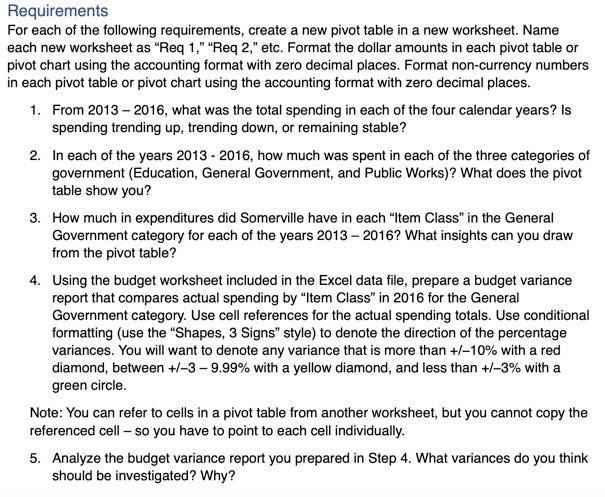
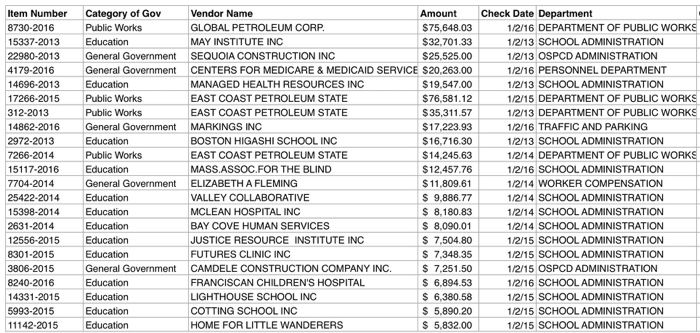
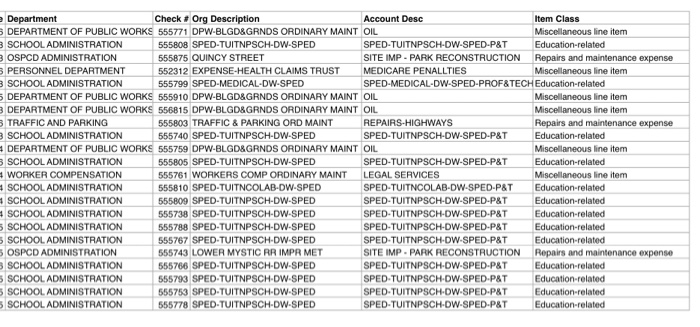
Requirements For each of the following requirements, create a new pivot table in a new worksheet. Name each new worksheet as "Req 1," "Req 2," etc. Format the dollar amounts in each pivot table or pivot chart using the accounting format with zero decimal places. Format non-currency numbers in each pivot table or pivot chart using the accounting format with zero decimal places. 1. From 2013 - 2016, what was the total spending in each of the four calendar years? Is spending trending up, trending down, or remaining stable? 2. In each of the years 2013 - 2016, how much was spent in each of the three categories of government (Education, General Government, and Public Works)? What does the pivot table show you? 3. How much in expenditures did Somerville have in each "Item Class" in the General Government category for each of the years 2013 - 2016? What insights can you draw from the pivot table? 4. Using the budget worksheet included in the Excel data file, prepare a budget variance report that compares actual spending by "Item Class in 2016 for the General Government category. Use cell references for the actual spending totals. Use conditional formatting (use the "Shapes, 3 Signs" style) to denote the direction of the percentage variances. You will want to denote any variance that is more than +/-10% with a red diamond, between +/-3 -9.99% with a yellow diamond, and less than +/-3% with a green circle. Note: You can refer to cells in a pivot table from another worksheet, but you cannot copy the referenced cell - so you have to point to each cell individually. 5. Analyze the budget variance report you prepared in Step 4. What variances do you think should be investigated? Why? Item Number 8730-2016 15337-2013 22980-2013 4179-2016 14696-2013 17266-2015 312-2013 14862-2016 2972-2013 7266-2014 15117-2016 7704-2014 25422-2014 15398-2014 2631-2014 12556-2015 8301-2015 3806-2015 8240-2016 14331-2015 5993-2015 11142-2015 Category of Gov Vendor Name Amount Public Works GLOBAL PETROLEUM CORP. $75,648.03 Education MAY INSTITUTE INC $32.701.33 General Government SEQUOIA CONSTRUCTION INC $25,525.00 General Government CENTERS FOR MEDICARE & MEDICAID SERVICE $20,263.00 Education MANAGED HEALTH RESOURCES INC $19,547.00 Public Works EAST COAST PETROLEUM STATE $ 76,581.12 Public Works EAST COAST PETROLEUM STATE $ 35,311.57 General Government MARKINGS INC $17.223.93 Education BOSTON HIGASHI SCHOOL INC $16.716.30 Public Works EAST COAST PETROLEUM STATE $14.245.63 Education MASS.ASSOC.FOR THE BLIND $12.457.76 General Government ELIZABETH A FLEMING $ 11,809.61 Education VALLEY COLLABORATIVE $ 9.886.77 Education MCLEAN HOSPITAL INC $ 8,180.83 Education BAY COVE HUMAN SERVICES $ 8,090.01 Education JUSTICE RESOURCE INSTITUTE INC $ 7,504.80 Education FUTURES CLINIC INC $ 7,348.35 General Government CAMDELE CONSTRUCTION COMPANY INC. $ 7.251.50 Education FRANCISCAN CHILDREN'S HOSPITAL $ 6.894.53 Education LIGHTHOUSE SCHOOL INC $ 6,380.58 Education COTTING SCHOOL INC $ 5,890.20 Education HOME FOR LITTLE WANDERERS $ 5,832.00 Check Date Department 1/2/16 DEPARTMENT OF PUBLIC WORKS 1/2/13 SCHOOL ADMINISTRATION 1/2/13 OSPCD ADMINISTRATION 1/2/16 PERSONNEL DEPARTMENT 1/2/13 SCHOOL ADMINISTRATION 1/2/15 DEPARTMENT OF PUBLIC WORKS 1/2/13 DEPARTMENT OF PUBLIC WORKS 1/2/16 TRAFFIC AND PARKING 1/2/13 SCHOOL ADMINISTRATION 1/2/14 DEPARTMENT OF PUBLIC WORKS 1/2/16 SCHOOL ADMINISTRATION 1/2/14 WORKER COMPENSATION 1/2/14 SCHOOL ADMINISTRATION 1/2/14 SCHOOL ADMINISTRATION 1/2/14 SCHOOL ADMINISTRATION 1/2/15 SCHOOL ADMINISTRATION 1/2/15 SCHOOL ADMINISTRATION 1/2/15 OSPCD ADMINISTRATION 1/2/16 SCHOOL ADMINISTRATION 1/2/15 SCHOOL ADMINISTRATION 1/2/15 SCHOOL ADMINISTRATION 1/2/15 SCHOOL ADMINISTRATION Department Check . Org Description Account Desc Item Class DEPARTMENT OF PUBLIC WORKS 555771 DPW-BLGD&GRNDS ORDINARY MAINT OIL Miscellaneous line item 3 SCHOOL ADMINISTRATION 555808 SPED-TUITNPSCH-DW-SPED SPED-TUITNPSCH-DW-SPED-P&T Education-related 3 OSPCD ADMINISTRATION 555875 QUINCY STREET SITE IMP - PARK RECONSTRUCTION Repairs and maintenance expense PERSONNEL DEPARTMENT 552312 EXPENSE-HEALTH CLAIMS TRUST MEDICARE PENALLTIES Miscellaneous line item 3 SCHOOL ADMINISTRATION 555799 SPED MEDICAL DW-SPED SPED MEDICAL-DW-SPED-PROF&TECH Education-related DEPARTMENT OF PUBLIC WORKS 555910 DPW-BLGD&GRNDS ORDINARY MAINT OIL Miscellaneous line item 3 DEPARTMENT OF PUBLIC WORKS 556815 DPW-BLGD&GRNDS ORDINARY MAINT OIL Miscellaneous line item 3 TRAFFIC AND PARKING 555803 TRAFFIC & PARKING ORD MAINT REPAIRS-HIGHWAYS Repairs and maintenance expense 3 SCHOOL ADMINISTRATION 555740 SPED-TUITNPSCH-DW-SPED SPED-TUITNPSCH-DW-SPED-P&T Education-related DEPARTMENT OF PUBLIC WORKS 555759 DPW-BLGD&GRNDS ORDINARY MAINT OIL Miscellaneous line item 3 SCHOOL ADMINISTRATION 555805 SPED-TUITNPSCH-DW-SPED SPED-TUITNPSCH-DW-SPED-P&T Education-related WORKER COMPENSATION 555761 WORKERS COMP ORDINARY MAINT LEGAL SERVICES Miscellaneous line item SCHOOL ADMINISTRATION 555810 SPED-TUITNCOLAB-DW-SPED SPED-TUITNCOLAB-DW-SPED-P&T Education-related SCHOOL ADMINISTRATION 555809 SPED-TUITNPSCH-DW-SPED SPED-TUITNPSCH-DW-SPED-P&T Education-related SCHOOL ADMINISTRATION 555738 SPED-TUITNPSCH-DW-SPED SPED-TUITNPSCH-DW-SPED-P&T Education-related SCHOOL ADMINISTRATION 555788 SPED-TUITNPSCH-DW-SPED SPED-TUITNPSCH-DW-SPED-P&T Education-related 5 SCHOOL ADMINISTRATION 555767 SPED-TUITNPSCHDW-SPED SPED-TUITNPSCH-DW-SPED.P&T Education-related 5 OSPCD ADMINISTRATION 555743 LOWER MYSTIC RR IMPR MET SITE IMP. PARK RECONSTRUCTION Repairs and maintenance expense SCHOOL ADMINISTRATION 555766 SPED-TUITNPSCH-DW-SPED SPED-TUITNPSCH-DW-SPED-P&T Education related SCHOOL ADMINISTRATION 555793 SPED-TUITNPSCH-DW-SPED SPED TUITNPSCH-DW.SPED-P&T Education-related SCHOOL ADMINISTRATION 555753 SPED-TUITNPSCH-DW-SPED SPED-TUITNPSCH-DW-SPED-P&T Education-related 5 SCHOOL ADMINISTRATION 555778 SPED-TUITNPSCH-DW-SPED SPED-TUITNPSCH-DW-SPED-P&T Education-related Requirements For each of the following requirements, create a new pivot table in a new worksheet. Name each new worksheet as "Req 1," "Req 2," etc. Format the dollar amounts in each pivot table or pivot chart using the accounting format with zero decimal places. Format non-currency numbers in each pivot table or pivot chart using the accounting format with zero decimal places. 1. From 2013 - 2016, what was the total spending in each of the four calendar years? Is spending trending up, trending down, or remaining stable? 2. In each of the years 2013 - 2016, how much was spent in each of the three categories of government (Education, General Government, and Public Works)? What does the pivot table show you? 3. How much in expenditures did Somerville have in each "Item Class" in the General Government category for each of the years 2013 - 2016? What insights can you draw from the pivot table? 4. Using the budget worksheet included in the Excel data file, prepare a budget variance report that compares actual spending by "Item Class in 2016 for the General Government category. Use cell references for the actual spending totals. Use conditional formatting (use the "Shapes, 3 Signs" style) to denote the direction of the percentage variances. You will want to denote any variance that is more than +/-10% with a red diamond, between +/-3 -9.99% with a yellow diamond, and less than +/-3% with a green circle. Note: You can refer to cells in a pivot table from another worksheet, but you cannot copy the referenced cell - so you have to point to each cell individually. 5. Analyze the budget variance report you prepared in Step 4. What variances do you think should be investigated? Why? Item Number 8730-2016 15337-2013 22980-2013 4179-2016 14696-2013 17266-2015 312-2013 14862-2016 2972-2013 7266-2014 15117-2016 7704-2014 25422-2014 15398-2014 2631-2014 12556-2015 8301-2015 3806-2015 8240-2016 14331-2015 5993-2015 11142-2015 Category of Gov Vendor Name Amount Public Works GLOBAL PETROLEUM CORP. $75,648.03 Education MAY INSTITUTE INC $32.701.33 General Government SEQUOIA CONSTRUCTION INC $25,525.00 General Government CENTERS FOR MEDICARE & MEDICAID SERVICE $20,263.00 Education MANAGED HEALTH RESOURCES INC $19,547.00 Public Works EAST COAST PETROLEUM STATE $ 76,581.12 Public Works EAST COAST PETROLEUM STATE $ 35,311.57 General Government MARKINGS INC $17.223.93 Education BOSTON HIGASHI SCHOOL INC $16.716.30 Public Works EAST COAST PETROLEUM STATE $14.245.63 Education MASS.ASSOC.FOR THE BLIND $12.457.76 General Government ELIZABETH A FLEMING $ 11,809.61 Education VALLEY COLLABORATIVE $ 9.886.77 Education MCLEAN HOSPITAL INC $ 8,180.83 Education BAY COVE HUMAN SERVICES $ 8,090.01 Education JUSTICE RESOURCE INSTITUTE INC $ 7,504.80 Education FUTURES CLINIC INC $ 7,348.35 General Government CAMDELE CONSTRUCTION COMPANY INC. $ 7.251.50 Education FRANCISCAN CHILDREN'S HOSPITAL $ 6.894.53 Education LIGHTHOUSE SCHOOL INC $ 6,380.58 Education COTTING SCHOOL INC $ 5,890.20 Education HOME FOR LITTLE WANDERERS $ 5,832.00 Check Date Department 1/2/16 DEPARTMENT OF PUBLIC WORKS 1/2/13 SCHOOL ADMINISTRATION 1/2/13 OSPCD ADMINISTRATION 1/2/16 PERSONNEL DEPARTMENT 1/2/13 SCHOOL ADMINISTRATION 1/2/15 DEPARTMENT OF PUBLIC WORKS 1/2/13 DEPARTMENT OF PUBLIC WORKS 1/2/16 TRAFFIC AND PARKING 1/2/13 SCHOOL ADMINISTRATION 1/2/14 DEPARTMENT OF PUBLIC WORKS 1/2/16 SCHOOL ADMINISTRATION 1/2/14 WORKER COMPENSATION 1/2/14 SCHOOL ADMINISTRATION 1/2/14 SCHOOL ADMINISTRATION 1/2/14 SCHOOL ADMINISTRATION 1/2/15 SCHOOL ADMINISTRATION 1/2/15 SCHOOL ADMINISTRATION 1/2/15 OSPCD ADMINISTRATION 1/2/16 SCHOOL ADMINISTRATION 1/2/15 SCHOOL ADMINISTRATION 1/2/15 SCHOOL ADMINISTRATION 1/2/15 SCHOOL ADMINISTRATION Department Check . Org Description Account Desc Item Class DEPARTMENT OF PUBLIC WORKS 555771 DPW-BLGD&GRNDS ORDINARY MAINT OIL Miscellaneous line item 3 SCHOOL ADMINISTRATION 555808 SPED-TUITNPSCH-DW-SPED SPED-TUITNPSCH-DW-SPED-P&T Education-related 3 OSPCD ADMINISTRATION 555875 QUINCY STREET SITE IMP - PARK RECONSTRUCTION Repairs and maintenance expense PERSONNEL DEPARTMENT 552312 EXPENSE-HEALTH CLAIMS TRUST MEDICARE PENALLTIES Miscellaneous line item 3 SCHOOL ADMINISTRATION 555799 SPED MEDICAL DW-SPED SPED MEDICAL-DW-SPED-PROF&TECH Education-related DEPARTMENT OF PUBLIC WORKS 555910 DPW-BLGD&GRNDS ORDINARY MAINT OIL Miscellaneous line item 3 DEPARTMENT OF PUBLIC WORKS 556815 DPW-BLGD&GRNDS ORDINARY MAINT OIL Miscellaneous line item 3 TRAFFIC AND PARKING 555803 TRAFFIC & PARKING ORD MAINT REPAIRS-HIGHWAYS Repairs and maintenance expense 3 SCHOOL ADMINISTRATION 555740 SPED-TUITNPSCH-DW-SPED SPED-TUITNPSCH-DW-SPED-P&T Education-related DEPARTMENT OF PUBLIC WORKS 555759 DPW-BLGD&GRNDS ORDINARY MAINT OIL Miscellaneous line item 3 SCHOOL ADMINISTRATION 555805 SPED-TUITNPSCH-DW-SPED SPED-TUITNPSCH-DW-SPED-P&T Education-related WORKER COMPENSATION 555761 WORKERS COMP ORDINARY MAINT LEGAL SERVICES Miscellaneous line item SCHOOL ADMINISTRATION 555810 SPED-TUITNCOLAB-DW-SPED SPED-TUITNCOLAB-DW-SPED-P&T Education-related SCHOOL ADMINISTRATION 555809 SPED-TUITNPSCH-DW-SPED SPED-TUITNPSCH-DW-SPED-P&T Education-related SCHOOL ADMINISTRATION 555738 SPED-TUITNPSCH-DW-SPED SPED-TUITNPSCH-DW-SPED-P&T Education-related SCHOOL ADMINISTRATION 555788 SPED-TUITNPSCH-DW-SPED SPED-TUITNPSCH-DW-SPED-P&T Education-related 5 SCHOOL ADMINISTRATION 555767 SPED-TUITNPSCHDW-SPED SPED-TUITNPSCH-DW-SPED.P&T Education-related 5 OSPCD ADMINISTRATION 555743 LOWER MYSTIC RR IMPR MET SITE IMP. PARK RECONSTRUCTION Repairs and maintenance expense SCHOOL ADMINISTRATION 555766 SPED-TUITNPSCH-DW-SPED SPED-TUITNPSCH-DW-SPED-P&T Education related SCHOOL ADMINISTRATION 555793 SPED-TUITNPSCH-DW-SPED SPED TUITNPSCH-DW.SPED-P&T Education-related SCHOOL ADMINISTRATION 555753 SPED-TUITNPSCH-DW-SPED SPED-TUITNPSCH-DW-SPED-P&T Education-related 5 SCHOOL ADMINISTRATION 555778 SPED-TUITNPSCH-DW-SPED SPED-TUITNPSCH-DW-SPED-P&T Education-related
Step by Step Solution
There are 3 Steps involved in it

Get step-by-step solutions from verified subject matter experts
 Study Help