







Question: Please use python as a programming language. Use simple code as possible. Exercise 2.3 Math Module In this exercise, we will play with some of
Please use python as a programming language. Use simple code as possible.
Exercise 2.3 Math Module
In this exercise, we will play with some of the functions provided in the math module. A module is a Python file with a collection of related functions. To use the module, you need to add the following line at the top of y our program, right underneath the comments with your name:
import math
Example: if you want to find out what is sin(90), we first need to convert from degrees to radians and then use the sin function in the math module:
radians = (90.0 / 360.0) * 2 * math.pi
print (math.sin(radians))
You can do this work in the interpreter by typing import math and then these lines.
For mathematical functions, you can generally call math.func, where func is whatever function you want to call. For example, if y ou want the sine of an angle a (where a is in radians), you can call math.sin(a). For logarithms, the function math.log(n)calculates the natural logarithm of n. You can calculate the log of any baseb (as in logb(n))usingmath.log(n, b). The math module even includes constants such as e (math.e) and (math.pi). Many computations can be expressed concisely using the multadd operation, which takes three operands and computes a b + c. One of the purposes of this exercise is to practice pattern-matching: the ability to recognize a specific problem as an instance of a general category of problems. In the last part, y ou get a chance to write a method that invokes a method y ou wrote. Whenever you do that, it is a good idea to test the first method carefully before you start working on the second. Otherwise, you might find yourself debugging two methods at the same time, which can be very difficult.
1.Write a function multadd that takes three parameters ,a, b and c. Test your function well before moving on.
2.Underneath your function definition, compute the following values using multadd and print out the result:
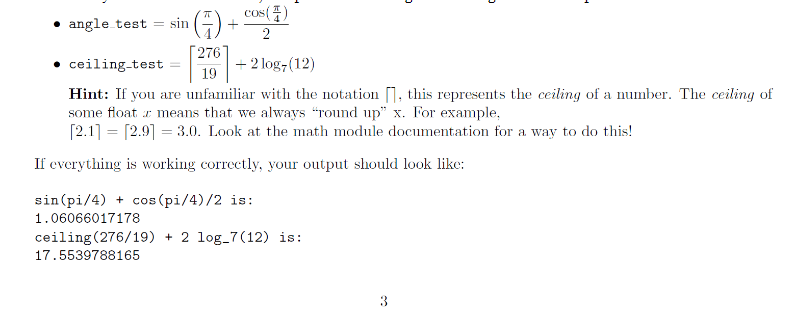
3.Write a new function called yikes that has one argument and uses the multadd function to calculate the following:
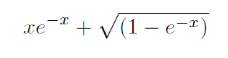
There are two different ways to raise e to a power- check out the math module documentation. Be sure to return the result! Try x=5as a test; y our answer should look like: yikes(5) is 1.0303150673.
Please use below example to work on the exercise.
## 1 - multadd function
##### YOUR CODE HERE #######
2 - Equations##### YOUR CODE HERE ######
Test Cases#
angle_test =
# print "sin(pi/4) + cos(pi/4)/2 is:"
# print angle_test
# ceiling_test =
# print "ceiling(276/19) + 2 log_7(12) is:"
# print ceiling_test
## 3 - yikes function
##### YOUR CODE HERE ######
Test Cases
# x = 5
# print "yikes(5) =", yikes(x)
70 COS(1) angle test sin 2 276 ceiling-test - 2 log (12) 19 Hint: If you are unfamiliar with the notation [], this represents the ceiling of a number. The ceiling of some float x means that we always around up" x. For example, [2.1] = [2.91 = 3.0. Look at the math module documentation for a way to do this! If everything is working correctly, your output should look like: sin(pi/4) + cos(pi/4)/2 is: 1.06066017178 ceiling (276/19) + 2 log-7(12) is: 17.5539788165 - - (1 e-r)
Step by Step Solution
There are 3 Steps involved in it

Get step-by-step solutions from verified subject matter experts
 Study Help