







Question: Please use SQL Developer to write and run the queries below. Just Lee Database Build 11 sql. Write a query that shows the total number
Please use SQL Developer to write and run the queries below. Just Lee Database Build 11 sql.
- Write a query that shows the total number of books with a retail price less than $50. Label the result "Books
- Write a query that shows the highest retail price of books in the computer category. Format your result show that it displays dollars and cents, and label the column "Max Retail"
- Write a query that displays each customer number along with the number of orders the customer has made. Display the results in order by customer number. Include customers with no orders. Their records should display 0 for the number of orders. You will need to use an outer join.
- Write a query that displays order number and the total paid for each order. Format the amount using dollars and cents. Label the total amount "Order Total." We will be using this again in future assignments.
- Write a query to show the names of the customers living in Florida who have placed an order totaling more than $50.
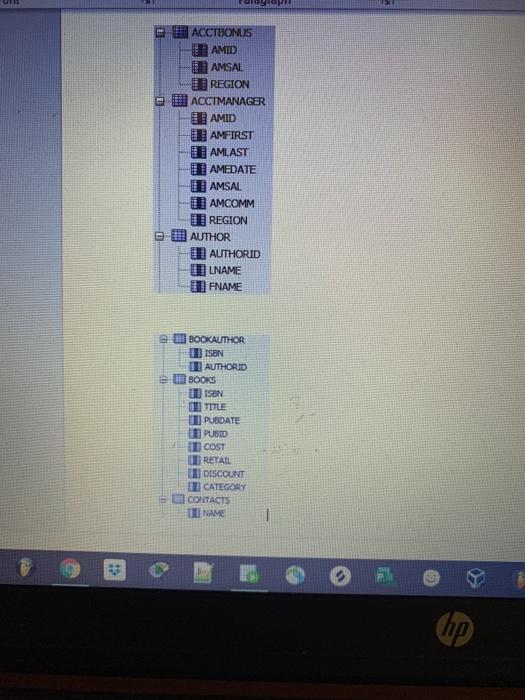
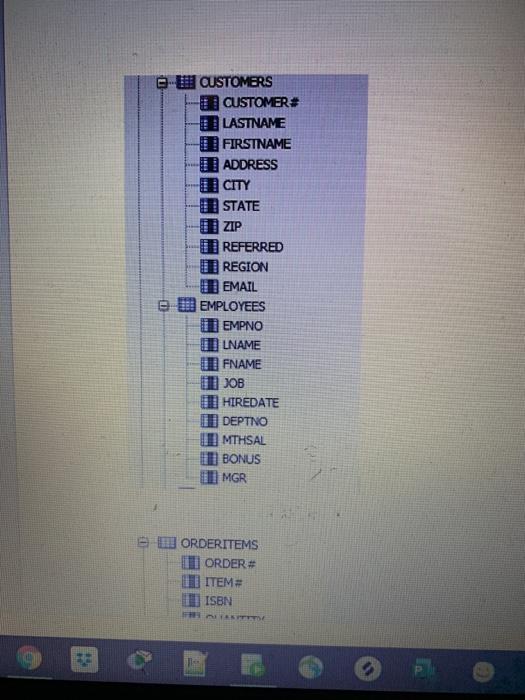
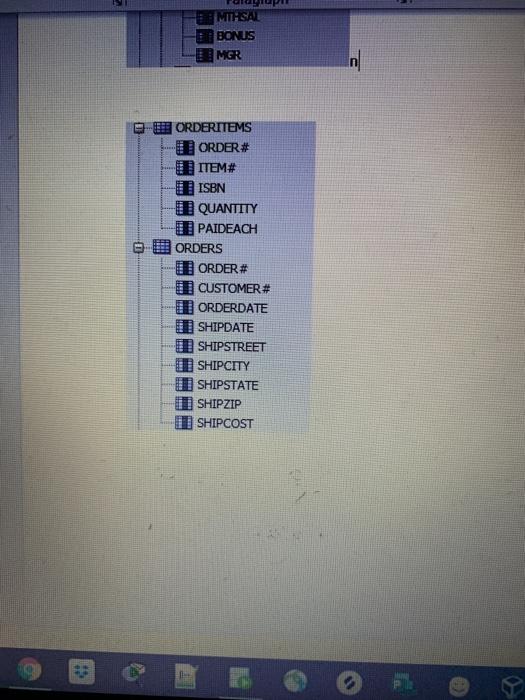
ACCTBONUS HAMID AMSAL REGION ACCTMANAGER AMID AMFIRST I AMLAST 1AMEDATE I AMSAL 1 AMCOMM REGION AUTHOR AUTHORID ILNAME FNAME BOOK AUTHOR ISBN AUTHORID e BOOKS ISON THE PUBDATE PUBID COST RETAIL DISCOUNT CATEGORY E CONTACTS NAME hp G CUSTOMERS CUSTOMER LASTNAME 1 FIRSTNAME 1 ADDRESS I CITY STATE 1 ZIP 1 REFERRED 1 REGION EMAIL e EMPLOYEES 1 EMPNO ILNAME FNAME 11 JOB II HIREDATE | DEPTNO 11 MTHSAL 11 BONUS MGR 0 ORDERITEMS 11 ORDER# | ITEM= ISBN MTHSAL BONUS MGR In ORDERITEMS ORDER# ITEM# 1 ISBN I QUANTITY 1 PAIDEACH 0 ORDERS ORDER# CUSTOMER # ORDERDATE 1 SHIPDATE SHIPSTREET 1 SHIPCITY I SHIPSTATE 1 SHIPZIP 1 SHIPCOST
Step by Step Solution
There are 3 Steps involved in it

Get step-by-step solutions from verified subject matter experts
 Study Help