







Question: Please use the Breezy Python GUI library. Problem 1 (50 points) Design a Python program using the Breezy Python GUI library that will implement a
Please use the Breezy Python GUI library.
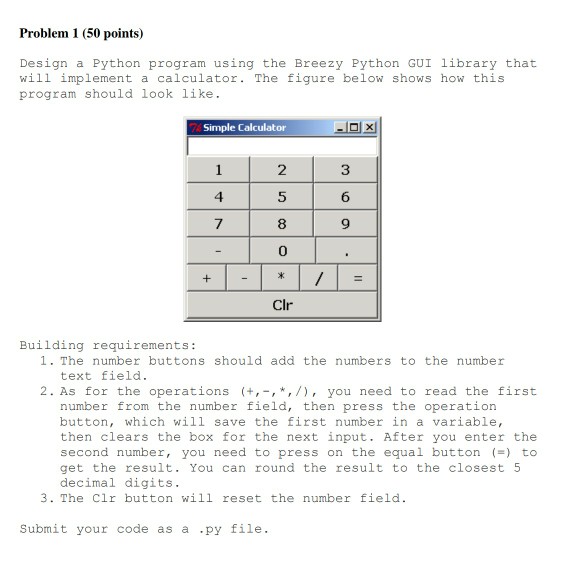
Problem 1 (50 points) Design a Python program using the Breezy Python GUI library that will implement a calculator. The figure below shows how this program should look like Simple Calculator 2 5 8 0 4 6 7 9 Clr Building requirements: 1. The number buttons should add the numbers to the number text field. 2. As for the operations (+,,*,/), you need to read the first number from the number field, then press the operation button, which will save the first number in a variable, then clears the box for the next input. After you enter the second number, you need to press on the equal button () to get the result. You can round the result to the closest 5 decimal digits 3. The Clr button will reset the number field. Submit your code as a .py file
Step by Step Solution
There are 3 Steps involved in it

Get step-by-step solutions from verified subject matter experts
 Study Help