







Question: Please use the provided code and instructions, code will be provided below the instructions. File: arrays.py class Array(object): Represents an array. def __init__(self,
Please use the provided code and instructions, code will be provided below the instructions.
"""
File: arrays.py
"""
class Array(object):
"""Represents an array."""
def __init__(self, capacity, fillValue = None):
"""Capacity is the static size of the array.
fillValue is placed at each position."""
self.items = list()
self.logicalSize = 0
# Track the capacity and fill value for adjustments later
self.capacity = capacity
self.fillValue = fillValue
for count in range(capacity):
self.items.append(fillValue)
def __len__(self):
"""-> The capacity of the array."""
return len(self.items)
def __str__(self):
"""-> The string representation of the array."""
return str(self.items)
def __iter__(self):
"""Supports traversal with a for loop."""
return iter(self.items)
def __getitem__(self, index):
"""Subscript operator for access at index.
Precondition: 0
if index = self.size():
raise IndexError("Array index out of bounds")
return self.items[index]
def __setitem__(self, index, newItem):
"""Subscript operator for replacement at index.
Precondition: 0
if index = self.size():
raise IndexError("Array index out of bounds")
self.items[index] = newItem
def size(self):
"""-> The number of items in the array."""
return self.logicalSize
def grow(self):
"""Increases the physical size of the array if necessary."""
# Double the physical size if no more room for items
# and add the fillValue to the new cells in the underlying list
for count in range(len(self)):
self.items.append(self.fillValue)
def shrink(self):
"""Decreases the physical size of the array if necessary."""
# Shrink the size by half but not below the default capacity
# and remove those garbage cells from the underlying list
newSize = max(self.capacity, len(self) // 2)
for count in range(len(self) - newSize):
self.items.pop()
def main():
"""Test code for modified Array class."""
a = Array(5)
print ("Physical size:", len(a))
print ("Logical size:", a.size())
print ("Items:", a)
for item in range(4):
a.insert(0, item)
print ("Items:", a)
a.insert(1, 77)
print ("Items:", a)
a.insert(10, 10)
print ("Items:", a)
print(a.pop(3))
print ("Items:", a)
for count in range(5):
print(a.pop(0), end = " ")
print ()
if __name__ == "__main__":
main()
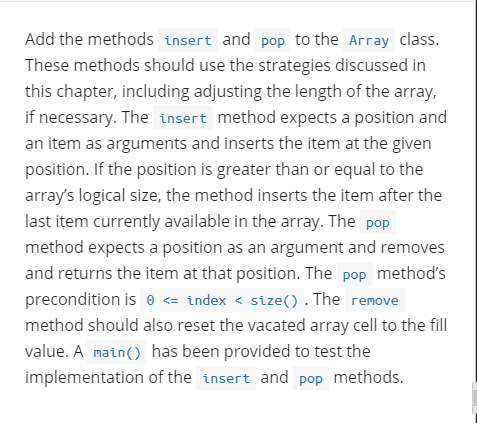
Add the methods insert and pop to the Array class. These methods should use the strategies discussed in this chapter, including adjusting the length of the array, if necessary. The insert method expects a position and an item as arguments and inserts the item at the given position. If the position is greater than or equal to the array's logical size, the method inserts the item after the last item currently available in the array. The pop method expects a position as an argument and removes and returns the item at that position. The pop method's precondition is a
Step by Step Solution
There are 3 Steps involved in it

Get step-by-step solutions from verified subject matter experts
 Study Help