







Question: Please used Mips code! to convert a string in integer. First, read and understand the skeleton code. The code reserves a buffer of 128 bytes
Please used Mips code! to convert a string in integer.
First, read and understand the skeleton code. The code reserves a buffer of 128 bytes for a stringstr.
Implement the strtoupper function, which takes the starting address of a string as the only argument, converts all English characters in the string to uppercase, and returns the address of the input string. Your implementation MUST be recursive. A C implementation is listed on the next page.
The main function repeats the following tasks until the user enters an empty line.
1. Use a system call to read a line of user input and place it into buffer str. str is now a NUL terminated ASCII string. Assume the line is of 126 characters or shorter.
2. Call strtoupper to convert str to uppercase, 3. Print the converted str. All characters should be in uppercase. 4. Exit from the loop if the first character of str is (ASCII value 10) or a NUL.
Step 1 is provided in the skeleton code. You need to complete Steps 2 to 4. Please pay attention to the registers you use in the function and follow the MIPS calling
conventions.
Below is a sample session of running the code.
4294967296
The number is too large.
4294967294
0xfffffffe 4294967294 -2
10000000000
The number is too large.
Mips start code
################################ data segment .data name: .asciiz "name " errmsg: .asciiz "The number is too large. " nl: .asciiz " " str: .space 128 ################################ code segment .text .globl main # declare main to be global main: la $a0, name # load the address of "name" into $a0 li $v0, 4 # system call, type 4, print an string syscall # system call main_loop: # use a system call to read a string into str la $a0, str li $a1, 128 li $v0, 8 syscall # TODO # if str[0] is ' ' or 0, exit from the loop. # call myatoi(str) # if the return value is the error code, print error message # otherwise, print the return value in 3 formats # print errmsg no_error: # print return value in three different formats, separated by a space. # syscall 11 can be used to print a character (e.g., a space, a new line). main_continue: b main_loop Exit: li $v0, 10 # System call, type 10, standard exit syscall # ...and call the OS # TODO # your implementation of myatoi myatoi: my_exit: jr $ra # return to calling routine
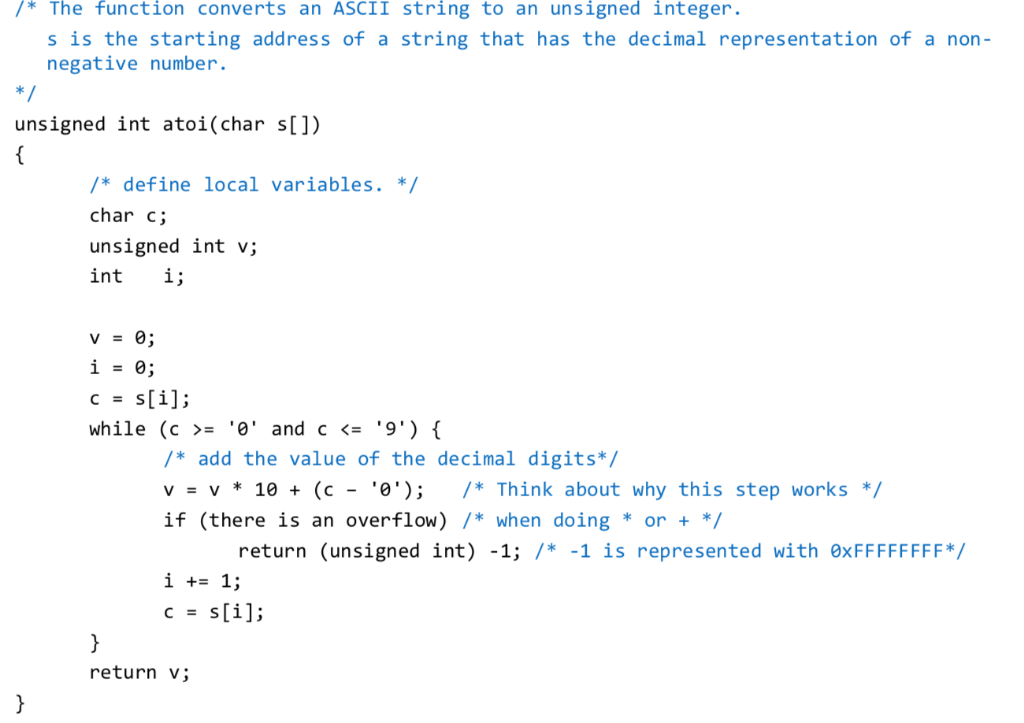
*The function converts an ASCII string to an unsigned integer. s is the starting address of a string that has the decimal representation of a non - negative number unsigned int atoi(char s[]) /*define local variables./ char c; unsigned int v; int i; CES while (c = '0' and c
Step by Step Solution
There are 3 Steps involved in it

Get step-by-step solutions from verified subject matter experts
 Study Help