







Question: Please using visual studio 2015 c++. how to give code and pseudo code. Also, can I have some comment each coding and show me result.
Please using visual studio 2015 c++. how to give code and pseudo code. Also, can I have some comment each coding and show me result. thank you :)
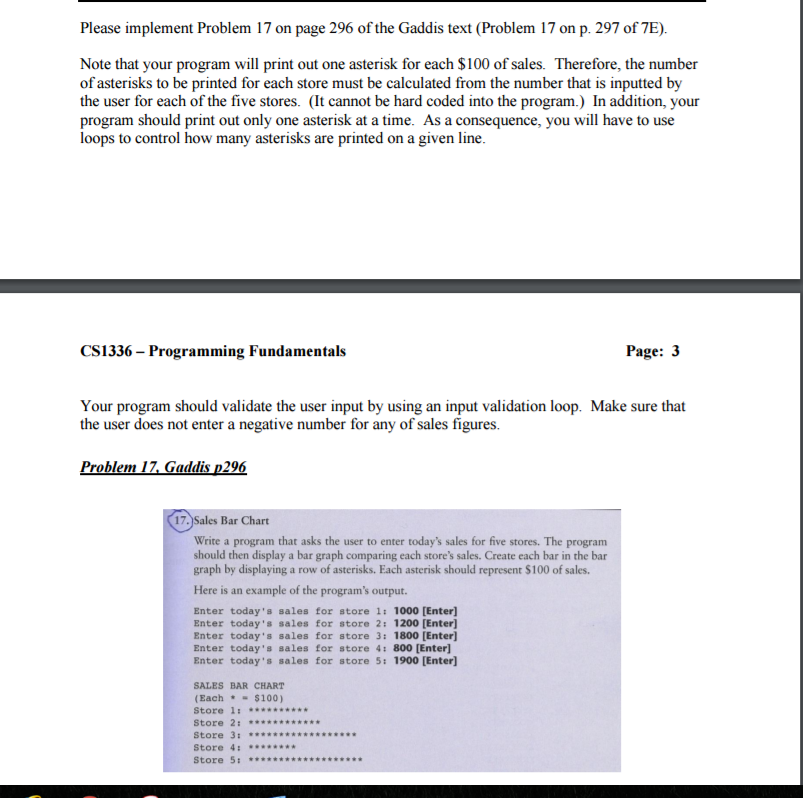
Please implement Problem 17 on page 296 of the Gaddis text (Problem 17 on p. 297 of 7E). Note that your program will print out one asterisk for each $100 of sales. Therefore, the number of asterisks to be printed for each store must be calculated from the number that is inputted by the user for each of the five stores. (It cannot be hard coded into the program.) In addition, your program should print out only one asterisk at a time. As a consequence, you will have to use loops to control how many asterisks are printed on a given line. CS1336 Programming Fundamentals Page: 3 Your program should validate the user input by using an input validation loop. Make sure that the user does not enter a negative number for any of sales figures. Problem 17 Gaddis 296 17. Sales Bar Chart Write a program that asks the user to enter today's sales for five stores. The program should then display a bar graph comparing each store's sales. Create each bar in the bar graph by displaying a row of asterisks. Each asterisk should represent S100 of sales. Here is an example of the program's output. Enter today's sales for store 1: 1000 [Enter] Enter today's sales for store 2: 1200 [Enter] Enter today's sales for store 3: 1800 [Enter] Enter today's sales for store 41 800 [Enter] Enter today's sales for store 5: 1900 [Enter] SALES BAR CHART (Each $100) Store 1 Store 2 Store 3 Store 4: Store 5
Step by Step Solution
There are 3 Steps involved in it

Get step-by-step solutions from verified subject matter experts
 Study Help