







Question: Please work in excel and show formulas!!!!! Start by restricting the numbers that can be used as inputs. Use Data Validation in cells C 2
Please work in excel and show formulas!!!!!
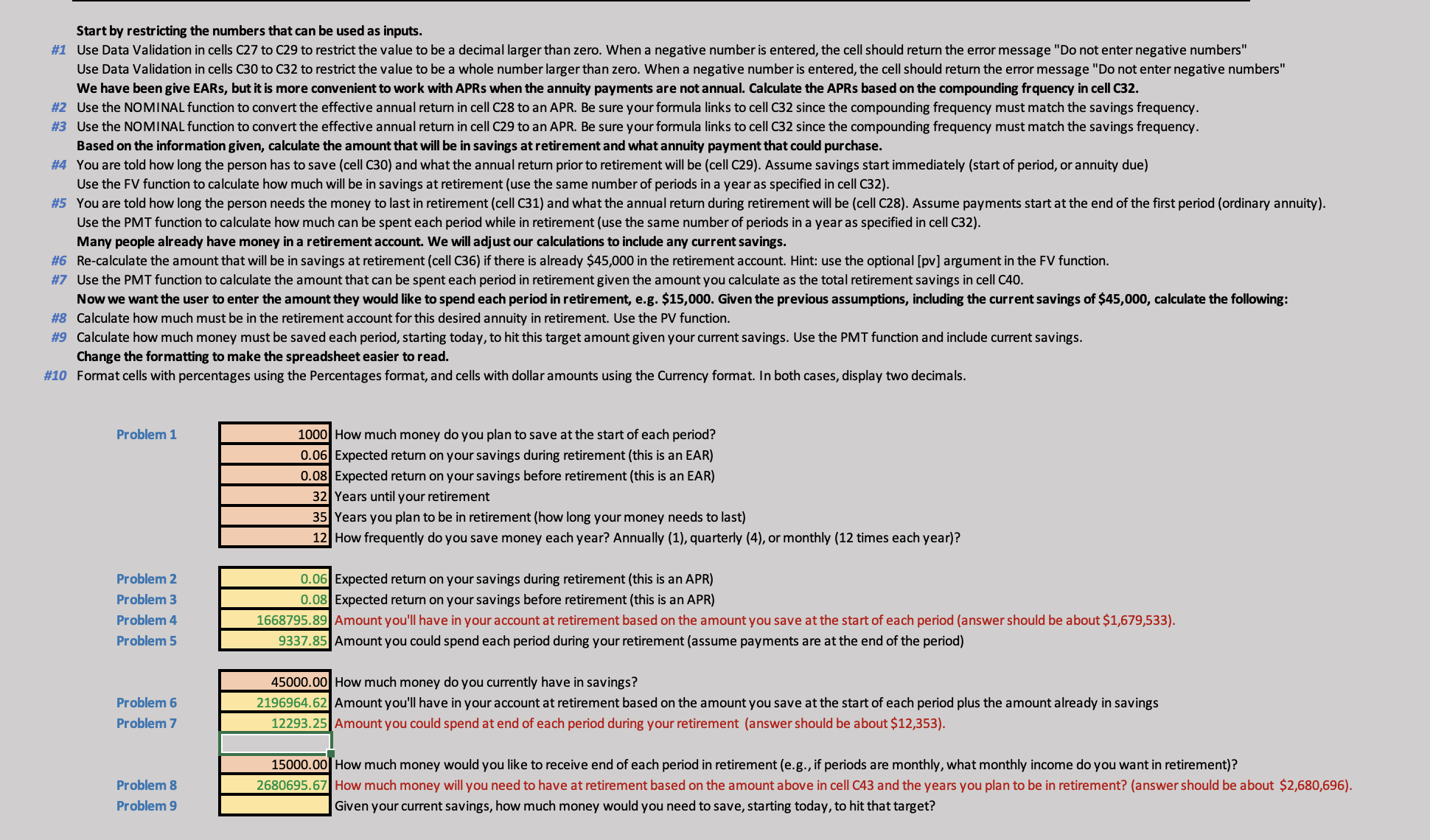
Start by restricting the numbers that can be used as inputs. Use Data Validation in cells C to C to restrict the value to be a decimal larger than zero. When a negative number is entered, the cell should return the error message Do not enter negative numbers" Use Data Validation in cells C to C to restrict the value to be a whole number larger than zero. When a negative number is entered, the cell should return the error message Do not enter negative numbers" We have been give EARs, but it is more convenient to work with APRs when the annuity payments are not annual. Calculate the APRs based on the compounding frquency in cell C Use the NOMINAL function to convert the effective annual return in cell C to an APR. Be sure your formula links to cell C since the compounding frequency must match the savings frequency. Use the NOMINAL function to convert the effective annual return in cell C to an APR. Be sure your formula links to cell C since the compounding frequency must match the savings frequency. Based on the information given, calculate the amount that will be in savings at retirement and what annuity payment that could purchase. You are told how long the person has to save cell C and what the annual return prior to retirement will be cell C Assume savings start immediately start of period, or annuity due Use the FV function to calculate how much will be in savings at retirement use the same number of periods in a year as specified in cell C You are told how long the person needs the money to last in retirement cell C and what the annual return during retirement will be cell C Assume payments start at the end of the first period ordinary annuity Use the PMT function to calculate how much can be spent each period while in retirement use the same number of periods in a year as specified in cell C Many people already have money in a retirement account. We will adjust our calculations to include any current savings. Recalculate the amount that will be in savings at retirement cell C if there is already $ in the retirement account. Hint: use the optional pv argument in the FV function. Use the PMT function to calculate the amount that can be spent each period in retirement given the amount you calculate as the total retirement savings in cell C Now we want the user to enter the amount they would like to spend each period in retirement, eg $ Given the previous assumptions, including the current savings of $ calculate the following: Calculate how much must be in the retirement account for this desired annuity in retirement. Use the PV function. Calculate how much money must be saved each period, starting today, to hit this target amount given your current savings. Use the PMT function and include current savings. Change the formatting to make the spreadsheet easier to read. Format cells with percentages using the Percentages format, and cells with dollar amounts using the Currency format. In both cases, display two decimals.
Step by Step Solution
There are 3 Steps involved in it
1 Expert Approved Answer
Step: 1 Unlock

Question Has Been Solved by an Expert!
Get step-by-step solutions from verified subject matter experts
Step: 2 Unlock
Step: 3 Unlock
 Study Help