







Question: Please write a Python script that unzips FolderA.zip iteratively since FolderB1.zip is in FolderA.zip to another directory (Folder E let's say), moves Folder B and
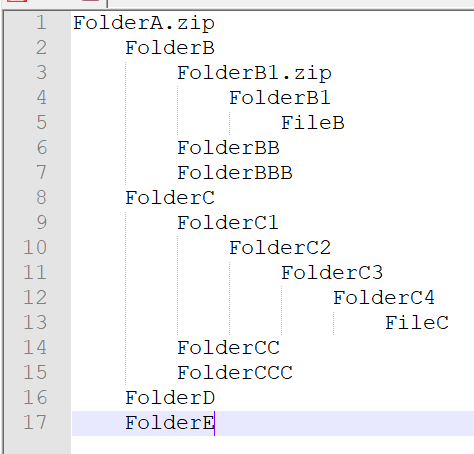 Please write a Python script that unzips FolderA.zip iteratively since FolderB1.zip is in FolderA.zip to another directory (Folder E let's say), moves Folder B and Folder C into a different directory but same for both, checks if File B and C exist, and when you run the script again it overwrites/replaces Folder B and Folder C and Folder E. Step #1: Unzips FolderA.zip iteratively and puts the contents into another directory and into a folder (Folder E) Step #2: With the Folder that contains Folder B-E, move Folder B and C into a different directory Step #3: Also within the script include file checking for File B and C Step #4: When you rerun the script it replaces Folder B C E (checking if it exists) Note: This is a file, directory, and folder handling in Python. The picture above is the folder structure. PYTHON 2.7 PLEASE!!! AND PLEASE USE LOTS OF COMMENTS AND PROVIDED IMAGES TOO!!!
1 2 3 4 5 6 7 8 9 10 11 12 13 14 15 16 17 FolderA.zip FolderB FolderBl.zip FolderB1 Files FolderBB FolderBBB Folderc Folderci Folderc2 Folderc3 Folderc4 Filec Foldercc Folderccc Folders Foldere 1 2 3 4 5 6 7 8 9 10 11 12 13 14 15 16 17 FolderA.zip FolderB FolderBl.zip FolderB1 Files FolderBB FolderBBB Folderc Folderci Folderc2 Folderc3 Folderc4 Filec Foldercc Folderccc Folders Foldere
Step by Step Solution
There are 3 Steps involved in it

Get step-by-step solutions from verified subject matter experts
 Study Help