







Question: please write down the source code in kotlin according the description : Requirements The application should have a tabbed interface with the following tabs: User:
please write down the source code in kotlin according the description :
Requirements
The application should have a tabbed interface with the following tabs:
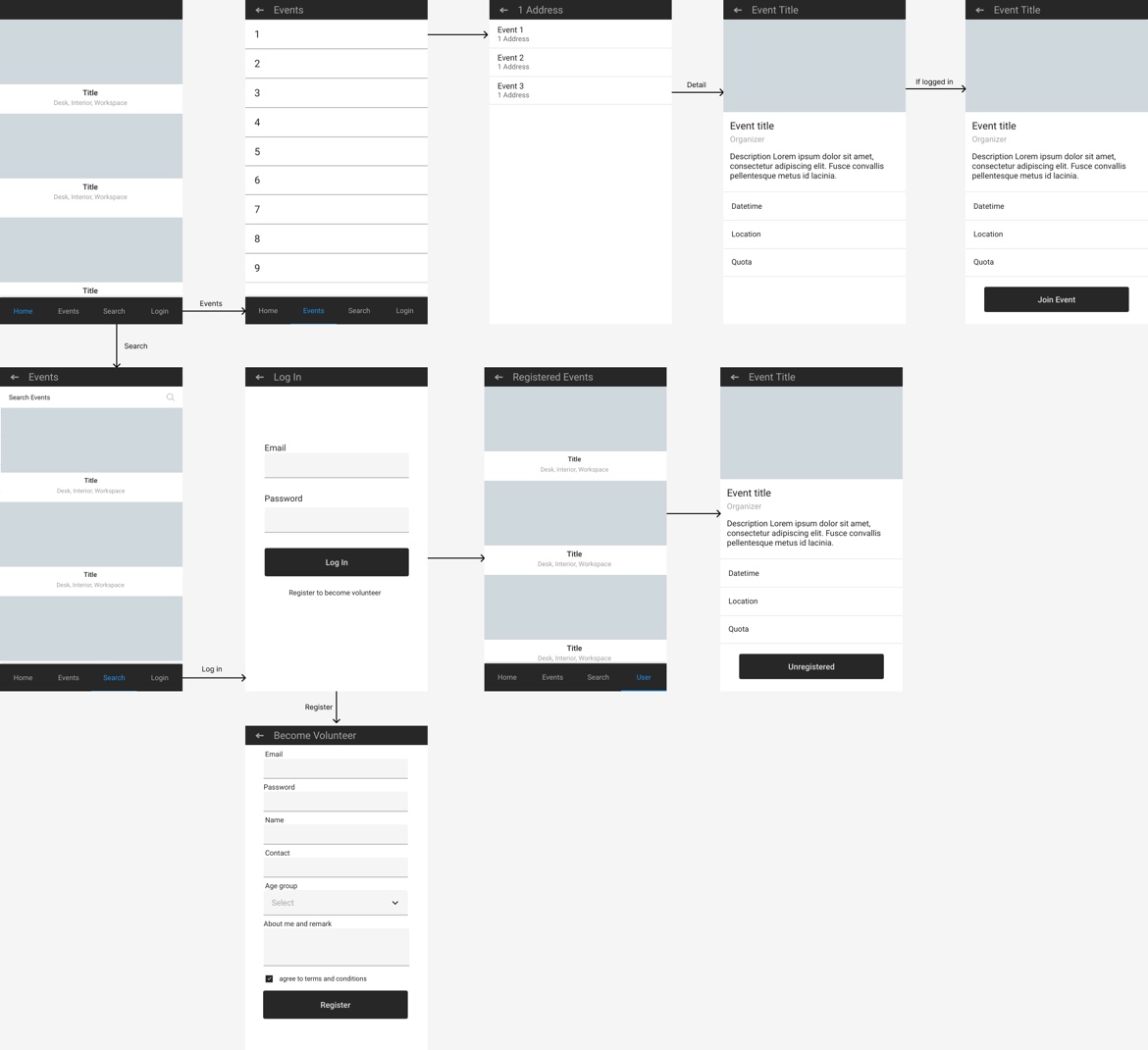
User: This tab is for user registration and login After logging in the user should be able to see their registered events.
Only loggedin users should be able to register and unregister events.
Search: This tab should provide a search box where the user can enter a keyword.The application should call an API to retrieve the search results and display them in a list view.
Events: This tab should display a list of all events, with highlighted events shown first.
Location: This tab should display a list of singledigit numbers.
Clicking on each number should show events with a location that starts with that singledigit number.Introduction
Your task is to develop a tabbed Android application using Jetpack Compose.
The application is a frontend for an Event Management System, and it interacts with a backend API provided by the Express framework.
The API documentation and data can be accessed at h#t#t#p#s#:###c#o#m#p######s#p#r#i#n#g######a#z#u#r#e#w#e#b#s#i#t#e#s##n#e#t#please remove #Some API endpoints will return paginated results. Therefore, it is necessary to implement a mechanism in the application to retrieve and display more information as needed,
allowing users to navigate through the paginated data.Furthermore, an app prototype is provided here. You can refer to this prototype for a visual representation of the expected user interface and functionality of the application.
The prototype will serve as a guide for implementing the required features and ensuring consistency with the provided design.Deliverables
A detailed README file containing setup and running instructions, any assumptions made, and limitations of the application.
Please continue to develop the code that has been written so far: BottomNavigation:
fun AppBottomNavigationnavController: NavHostController
val items listOf
Screen.User,
Screen.Search,
Screen.Events,
Screen.Location
BottomNavigation
val currentRoute currentRoutenavController
items.forEach screen
BottomNavigationItem
icon Iconscreenicon, contentDescription null
label Textscreentitle
selected curr
Step by Step Solution
There are 3 Steps involved in it
1 Expert Approved Answer
Step: 1 Unlock

Question Has Been Solved by an Expert!
Get step-by-step solutions from verified subject matter experts
Step: 2 Unlock
Step: 3 Unlock
 Study Help