







Question: Please write in C++ shownames.c: #include #include #include int main (int argc, char *argv[]) { struct dirent *direntp; // define a pointer with type directory
Please write in C++
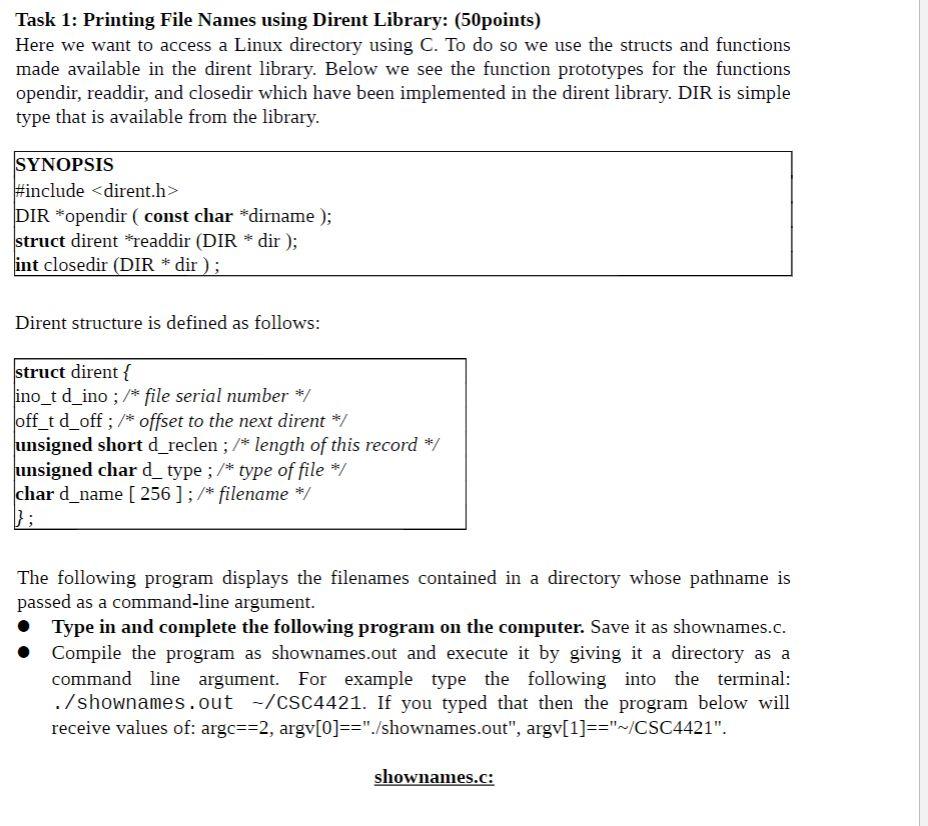
shownames.c:
#include
#include
#include
int main (int argc, char *argv[])
{
struct dirent *direntp;
// define a pointer with type directory stream (DIR):________
// check the number of arguments (argc). It should be two. If it
// is not two, then print an error message and exit the program:
if (__________)
{
fprintf (stderr, "Usage: %s directory name ", argv[0]);
return 1;
}
// The following lines should open the directory given by
// argument argv[1] (by using opendir).
// Store it in your defined directory stream variable.
// The rest checks if the system call returned a proper value
// if not an error message is printed and the program closed
if ( ________ == NULL)
{
perror ( "Failed to open directory" );
return 1;
}
// Read all the entries in this directory and store them in
// direntp. readdir will read one entry at a time and increment
// automatically. This is why it is in a while loop.
// Then, print all the file names (using the struct from readdir).
while (_______ != NULL)
printf ("%s " , _______ );
// close the defined directory stream.
while ( ( closedir (_______) == -1) && ( errno == EINTR) );
return 0;
}
Task 1: Printing File Names using Dirent Library: (50points) Here we want to access a Linux directory using C. To do so we use the structs and functions made available in the dirent library. Below we see the function prototypes for the functions opendir, readdir, and closedir which have been implemented in the dirent library. DIR is simple type that is available from the library. SYNOPSIS #include
Step by Step Solution
There are 3 Steps involved in it

Get step-by-step solutions from verified subject matter experts
 Study Help