







Question: Please write php code and html code Second Exam prepared by STUDENT_NAME(STUDENT_ID) Email Finder Service Get Email for the given name Calculator Service send to
Please write php code and html code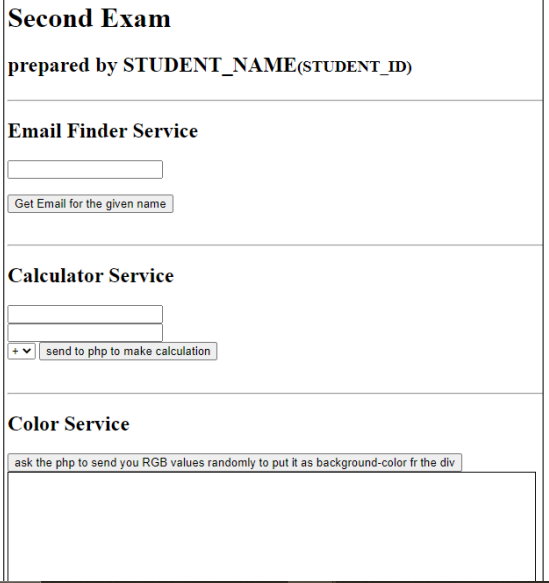
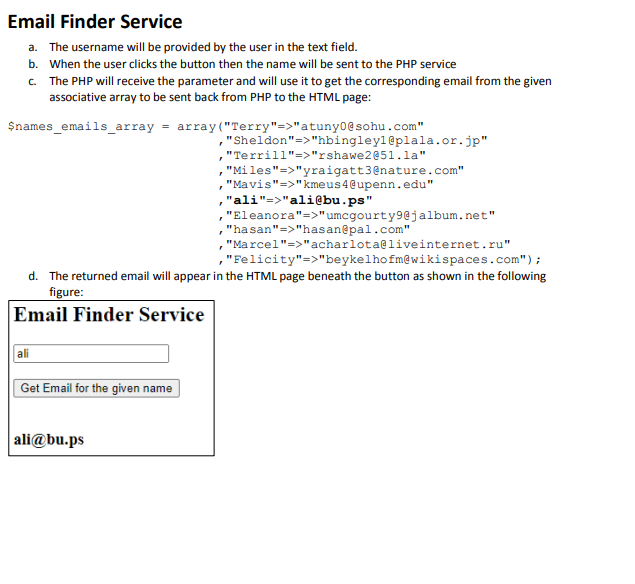
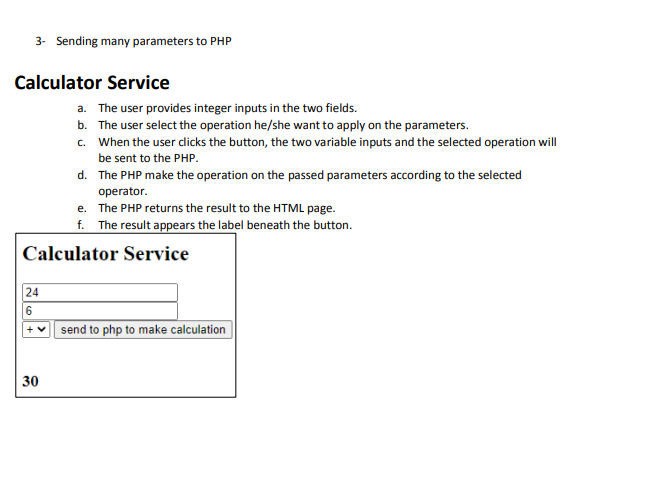
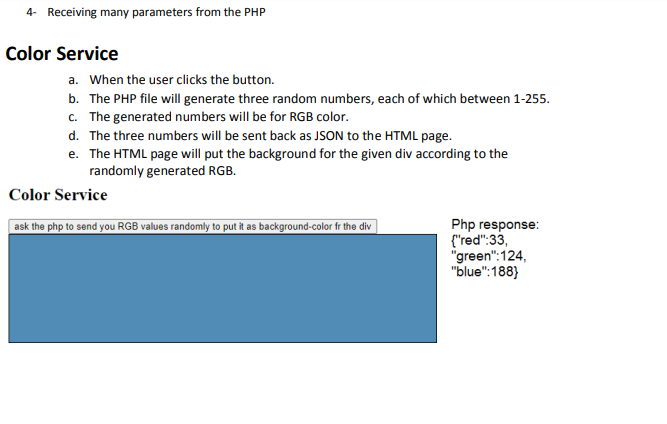
Second Exam prepared by STUDENT_NAME(STUDENT_ID) Email Finder Service Get Email for the given name Calculator Service send to php to make calculation Color Service ask the php to send you RGB values randomly to put it as background-color fr the div Email Finder Service a. The username will be provided by the user in the text field. b. When the user clicks the button then the name will be sent to the PHP service c. The PHP will receive the parameter and will use it to get the corresponding email from the given associative array to be sent back from PHP to the HTML page: \$names_emails_array = array ("Terry"=>"atuny0@sohu.com" ,"Sheldon"=>"hbingleyleplala.or.jp" ," Terrill"=>"rshawe2e51.1a" ,"Miles"=>"yraigatt3enature.com" ,"Mavis" => "kmeus 4 eupenn. edu" ,"ali"=>"ali@bu.ps" ,"Eleanora"=>"umcgourty9@jalbum. net" ," hasan"=>"hasanepal.com" , "Marcel"=>"acharlotaeliveinternet.ru" ,"Felicity"=>"beykelhofm@wikispaces.com"); d. The returned email will appear in the HTML page beneath the button as shown in the following 3- Sending many parameters to PHP Calculator Service a. The user provides integer inputs in the two fields. b. The user select the operation he/she want to apply on the parameters. c. When the user clicks the button, the two variable inputs and the selected operation will be sent to the PHP. d. The PHP make the operation on the passed parameters according to the selected operator. e. The PHP returns the result to the HTML page. f. The result appears the label beneath the button. 4- Receiving many parameters from the PHP Color Service a. When the user clicks the button. b. The PHP file will generate three random numbers, each of which between 1-255. c. The generated numbers will be for RGB color. d. The three numbers will be sent back as JSON to the HTML page. e. The HTML page will put the background for the given div according to the randomly generated RGB. Color Service Php response: \{"red":33, "green": 124, "blue": 188
Step by Step Solution
There are 3 Steps involved in it

Get step-by-step solutions from verified subject matter experts
 Study Help