







Question: Please write the answers clear and easy to be read and please sipirt the answers so It would be in order SimpleCalculator Lab (Working Idea...)
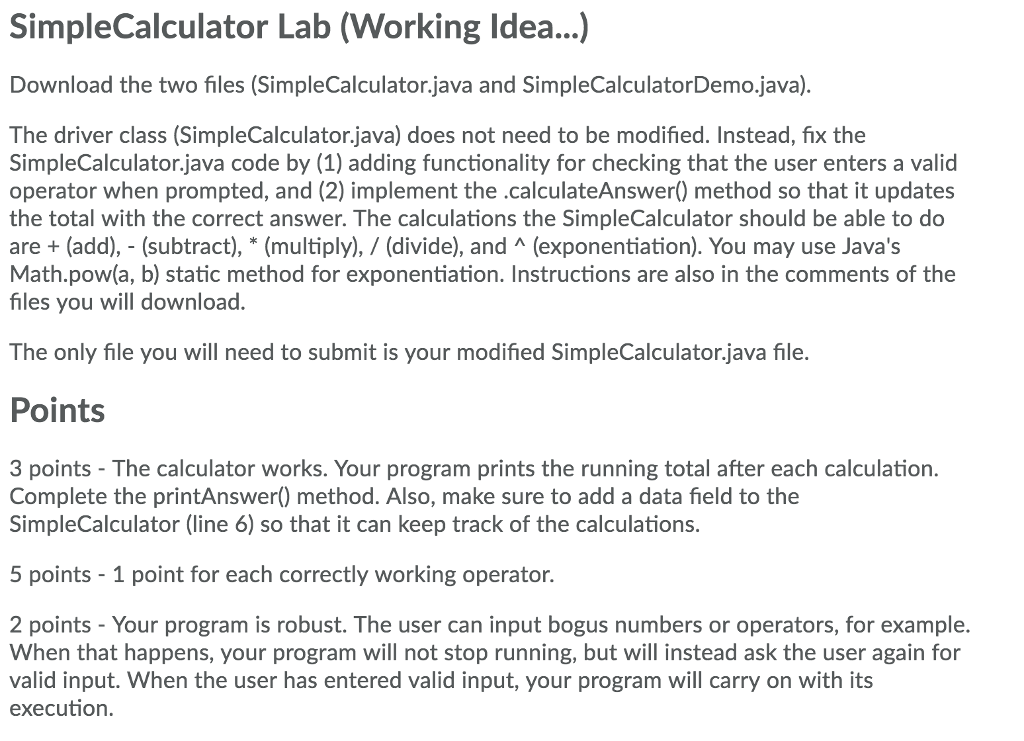
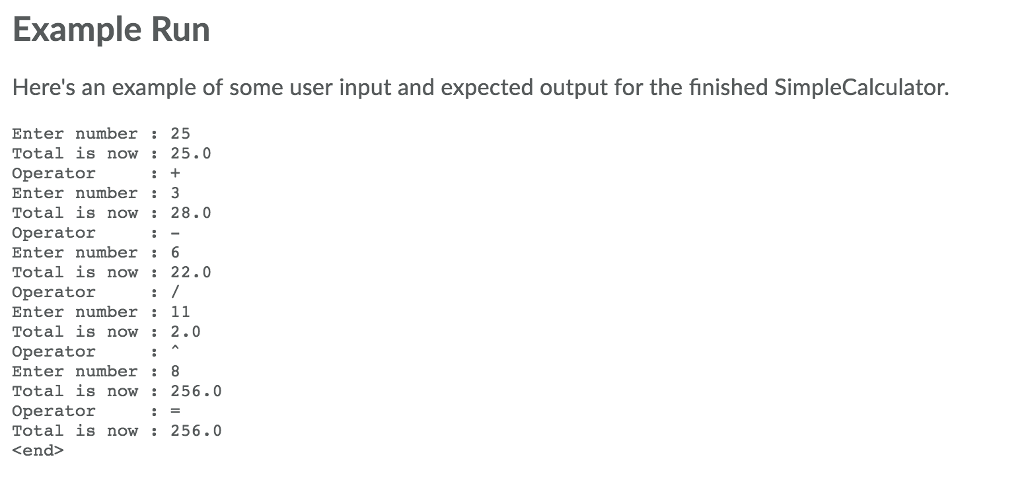
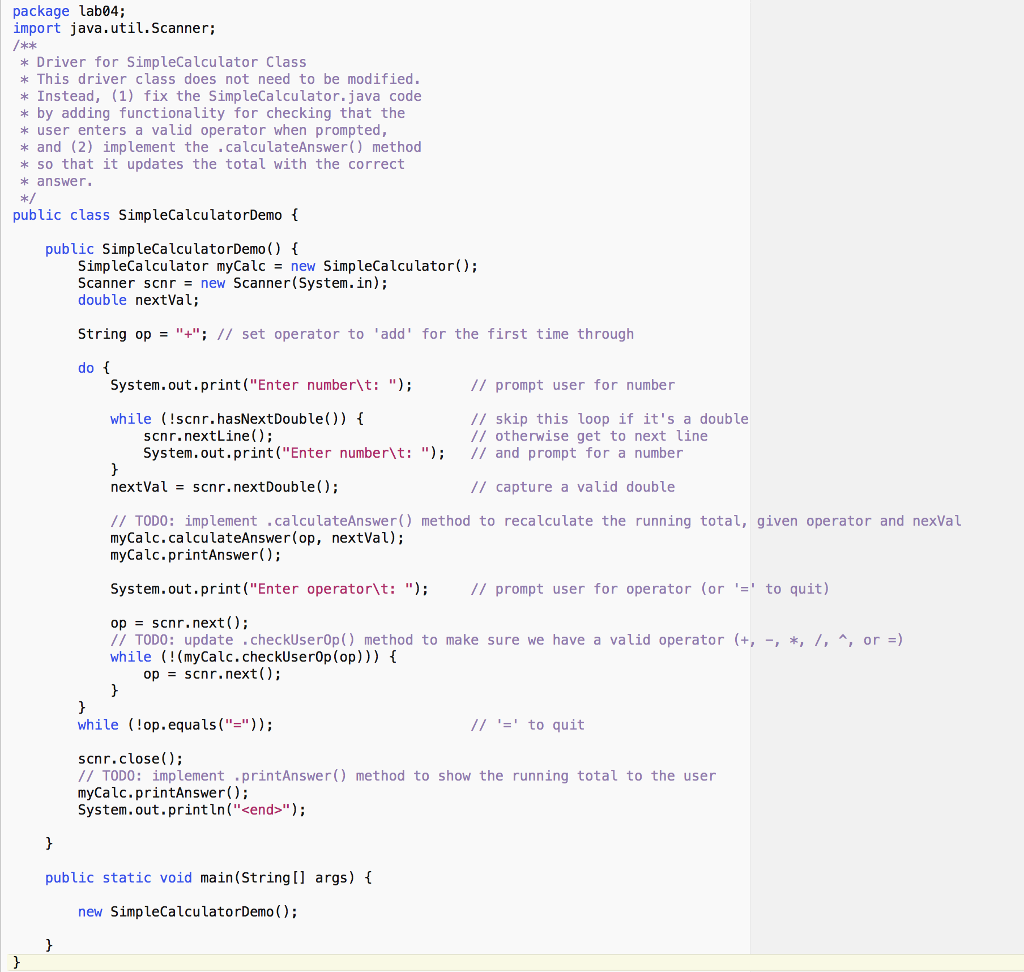
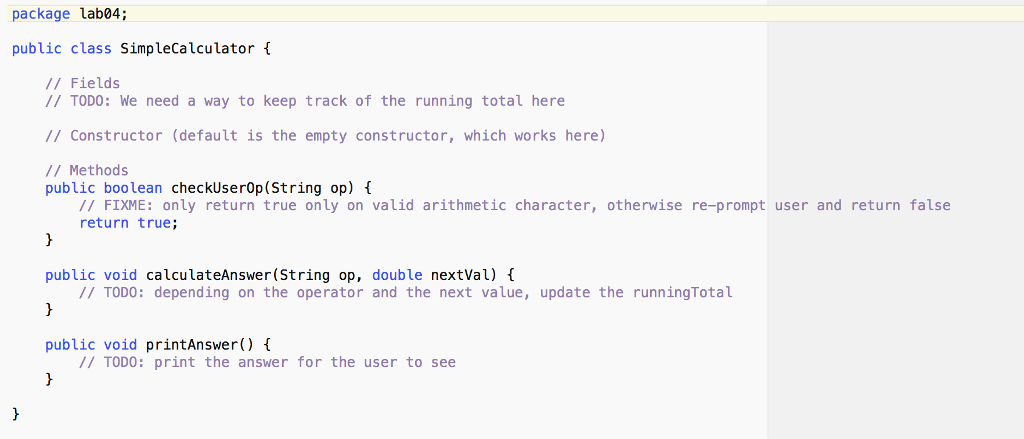
Please write the answers clear and easy to be read and please sipirt the answers so It would be in order SimpleCalculator Lab (Working Idea...) Download the two files (SimpleCalculator.java and SimpleCalculatorDemo.java) The driver class (SimpleCalculator.java) does not need to be modified. Instead, fix the SimpleCalculator.java code by (1) adding functionality for checking that the user enters a valid operator when prompted, and (2) implement the .calculateAnswer) method so that it updates the total with the correct answer. The calculations the SimpleCalculator should be able to do are (add), - (subtract), (multiply), / (divide), and A (exponentiation). You may use Java's Math.pow(a, b) static method for exponentiation. Instructions are also in the comments of the files you will download. The only file you will need to submit is your modified SimpleCalculator.java file. Points 3 points - The calculator works. Your program prints the running total after each calculation. Complete the printAnswer) method. Also, make sure to add a data field to the SimpleCalculator (line 6) so that it can keep track of the calculations. 5 points - 1 point for each correctly working operator. 2 points - Your program is robust. The user can input bogus numbers or operators, for example. When that happens, your program will not stop running, but will instead ask the user again for valid input. When the user has entered valid input, your program will carry on with its execution Example Run Here's an example of some user input and expected output for the finished SimpleCalculator. Enter number 25 Total is now 25. Operator Enter number 3 Total is now 28.0 Operator Enter number 6 Total is now 22.0 Operator Enter number 11 Total is now 2.0 Operator Enter number 8 Total is now 256.0 Operator Total is now 256.0 end> package lab04; import java.util.Scanner; skok * Driver for SimpleCalculator Class k This driver class does not need to be modified * Instead, (1) fix the SimpleCalculator.java code * by adding functionality for checking that the * user enters a valid operator when prompted, k and (2) implement the .calculateAnswer) method k so that it updates the total with the correct k answer. public class SimpleCalculatorDemo public SimpleCalculatorDemo() f SimpleCalculator myCalcnew SimpleCalculator); Scanner scnrnew Scanner(System.in); double nextVal String op"+"; // set operator to 'add' for the first time through 0 System.out.print("Enter number\t: "; // prompt user for number while (!scnr.hasNextDouble)) // skip this loop if it's a double // otherwise get to next line scnr.nextLine); System.out.print("Enter numberlt: "); I/ and prompt for a number nextValscnr.nextDouble) // capture a valid double /ITODO: implement.calculateAnswer() method to recalculate the running total, given operator and nexVal myCalc.calculateAnswer(op, nextVal); myCalc.printAnswer); System.out, print ("Enter operator\t: "); // prompt user for operator (or to quit) op scnr.next ( ) ; // TODO: update .checkUserOp() method to make sure we have a valid operator +, -, , /, A, or-) while (!(myCalc.checkUserOp(op))) t opscnr.next); while (!op.equals ("-")); to quit scnr.close); ITODO: implement printAnswer) method to show the running total to the user myCalc.printAnswer); System.out.println("
Step by Step Solution
There are 3 Steps involved in it

Get step-by-step solutions from verified subject matter experts
 Study Help