







Question: please write the code in java The program you will be writing is a simple version of the Milton Bradley (now owned by Hasbro) game
please write the code in java
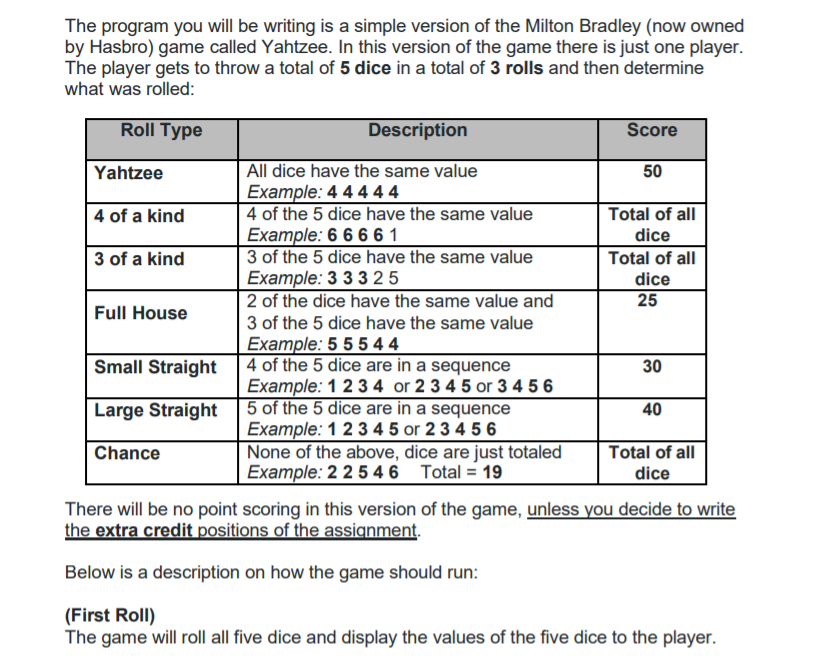
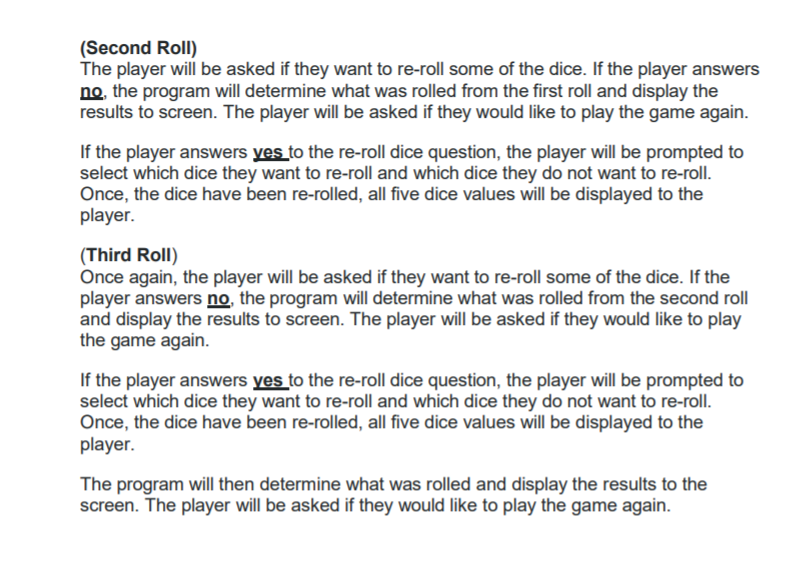
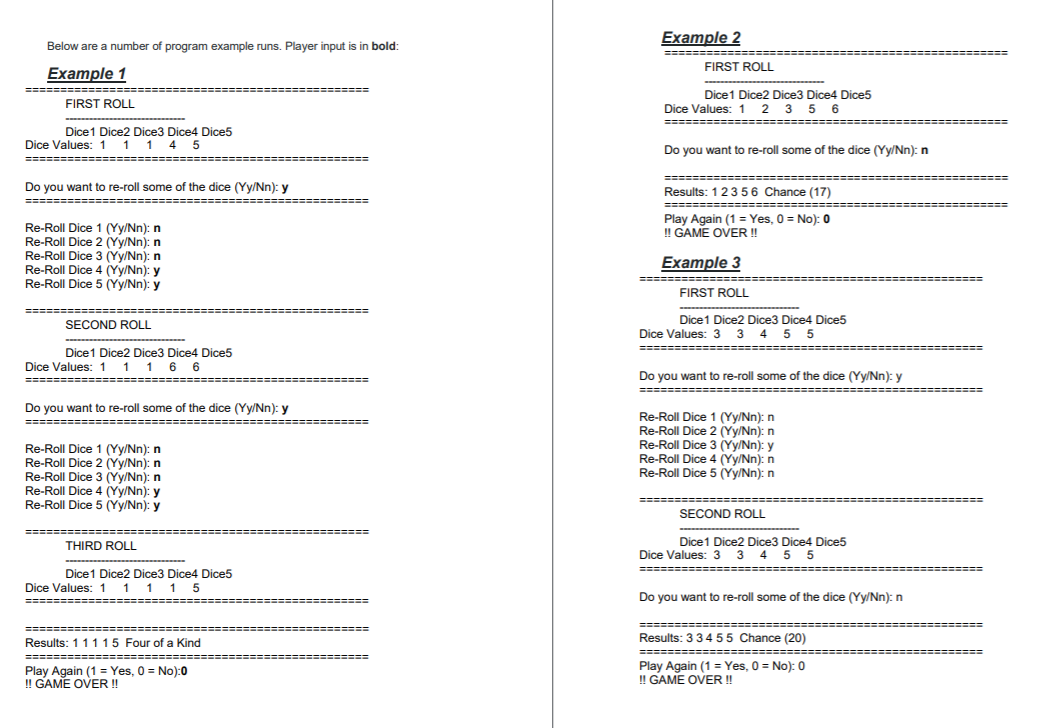
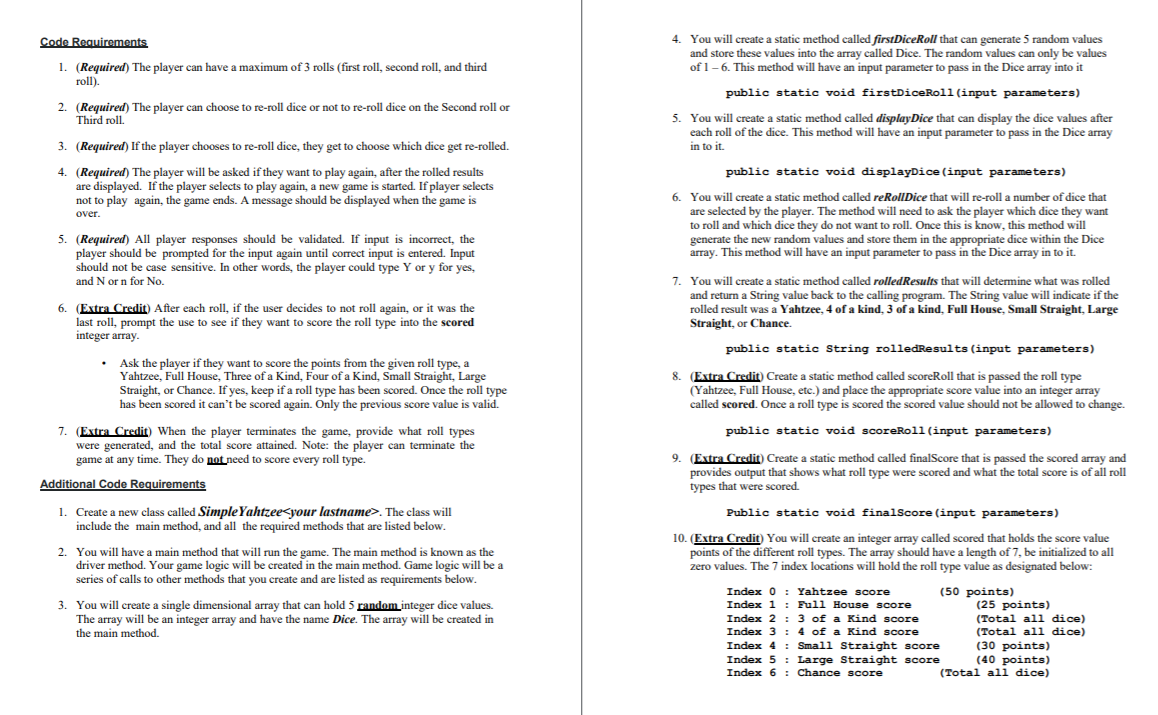
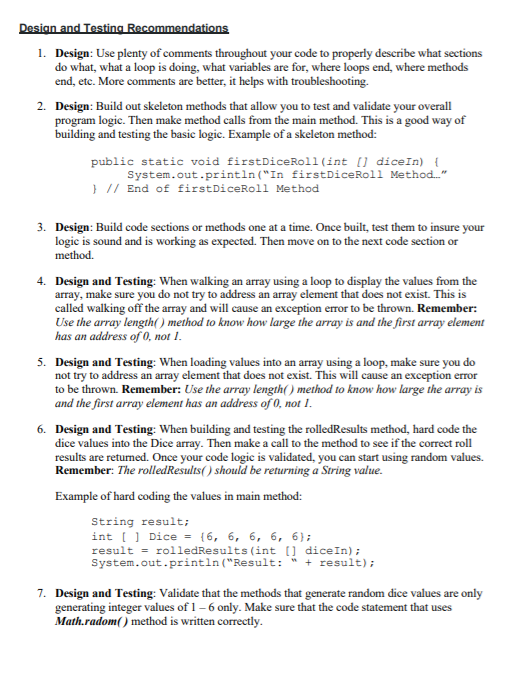
The program you will be writing is a simple version of the Milton Bradley (now owned by Hasbro) game called Yahtzee. In this version of the game there is just one player. The player gets to throw a total of 5 dice in a total of 3 rolls and then determine what was rolled: Roll Type Description Score Yahtzee All dice have the same value 50 Example: 4 4 4 4 4 4 of a kind 4 of the 5 dice have the same value Total of all Example: 6 6 6 6 1 dice 3 of a kind 3 of the 5 dice have the same value Total of all Example: 3 3 3 2 5 dice 25 Full House 2 of the dice have the same value and 3 of the 5 dice have the same value Example: 5 5 5 4 4 Small Straight 4 of the 5 dice are in a sequence 30 Example: 1 2 3 4 or 2 3 4 5 or 3 4 5 6 Large Straight 5 of the 5 dice are in a sequence 40 Example: 1 2 3 4 5 or 2 3 4 5 6 Chance None of the above, dice are just totaled Total of all Example: 2 2 546 Total = 19 dice There will be no point scoring in this version of the game, unless you decide to write the extra credit positions of the assignment. Below is a description on how the game should run: (First Roll) The game will roll all five dice and display the values of the five dice to the player. (Second Roll) The player will be asked if they want to re-roll some of the dice. If the player answers no, the program will determine what was rolled from the first roll and display the results to screen. The player will be asked if they would like to play the game again. If the player answers yes to the re-roll dice question, the player will be prompted to select which dice they want to re-roll and which dice they do not want to re-roll. Once, the dice have been re-rolled, all five dice values will be displayed to the player. (Third Roll) Once again, the player will be asked if they want to re-roll some of the dice. If the player answers no, the program will determine what was rolled from the second roll and display the results to screen. The player will be asked if they would like to play the game again. If the player answers yes to the re-roll dice question, the player will be prompted to select which dice they want to re-roll and which dice they do not want to re-roll. Once, the dice have been re-rolled, all five dice values will be displayed to the player. The program will then determine what was rolled and display the results to the screen. The player will be asked if they would like to play the game again. Example 2 DEESSSSS FIRST ROLL Below are a number of program example runs. Player input is in bold: Example 1 EEEEEEEEEEEEEEEEEEEEESSSSSSSSSSSEEEEEEEEEEEEEEEEE FIRST ROLL Dice 1 Dice2 Dice3 Dice4 Dice5 Dice Values: 1 2 3 5 6 DESSEEEEEEEEEEEEE EEEEE========= Dice 1 Dice2 Dice3 Dice4 Dice5 Dice Values: 1 1 1 4 5 EEEEEEEEEEEEEEEE Do you want to re-roll some of the dice (Yy/Nn): n Do you want to re-roll some of the dice (Yy/Nn): y ========= ========================== Results: 1 2356 Chance (17) EEEEEEEEEEE Play Again (1 = Yes, 0 = No): 0 !! GAME OVER !! Re-Roll Dice 1 (Yy/Nn): n Re-Roll Dice 2 (Yy/Nn): n Re-Roll Dice 3 (Yy/Nn): n Re-Roll Dice 4 (Yy/Nn): y Re-Roll Dice 5 (Yy/Nn): y Example 3 =============== FIRST ROLL ========= ============== SECOND ROLL Dice 1 Dice2 Dice3 Dice4 Dice5 Dice Values: 3 3 4 5 5 =========== EEEEEEEE Dice 1 Dice2 Dice3 Dice4 Dice5 Dice Values: 1 1 1 6 6 ====================== Do you want to re-roll some of the dice (Yy/Nn): y 3D%3D% 3E%%3D%3D%3D%3D Do you want to re-roll some of the dice (Yy/Nn): y ======== Re-Roll Dice 1 (Yy/Nn): n Re-Roll Dice 2 (Yy/Nn): n Re-Roll Dice 3 (Yy/Nn): n Re-Roll Dice 4 (Yy/Nn): Y Re-Roll Dice 5 (Yy/Nn): y Re-Roll Dice 1 (Yy/Nn): n Re-Roll Dice 2 (Yy/Nn): n Re-Roll Dice 3 (Yy/Nn): y Re-Roll Dice 4 (Yy/Nn): n Re-Roll Dice 5 (Yy/Nn): SECOND ROLL ==== THIRD ROLL Dice 1 Dice2 Dice3 Dice4 Dice5 Dice Values: 3 3 4 5 5 SSSSSSSSSSSSS Dice 1 Dice2 Dice3 Dice4 Dice5 Dice Values: 1 1 1 1 5 EEEEEEEEEE Do you want to re-roll some of the dice (Yy/Nn): n ============= ====== =================================== Results: 1 1115 Four of a kind EEEEEEEEEEEEEEESSSSSSSSSSSSSS FEEEEEEEEEEEEEEEEEEE Play Again (1 = Yes, 0 = No):0 !! GAME OVER !! ======================== Results: 3 3455 Chance (20) EEEEEEEEEEEEEEEEEEEEEEEEEE Play Again (1 = Yes, 0 = No): 0 !! GAME OVER !! Code Requirements 1. (Required) The player can have a maximum of 3 rolls (first roll, second roll, and third roll). 4. You will create a static method called firstDiceRoll that can generate 5 random values and store these values into the array called Dice. The random values can only be values of 1-6. This method will have an input parameter to pass in the Dice array into it public static void firstDiceRoll (input parameters) 5. You will create a static method called display Dice that can display the dice values after each roll of the dice. This method will have an input parameter to pass in the Dice array in to it. 2. (Required) The player can choose to re-roll dice or not to re-roll dice on the Second roll or Third roll. 3. (Required) If the player chooses to re-roll dice, they get to choose which dice get re-rolled. 4. (Required) The player will be asked if they want to play again, after the rolled results are displayed. If the player selects to play again, a new game is started. If player selects not to play again, the game ends. A message should be displayed when the game is public static void displayDice (input parameters) over. 5. (Required) All player responses should be validated. If input is incorrect, the player should be prompted for the input again until correct input is entered. Input should not be case sensitive. In other words, the player could type Y or y for yes, and Norn for No. 6. You will create a static method called reRollDice that will re-roll a number of dice that are selected by the player. The method will need to ask the player which dice they want to roll and which dice they do not want to roll. Once this is know, this method will generate the new random values and store them in the appropriate dice within the Dice array. This method will have an input parameter to pass in the Dice array in to it. 7. You will create a static method called rolled Results that will determine what was rolled and return a String value back to the calling program. The String value will indicate if the rolled result was a Yahtzee, 4 of a kind, 3 of a kind, Full House, Small Straight, Large Straight, or Chance 6. (Extra Credit After each roll, if the user decides to not roll again, or it was the last roll, prompt the use to see if they want to score the roll type into the scored integer array public static String rolledResults (input parameters) Ask the player if they want score the points from the given roll type, a Yahtzee, Full House, Three of a Kind, Four of a Kind, Small Straight, Large Straight, or Chance. If yes, keep if a roll type has been scored. Once the roll type has been scored it can't be scored again. Only the previous score value is valid. 7. (Extra Credit) When the player terminates the game, provide what roll types were generated, and the total score attained. Note: the player can terminate the game at any time. They do not need to score every roll type. 8. Extra Credit Create a static method called scoreRoll that is passed the roll type (Yahtzee, Full House, etc.) and place the appropriate score value into an integer array called scored. Once a roll type is scored the scored value should not be allowed to change. public static void scoreRoll (input parameters) 9. Extra Credit) Create a static method called finalScore that is passed the scored array and provides output that shows what roll type were scored and what the total score is of all roll types that were scored. Additional Code Requirements 1. Create a new class called Simple Yahtzee your lastname>. The class will include the main method, and all the required methods that are listed below. 2. You will have a main method that will run the game. The main method is known as the driver method. Your game logic will be created in the main method. Game logie will be a series of calls to other methods that you create and are listed as requirements below. 3. You will create a single dimensional array that can hold 5 random integer dice values. The array will be an integer array and have the name Dice. The array will be created in the main method. Public static void finalscore (input parameters) 10. Extra Credit) You will create an integer array called scored that holds the score value points of the different roll types. The array should have a length of 7, be initialized to all zero values. The 7 index locations will hold the roll type value as designated below: Index 0 : Yahtzee score (50 points) Index 1 : Full House score (25 points) Index 2 : 3 of a kind score (Total all dice) Index 3 : 4 of a Kind score (Total all dice) Index 4: Small Straight score (30 points) Index 5 : Large Straight score (40 points) Index 6 : Chance score (Total all dice) Design and Testing Recommendations 1. Design: Use plenty of comments throughout your code to properly describe what sections do what, what a loop is doing, what variables are for, where loops end, where methods end, etc. More comments are better, it helps with troubleshooting. 2. Design: Build out skeleton methods that allow you to test and validate your overall program logic. Then make method calls from the main method. This is a good way of building and testing the basic logic. Example of a skeleton method: public static void firstDiceRoll(int !) diceIn) { System.out.println("In firstDiceRoll Method..." } // End of firstDiceRoll Method 3. Design: Build code sections or methods one at a time. Once built, test them to insure your logic is sound and is working as expected. Then move on to the next code section or method. 4. Design and Testing: When walking an array using a loop to display the values from the array, make sure you do not try to address an array element that does not exist. This is called walking off the array and will cause an exception error to be thrown. Remember: Use the array length() method to know how large the array is and the first array element has an address of 0, not 1. 5. Design and Testing: When loading values into an array using a loop, make sure you do not try to address an array element that does not exist. This will cause an exception error to be thrown. Remember: Use the array length() method to know how large the array is and the first array element has an address of 0, not 1. 6. Design and Testing: When building and testing the rolled Results method, hard code the dice values into the Dice array. Then make a call to the method to see if the correct roll results are returned. Once your code logie is validated, you can start using random values. Remember: The rolled Results() should be returning a String value. Example of hard coding the values in main method: String result; int Dice = 16, 6, 6, 6, 6); result = rolledResults(int (1 diceIn); System.out.println("Result: + result); 7. Design and Testing: Validate that the methods that generate random dice values are only generating integer values of 1 - 6 only. Make sure that the code statement that uses Math.radom() method is written correctly. The program you will be writing is a simple version of the Milton Bradley (now owned by Hasbro) game called Yahtzee. In this version of the game there is just one player. The player gets to throw a total of 5 dice in a total of 3 rolls and then determine what was rolled: Roll Type Description Score Yahtzee All dice have the same value 50 Example: 4 4 4 4 4 4 of a kind 4 of the 5 dice have the same value Total of all Example: 6 6 6 6 1 dice 3 of a kind 3 of the 5 dice have the same value Total of all Example: 3 3 3 2 5 dice 25 Full House 2 of the dice have the same value and 3 of the 5 dice have the same value Example: 5 5 5 4 4 Small Straight 4 of the 5 dice are in a sequence 30 Example: 1 2 3 4 or 2 3 4 5 or 3 4 5 6 Large Straight 5 of the 5 dice are in a sequence 40 Example: 1 2 3 4 5 or 2 3 4 5 6 Chance None of the above, dice are just totaled Total of all Example: 2 2 546 Total = 19 dice There will be no point scoring in this version of the game, unless you decide to write the extra credit positions of the assignment. Below is a description on how the game should run: (First Roll) The game will roll all five dice and display the values of the five dice to the player. (Second Roll) The player will be asked if they want to re-roll some of the dice. If the player answers no, the program will determine what was rolled from the first roll and display the results to screen. The player will be asked if they would like to play the game again. If the player answers yes to the re-roll dice question, the player will be prompted to select which dice they want to re-roll and which dice they do not want to re-roll. Once, the dice have been re-rolled, all five dice values will be displayed to the player. (Third Roll) Once again, the player will be asked if they want to re-roll some of the dice. If the player answers no, the program will determine what was rolled from the second roll and display the results to screen. The player will be asked if they would like to play the game again. If the player answers yes to the re-roll dice question, the player will be prompted to select which dice they want to re-roll and which dice they do not want to re-roll. Once, the dice have been re-rolled, all five dice values will be displayed to the player. The program will then determine what was rolled and display the results to the screen. The player will be asked if they would like to play the game again. Example 2 DEESSSSS FIRST ROLL Below are a number of program example runs. Player input is in bold: Example 1 EEEEEEEEEEEEEEEEEEEEESSSSSSSSSSSEEEEEEEEEEEEEEEEE FIRST ROLL Dice 1 Dice2 Dice3 Dice4 Dice5 Dice Values: 1 2 3 5 6 DESSEEEEEEEEEEEEE EEEEE========= Dice 1 Dice2 Dice3 Dice4 Dice5 Dice Values: 1 1 1 4 5 EEEEEEEEEEEEEEEE Do you want to re-roll some of the dice (Yy/Nn): n Do you want to re-roll some of the dice (Yy/Nn): y ========= ========================== Results: 1 2356 Chance (17) EEEEEEEEEEE Play Again (1 = Yes, 0 = No): 0 !! GAME OVER !! Re-Roll Dice 1 (Yy/Nn): n Re-Roll Dice 2 (Yy/Nn): n Re-Roll Dice 3 (Yy/Nn): n Re-Roll Dice 4 (Yy/Nn): y Re-Roll Dice 5 (Yy/Nn): y Example 3 =============== FIRST ROLL ========= ============== SECOND ROLL Dice 1 Dice2 Dice3 Dice4 Dice5 Dice Values: 3 3 4 5 5 =========== EEEEEEEE Dice 1 Dice2 Dice3 Dice4 Dice5 Dice Values: 1 1 1 6 6 ====================== Do you want to re-roll some of the dice (Yy/Nn): y 3D%3D% 3E%%3D%3D%3D%3D Do you want to re-roll some of the dice (Yy/Nn): y ======== Re-Roll Dice 1 (Yy/Nn): n Re-Roll Dice 2 (Yy/Nn): n Re-Roll Dice 3 (Yy/Nn): n Re-Roll Dice 4 (Yy/Nn): Y Re-Roll Dice 5 (Yy/Nn): y Re-Roll Dice 1 (Yy/Nn): n Re-Roll Dice 2 (Yy/Nn): n Re-Roll Dice 3 (Yy/Nn): y Re-Roll Dice 4 (Yy/Nn): n Re-Roll Dice 5 (Yy/Nn): SECOND ROLL ==== THIRD ROLL Dice 1 Dice2 Dice3 Dice4 Dice5 Dice Values: 3 3 4 5 5 SSSSSSSSSSSSS Dice 1 Dice2 Dice3 Dice4 Dice5 Dice Values: 1 1 1 1 5 EEEEEEEEEE Do you want to re-roll some of the dice (Yy/Nn): n ============= ====== =================================== Results: 1 1115 Four of a kind EEEEEEEEEEEEEEESSSSSSSSSSSSSS FEEEEEEEEEEEEEEEEEEE Play Again (1 = Yes, 0 = No):0 !! GAME OVER !! ======================== Results: 3 3455 Chance (20) EEEEEEEEEEEEEEEEEEEEEEEEEE Play Again (1 = Yes, 0 = No): 0 !! GAME OVER !! Code Requirements 1. (Required) The player can have a maximum of 3 rolls (first roll, second roll, and third roll). 4. You will create a static method called firstDiceRoll that can generate 5 random values and store these values into the array called Dice. The random values can only be values of 1-6. This method will have an input parameter to pass in the Dice array into it public static void firstDiceRoll (input parameters) 5. You will create a static method called display Dice that can display the dice values after each roll of the dice. This method will have an input parameter to pass in the Dice array in to it. 2. (Required) The player can choose to re-roll dice or not to re-roll dice on the Second roll or Third roll. 3. (Required) If the player chooses to re-roll dice, they get to choose which dice get re-rolled. 4. (Required) The player will be asked if they want to play again, after the rolled results are displayed. If the player selects to play again, a new game is started. If player selects not to play again, the game ends. A message should be displayed when the game is public static void displayDice (input parameters) over. 5. (Required) All player responses should be validated. If input is incorrect, the player should be prompted for the input again until correct input is entered. Input should not be case sensitive. In other words, the player could type Y or y for yes, and Norn for No. 6. You will create a static method called reRollDice that will re-roll a number of dice that are selected by the player. The method will need to ask the player which dice they want to roll and which dice they do not want to roll. Once this is know, this method will generate the new random values and store them in the appropriate dice within the Dice array. This method will have an input parameter to pass in the Dice array in to it. 7. You will create a static method called rolled Results that will determine what was rolled and return a String value back to the calling program. The String value will indicate if the rolled result was a Yahtzee, 4 of a kind, 3 of a kind, Full House, Small Straight, Large Straight, or Chance 6. (Extra Credit After each roll, if the user decides to not roll again, or it was the last roll, prompt the use to see if they want to score the roll type into the scored integer array public static String rolledResults (input parameters) Ask the player if they want score the points from the given roll type, a Yahtzee, Full House, Three of a Kind, Four of a Kind, Small Straight, Large Straight, or Chance. If yes, keep if a roll type has been scored. Once the roll type has been scored it can't be scored again. Only the previous score value is valid. 7. (Extra Credit) When the player terminates the game, provide what roll types were generated, and the total score attained. Note: the player can terminate the game at any time. They do not need to score every roll type. 8. Extra Credit Create a static method called scoreRoll that is passed the roll type (Yahtzee, Full House, etc.) and place the appropriate score value into an integer array called scored. Once a roll type is scored the scored value should not be allowed to change. public static void scoreRoll (input parameters) 9. Extra Credit) Create a static method called finalScore that is passed the scored array and provides output that shows what roll type were scored and what the total score is of all roll types that were scored. Additional Code Requirements 1. Create a new class called Simple Yahtzee your lastname>. The class will include the main method, and all the required methods that are listed below. 2. You will have a main method that will run the game. The main method is known as the driver method. Your game logic will be created in the main method. Game logie will be a series of calls to other methods that you create and are listed as requirements below. 3. You will create a single dimensional array that can hold 5 random integer dice values. The array will be an integer array and have the name Dice. The array will be created in the main method. Public static void finalscore (input parameters) 10. Extra Credit) You will create an integer array called scored that holds the score value points of the different roll types. The array should have a length of 7, be initialized to all zero values. The 7 index locations will hold the roll type value as designated below: Index 0 : Yahtzee score (50 points) Index 1 : Full House score (25 points) Index 2 : 3 of a kind score (Total all dice) Index 3 : 4 of a Kind score (Total all dice) Index 4: Small Straight score (30 points) Index 5 : Large Straight score (40 points) Index 6 : Chance score (Total all dice) Design and Testing Recommendations 1. Design: Use plenty of comments throughout your code to properly describe what sections do what, what a loop is doing, what variables are for, where loops end, where methods end, etc. More comments are better, it helps with troubleshooting. 2. Design: Build out skeleton methods that allow you to test and validate your overall program logic. Then make method calls from the main method. This is a good way of building and testing the basic logic. Example of a skeleton method: public static void firstDiceRoll(int !) diceIn) { System.out.println("In firstDiceRoll Method..." } // End of firstDiceRoll Method 3. Design: Build code sections or methods one at a time. Once built, test them to insure your logic is sound and is working as expected. Then move on to the next code section or method. 4. Design and Testing: When walking an array using a loop to display the values from the array, make sure you do not try to address an array element that does not exist. This is called walking off the array and will cause an exception error to be thrown. Remember: Use the array length() method to know how large the array is and the first array element has an address of 0, not 1. 5. Design and Testing: When loading values into an array using a loop, make sure you do not try to address an array element that does not exist. This will cause an exception error to be thrown. Remember: Use the array length() method to know how large the array is and the first array element has an address of 0, not 1. 6. Design and Testing: When building and testing the rolled Results method, hard code the dice values into the Dice array. Then make a call to the method to see if the correct roll results are returned. Once your code logie is validated, you can start using random values. Remember: The rolled Results() should be returning a String value. Example of hard coding the values in main method: String result; int Dice = 16, 6, 6, 6, 6); result = rolledResults(int (1 diceIn); System.out.println("Result: + result); 7. Design and Testing: Validate that the methods that generate random dice values are only generating integer values of 1 - 6 only. Make sure that the code statement that uses Math.radom() method is written correctly
Step by Step Solution
There are 3 Steps involved in it

Get step-by-step solutions from verified subject matter experts
 Study Help