







Question: Please write this code in simple C programming only. Also please do not use other Chegg answers as they are complicated and hard for me
Please write this code in simple C programming only. Also please do not use other Chegg answers as they are complicated and hard for me to understand.
Comments for learning would be apprecaited. Thank you!
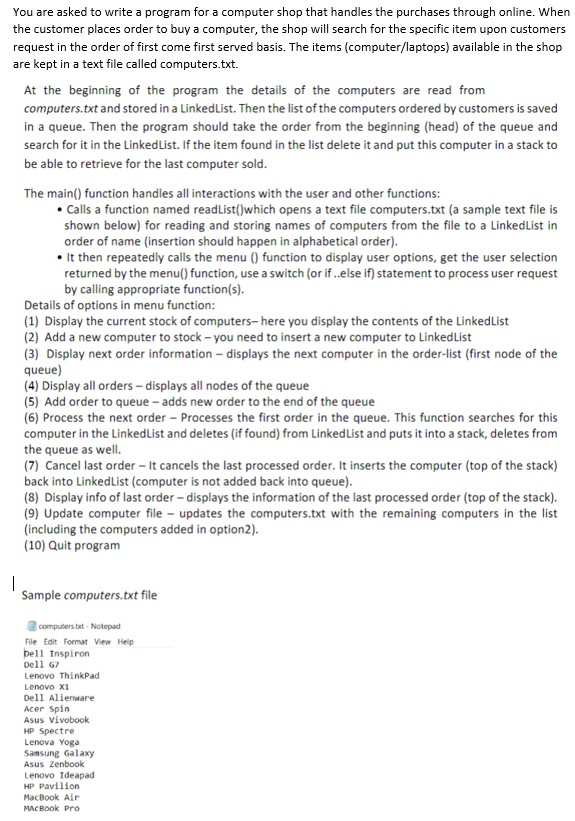
You are asked to write a program for a computer shop that handles the purchases through online. When the customer places order to buy a computer, the shop will search for the specific item upon customers request in the order of first come first served basis. The items (computer/laptops) available in the shop are kept in a text file called computers.txt. At the beginning of the program the details of the computers are read from computers.txt and stored in a LinkedList. Then the list of the computers ordered by customers is saved in a queue. Then the program should take the order from the beginning (head) of the queue and search for it in the Linkedlist. If the item found in the list delete it and put this computer in a stack to be able to retrieve for the last computer sold. The main() function handles all interactions with the user and other functions: Calls a function named readList()which opens a text file computers.txt (a sample text file is shown below) for reading and storing names of computers from the file to a Linkedlist in order of name (insertion should happen in alphabetical order). It then repeatedly calls the menu () function to display user options, get the user selection returned by the menu() function, use a switch (or if ..else if) statement to process user request by calling appropriate function(s). Details of options in menu function: (1) Display the current stock of computers-here you display the contents of the LinkedList (2) Add a new computer to stock - you need to insert a new computer to LinkedList (3) Display next order information - displays the next computer in the order-list (first node of the queue) (4) Display all orders - displays all nodes of the queue (5) Add order to queue - adds new order to the end of the queue (6) Process the next order - Processes the first order in the queue. This function searches for this computer in the LinkedList and deletes (if found) from Linked List and puts it into a stack, deletes from the queue as well. (7) Cancel last order - It cancels the last processed order. It inserts the computer (top of the stack) back into LinkedList (computer is not added back into queue). (8) Display info of last order displays the information of the last processed order (top of the stack). (9) Update computer file - updates the computers.txt with the remaining computers in the list (including the computers added in option2). (10) Quit program | Sample computers.txt file computers.txt - Notepad File Edit Format View Help Dell Inspiron Dell 67 Lenovo ThinkPad Lenovo x1 Dell Alienware Acer Spin Asus Vivobook HP Spectre Lenova Yoga Samsung Galaxy Asus Zenbook Lenovo Ideapad HP Pavilion MacBook Air MACBOOK Pro You are asked to write a program for a computer shop that handles the purchases through online. When the customer places order to buy a computer, the shop will search for the specific item upon customers request in the order of first come first served basis. The items (computer/laptops) available in the shop are kept in a text file called computers.txt. At the beginning of the program the details of the computers are read from computers.txt and stored in a LinkedList. Then the list of the computers ordered by customers is saved in a queue. Then the program should take the order from the beginning (head) of the queue and search for it in the Linkedlist. If the item found in the list delete it and put this computer in a stack to be able to retrieve for the last computer sold. The main() function handles all interactions with the user and other functions: Calls a function named readList()which opens a text file computers.txt (a sample text file is shown below) for reading and storing names of computers from the file to a Linkedlist in order of name (insertion should happen in alphabetical order). It then repeatedly calls the menu () function to display user options, get the user selection returned by the menu() function, use a switch (or if ..else if) statement to process user request by calling appropriate function(s). Details of options in menu function: (1) Display the current stock of computers-here you display the contents of the LinkedList (2) Add a new computer to stock - you need to insert a new computer to LinkedList (3) Display next order information - displays the next computer in the order-list (first node of the queue) (4) Display all orders - displays all nodes of the queue (5) Add order to queue - adds new order to the end of the queue (6) Process the next order - Processes the first order in the queue. This function searches for this computer in the LinkedList and deletes (if found) from Linked List and puts it into a stack, deletes from the queue as well. (7) Cancel last order - It cancels the last processed order. It inserts the computer (top of the stack) back into LinkedList (computer is not added back into queue). (8) Display info of last order displays the information of the last processed order (top of the stack). (9) Update computer file - updates the computers.txt with the remaining computers in the list (including the computers added in option2). (10) Quit program | Sample computers.txt file computers.txt - Notepad File Edit Format View Help Dell Inspiron Dell 67 Lenovo ThinkPad Lenovo x1 Dell Alienware Acer Spin Asus Vivobook HP Spectre Lenova Yoga Samsung Galaxy Asus Zenbook Lenovo Ideapad HP Pavilion MacBook Air MACBOOK Pro
Step by Step Solution
There are 3 Steps involved in it

Get step-by-step solutions from verified subject matter experts
 Study Help