







Question: Please write this program in JAVA and make sure you follow all steps. Grid Based games such as tic-tac-toe , Connect 4 , chess ,
Please write this program in JAVA and make sure you follow all steps.
Grid Based games such as tic-tac-toe, Connect 4, chess, checkers, battleship, sudoku, and crossword puzzles often represent the board on a 2 dimensional array of characters. For this assignment you'll be making a class that reads in a saved state of one of these games so that it could be used as a game loader. Once the game is loaded, a game can get a copy of the state from the Grid Reader and use it. The other half of this would be a GridWriter which is outside the scope of this assignment.
Requirements:
For this assignment, you'll be developing a java class GridReader and one java program GameFileTester that will test the class.
The class that you will create is:
- GridReader - an object for reading files into a 2-D array. When the GridReader constructor is called, it should store the filename, read the specified file and convert it to a two dimensional array of characters and store it in the grid field. The toString() method should return a string that is identical to the contents of the file. getCopy() should return a deep copy of the grid or null if the file specified was not found. getFileName() should return the file name specified on construction. The UML diagram for GridReader is below.
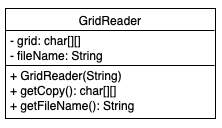
In addition you should create a program in a file called GameFileTester.java that reads in a grid that represents your favorite grid based game. Make sure to upload the file that your GameFileTester is reading. Also make sure that the program runs without any request for input or any need for command line arguments.
Class description
GridReader - an object for reading files into a 2-D array.
- fields
- grid: the two dimensional char array that holds the file contents
- fileName: the name of the file where the grid originated.
- methods
- GridReader(...): When the GridReader constructor is called, it should store the file name, read the specified file and convert it to a two dimensional array of characters and store it in the grid field.
- toString(): this method should return a string that is identical to the contents of the file.
- getCopy(): this method should return a deep copy of the grid or null if the file specified was not found.
- getFileName(): this method should return the file name specified on construction.
Here's the GridReaderTester.java
import java.util.Scanner; import java.io.File;
public class GridReaderTester { public static void main(String[] args) { // the last readable character in an ASCII file final char LAST_CHAR = '~'; // the End of File Pattern for the Scanner final String EOF = "\\Z"; // use this file final String FILE_NAME = "GridReaderTester.java";
// the test to perform int index = -1;
// get the test from the command line if(args.length > 0) { try { index = Integer.valueOf(args[0]); } catch (NumberFormatException e) {
} }
// to keep track of which test to run boolean[] test = new boolean[4];
// either run 1 test or all tests if(index >= 0 && index
// in case GridReader or any of the File operations // throw an exception try { // make a GridReader to be tested GridReader reader = new GridReader(FILE_NAME); // test getFileName() if(test[0]) { String testFileName = reader.getFileName(); if (testFileName != null && testFileName.equals(FILE_NAME)) { System.out.println("getFileName() works!"); System.out.println("Test 0: PASS"); } else { System.out.println("getFileName() incomplete."); System.out.println(testFileName + " should be " + FILE_NAME); System.out.println("Test 0: FAIL"); } }
// test that toString() matches the file if(test[1]) { String toString = reader.toString(); if(toString != null) { String[] lines = toString.split(" "); Scanner scan = new Scanner(new File(FILE_NAME)); boolean matches = true; int i = 0; while(scan.hasNextLine()) { String testLine = scan.nextLine(); if(!testLine.equals(lines[i])) { matches = false; } ++i; } if (matches) { System.out.println("toString() works!"); System.out.println("Test 1: PASS"); } else { System.out.println("toString() incomplete."); System.out.println("Test 1: FAIL"); } } else { System.out.println("toString() incomplete (null)."); System.out.println("Test 1: FAIL"); } }
// test that getCopy() returns a copy and not a reference if(test[2]) { char[][] grid1 = reader.getCopy(); if (grid1 != null && grid1.length > 0 && grid1[0].length > 0) { if(grid1[0][0]
// test that getCopy() is holding the contents of the file // by comparing getCopy to toString(); if(test[3]) { char[][] grid = reader.getCopy(); String toString = reader.toString(); if(grid != null && toString != null) { char[] letters = toString.toCharArray(); int row = 0; int col = 0; boolean matches = true; for(char x : letters) { if(x == ' ') { row++; col = 0; } else { if(grid[row][col] != x) { matches = false; } col++; } } if (matches) { System.out.println("getCopy() matches toString()!"); System.out.println("Test 3: PASS"); } else { System.out.println("getCopy() doesn't match toString()."); System.out.println("Test 3: FAIL"); } } else { System.out.println("getCopy() and/or toString() returns null."); System.out.println("Test 3: FAIL"); } } } catch(Exception e) { System.out.println("Exception thrown"); System.out.println("Test: FAIL"); e.printStackTrace(); } } }
GridReader - grid: char[][] - fileName: String + GridReader(String) + getCopy(): char10 getFileName(): String
Step by Step Solution
There are 3 Steps involved in it

Get step-by-step solutions from verified subject matter experts
 Study Help