







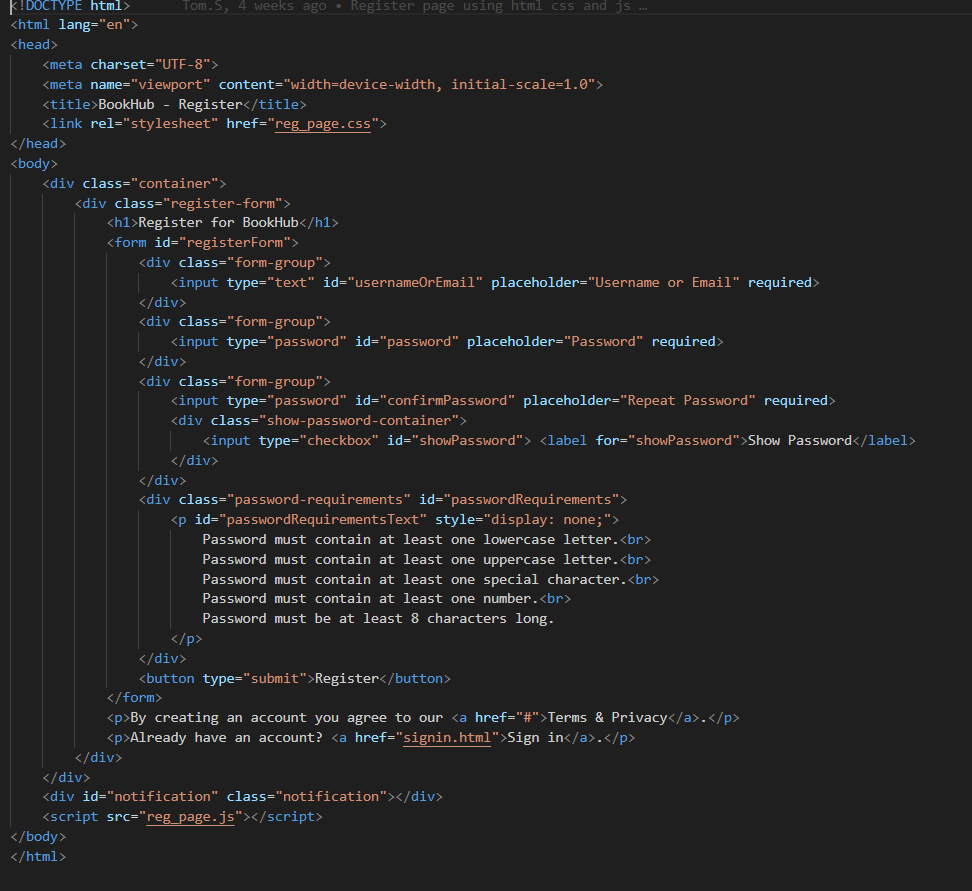
Question: please write unit tests in javascript using jest framework for a register page ( attached is a picture of the html code ) the javascript
please write unit tests in javascript using jest framework for a register page attached is a picture of the html code the javascript and css code are pasted below, the test cases are also pasted below. Please USE THE CODES I PASTED HERE TO CREATE UNIT TESTS. js code: document.getElementByIdregisterFormaddEventListenersubmit functionevent
event.preventDefault;
var usernameOrEmail document.getElementByIdusernameOrEmailvalue;
var password document.getElementByIdpasswordvalue;var confirmPassword document.getElementByIdconfirmPasswordvalue; if isValidEmailusernameOrEmailshowNotificationPlease enter a valid email address.";
return;if isPasswordValidpassword confirmPasswordshowNotificationPassword must contain at least one lowercase letter, one uppercase letter, one special character, one number, and be at least characters long. Passwords must match.";return;
if password confirmPassword
showNotificationPasswords do not match.";
return;showNotificationRegistration successful!";
;function isValidEmailemailvar emailPattern s@@s@s@$;
return emailPattern.testemail;function isPasswordValidpasswordvar passwordPattern dazAZ@#$&azAZd@#$&$;return passwordPattern.testpassword;function updatePasswordRequirementsrequirementsMetvar requirementsList document.getElementByIpasswordRequirements";if requirementsMetrequirementsListclassList.addrequirementsmet"; else requirementsListclassList.removerequirementsmet";function showNotificationmessage
var notification document.getElementByIdnotification;
notification.innerText message;
notification.style.display "block";setTimeoutfunctionnotificationstyle.display "none";;var showPasswordCheckbox document.getElementByIdshowPassword;var passwordField document.getElementByIdpassword;
showPasswordCheckbox.addEventListenerchange functionpasswordFieldtype this.checked "text" : "password";
;passwordField.addEventListenerinput function
var password this.value.trim;
if password documentgetElementByIdpasswordRequirementsTextstyle.display "block";updatePasswordRequirementsisPasswordValidpassword; else documentgetElementByIdpasswordRequirementsTextstyle.display "none";updatePasswordRequirementsfalse;;function updatePasswordRequirementsrequirementsMetvar requirementsListdocument.getElementByIdpasswordRequirementsif requirementsMetrequirementsListclassList.addrequirementsmet"; else requirementsList.classList.removerequirementsmet";
this the css code:body
fontfamily: Arial, sansserif;
backgroundimage: urlbookswpjpg;
backgroundsize: cover;
backgroundrepeat: norepeat;margin: ;padding: ;display: flex;justifycontent: center;alignitems: center;height: vh;container position: relative;background: lineargradientto bottom, crimson, #fff;borderradius: px;boxshadow: px rgba;padding: px;width: px;hmarginbottom: px;color: #;textalign: center;formgroup marginbottom: px;inputtype"text"inputtype"password"width: calcpx;padding: px;border: px solid #ccc;borderradius: px;backgroundcolor: #fff;color: #;buttontype"submit"backgroundcolor: #ff;color: #fff;padding: px px;border: none;borderradius: px;cursor: pointer;position: absolute;bottom: px;right: px;buttontype"submit":hover backgroundcolor: #cc;notification position: absolute;top: px;left: ;transform: translateX;backgroundcolor: #;color: #fff; padding: px px;borderradius: px;display: none;showpasswordcontainer
position: relative;
margintop: px;
textalign: right
test cases:# TEST CASES TO VERIFY THE "REGISTRATION" PAGE
## Page specific tests: The first test will be trying to register with something that is not an email address. Success if the page shows the please enter a valid email address notification, failure if the registration is successful. The second test will be trying to use a password that does not meet the requirements. Success if the page shows the Password do not meet the requirements or passwords do not match notification, failure if the registration is successful. The third test will be trying to register with two different passwords. Success if the page shows the Password do not meet the requirements or passwords do not match notification, failure if the registration is successful. The fourth test is clicking on the show password button. Success if the password is shown, failure if the password is not shown.
Step by Step Solution
There are 3 Steps involved in it
1 Expert Approved Answer
Step: 1 Unlock

Question Has Been Solved by an Expert!
Get step-by-step solutions from verified subject matter experts
Step: 2 Unlock
Step: 3 Unlock
 Study Help