







Question: Please,Need to build a c++ program using visual studio Using FuelTankDriver.txt and FuelTankHeader.txt . The specifications are on the picture. Thank you! FuelTankHeader.txt #pragma once
Please,Need to build a c++ program using visual studio Using FuelTankDriver.txt and FuelTankHeader.txt . The specifications are on the picture. Thank you!
FuelTankHeader.txt
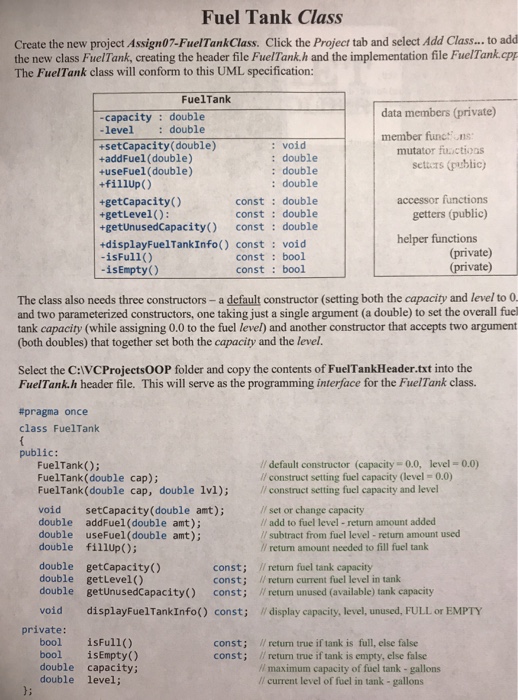
#pragma once
class FuelTank
{
public:
FuelTank(); // default constructor (capacity = 0.0, level = 0.0)
FuelTank(double cap); // construct setting fuel capacity (level = 0.0)
FuelTank(double cap, double lvl); // construct setting fuel capacity and level
void setCapacity(double amt); // set or change capacity
double addFuel(double amt); // add to level - return amount added
double useFuel(double amt); // subtract from level - return amount used
double fillUp(); // return amount used
double getCapacity() const; // return fuel tank capacity
double getLevel() const; // return current fuel level in tank
double getUnusedCapacity() const; // return available (unused) fuel capacity
void displayFuelTankInfo() const; // show capacity, current level, unused capacity
private:
bool isFull() const; // return true if tank is full, else false
bool isEmpty() const; // return true if tank is empty, else false
double capacity; // maximum capacity of fuel tank - gallons
double level; // current level of fuel in tank - gallons
};
FuelTankDriver.txt
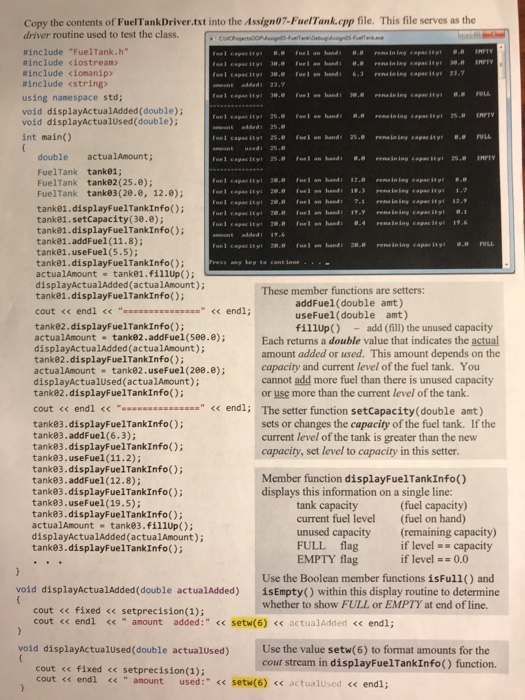
// Assign05-FuelTank.cpp : Defines the entry point for the console application.
//
#include "stdafx.h"
#include "FuelTank.h"
#include
#include
#include
using namespace std;
void displayActualAdded(double actualAdded);
void displayActualUsed(double actualAdded);
int main()
{
double actualAmount;
FuelTank tank01;
FuelTank tank02(25.0);
FuelTank tank03(20.0, 12.0);
tank01.displayFuelTankInfo();
tank01.setCapacity(30.0);
tank01.displayFuelTankInfo();
tank01.addFuel(11.8);
tank01.useFuel(5.5);
tank01.displayFuelTankInfo();
actualAmount = tank01.fillUp();
displayActualAdded(actualAmount);
tank01.displayFuelTankInfo();
cout
tank02.displayFuelTankInfo();
actualAmount = tank02.addFuel(500.0);
displayActualAdded(actualAmount);
tank02.displayFuelTankInfo();
actualAmount = tank02.useFuel(200.0);
displayActualUsed(actualAmount);
tank02.displayFuelTankInfo();
cout
tank03.displayFuelTankInfo();
tank03.addFuel(6.3);
tank03.displayFuelTankInfo();
tank03.useFuel(11.2);
tank03.displayFuelTankInfo();
tank03.addFuel(12.8);
tank03.displayFuelTankInfo();
tank03.useFuel(19.5);
tank03.displayFuelTankInfo();
actualAmount = tank03.fillUp();
displayActualAdded(actualAmount);
tank03.displayFuelTankInfo();
cout
system("pause");
return 0;
}
void displayActualAdded(double actualAdded)
{
cout
cout
Fuel Tank Class Create the new project Assign07-FuelTankClass. Click the Project tab and select Add Class... to add the new class FuelTank, creating the header file FuelTank.h and the implementation file FuelTank.cpp The FuelTank class will conform to this UML specification: FuelTank data members (private) member functins -capacity double level double +setCapacity (double) +addFue1 (double) +useFuel (double) +fillup() : void mutator fuctions settcrs (public) : double : double : double const : double const double accessor functions getters (public) +getCapacity() +getLevel): +getUnusedCapacity) const double +displayFuelTankInfo() const void -isFull() helper functions const: bool const bool (private) (private) isEmpty() The class also needs three constructors - a default constructor (setting both the capacity and level to 0 and two parameterized constructors, one taking just a single argument (a double) to set the overall fuel tank capacity (while assigning 0.0 to the fuel level) and another constructor that accepts two argument (both doubles) that together set both the capacity and the level. Select the C:VCProjectsOOP folder and copy the contents of FuelTankHeader.txt into the FuelTank.h header file. This will serve as the programming interface for the FuelTank class. #pragma once class FuelTank public: FuelTank); FuelTank (double cap); FuelTank(double cap, double 1v1); // default constructor (capacity 0.0, level-0.0) ll construct setting fuel capacity (level 0.0) l/construct seting fuel capacity and level // set or change capacity /f add to fuel level - return amount added // subtract from fuel level - return amount used // return amount needed to fill fuel tank void setCapacity(double amt); double addFuel (double amt); double useFuel (double amt); double fillup) double getCapacity() double getLevel() double getUnusedCapacity() const; Il return unused (available) tank capacity const; //return fuel tank capacity const; Il return current fuel level in tank void displayFuelTankInfo() const; display capacity, level, unused, FULL or EMPTY private: bool isFull() bool isEmpty() double capacity; double level; const; /return true if tank is full, else false const; return true if tank is empty, else false / maximum capacity of fuel tank-gallons /l current level of fuel in tank - gallons }
void displayActualUsed(double actualUsed)
{
cout
cout
}
Step by Step Solution
There are 3 Steps involved in it
1 Expert Approved Answer
Step: 1 Unlock

Question Has Been Solved by an Expert!
Get step-by-step solutions from verified subject matter experts
Step: 2 Unlock
Step: 3 Unlock
 Study Help