







Question: pleasue answer showing excel formulas Complete the steps below using cell references to given data or previous calculations. In some cases, a simple cell reference
pleasue answer showing excel formulas
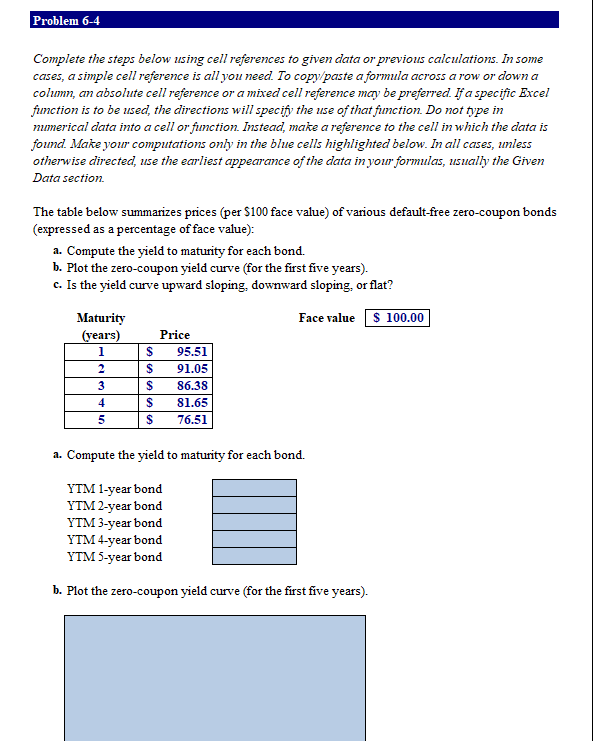
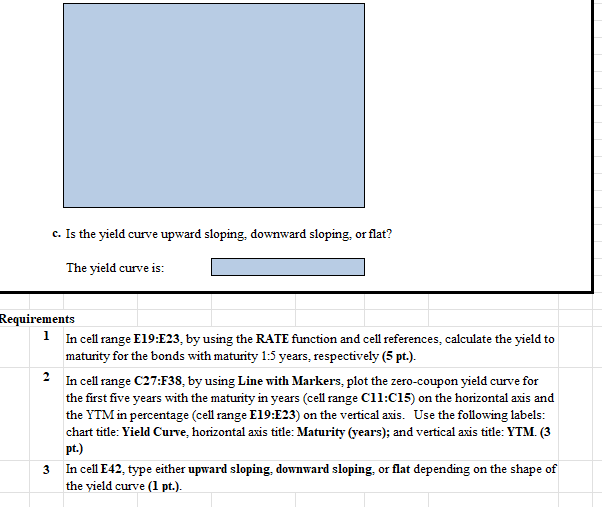
Complete the steps below using cell references to given data or previous calculations. In some cases, a simple cell reference is all you need. To copy/paste a formula across a row or down a column, an absolute cell reference or a mixed cell reference may be preferred. If a specific Excel function is to be used, the directions will specify the use of that function. Do not type in numerical data into a cell or function. Instead, make a reference to the cell in which the data is found. Make your computations only in the blue cells highlighted below. In all cases, unless otherwise directed, use the earliest appearance of the data in your formulas, usually the Given Data section. The table below summarizes prices (per $100 face value) of various default-free zero-coupon bonds (expressed as a percentage of face value): a. Compute the yield to maturity for each bond. b. Plot the zero-coupon yield curve (for the first five years). c. Is the yield curve upward sloping, downward sloping, or flat? Face value a. Compute the yield to maturity for each bond. b. Plot the zero-coupon yield curve (for the first five years). c. Is the yield curve upward sloping, downward sloping, or flat? The yield curve is: Requirements 1 In cell range E19:E23, by using the RATE function and cell references, calculate the yield to maturity for the bonds with maturity 1:5 years, respectively (5pt). 2 In cell range C27:F38, by using Line with Markers, plot the zero-coupon yield curve for the first five years with the maturity in years (cell range Cll:Cl5 ) on the horizontal axis and the YTM in percentage (cell range E19:E23) on the vertical axis. Use the following labels: chart title: Yield Curve, horizontal axis title: Maturity (years); and vertical axis title: YTM. (3 pt.) 3 In cell E42, type either upward sloping, downward sloping, or flat depending on the shape of the yield curve (l pt.)
Step by Step Solution
There are 3 Steps involved in it

Get step-by-step solutions from verified subject matter experts
 Study Help