







Question: PLS HELP ME WITH THIS DO NOT DO IT IN EXCEL TIA. There are three independent projects with the loss distribution for individual projects as
PLS HELP ME WITH THIS DO NOT DO IT IN EXCEL TIA.
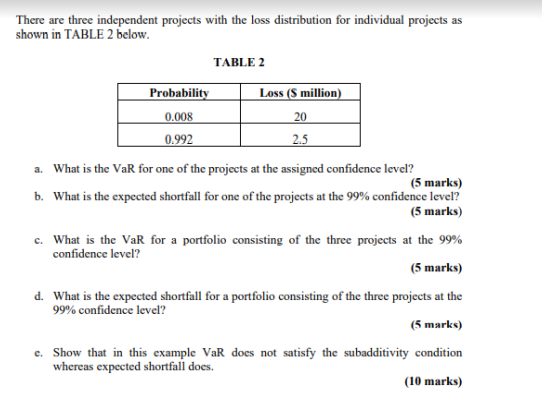
There are three independent projects with the loss distribution for individual projects as shown in TABLE 2 below. TABLE 2 Probability Loss (S million) 0.008 20 0.992 2.5 a. What is the VaR for one of the projects at the assigned confidence level? (5 marks) b. What is the expected shortfall for one of the projects at the 99% confidence level? (5 marks) c. What is the VaR for a portfolio consisting of the three projects at the 99% confidence level? (5 marks) d. What is the expected shortfall for a portfolio consisting of the three projects at the 99% confidence level? (5 marks) c. Show that in this example VaR does not satisfy the subadditivity condition whereas expected shortfall does. (10 marks) There are three independent projects with the loss distribution for individual projects as shown in TABLE 2 below. TABLE 2 Probability Loss (S million) 0.008 20 0.992 2.5 a. What is the VaR for one of the projects at the assigned confidence level? (5 marks) b. What is the expected shortfall for one of the projects at the 99% confidence level? (5 marks) c. What is the VaR for a portfolio consisting of the three projects at the 99% confidence level? (5 marks) d. What is the expected shortfall for a portfolio consisting of the three projects at the 99% confidence level? (5 marks) c. Show that in this example VaR does not satisfy the subadditivity condition whereas expected shortfall does. (10 marks)
Step by Step Solution
There are 3 Steps involved in it
Lets address each part of the problem step by step a VaR for One ProjectValue at Risk VaR at the 99 confidence level is the loss amount that will not ... View full answer

Get step-by-step solutions from verified subject matter experts
 Study Help