







Question: pls show the excel formulas on how to get answer. Perfect Parties, Inc has several divisions, one of which provides bitthday porties at their facility,
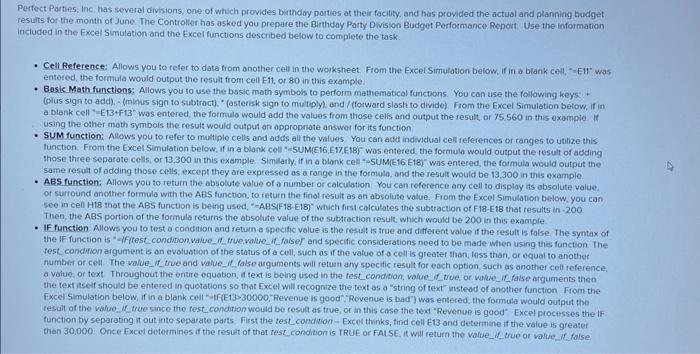
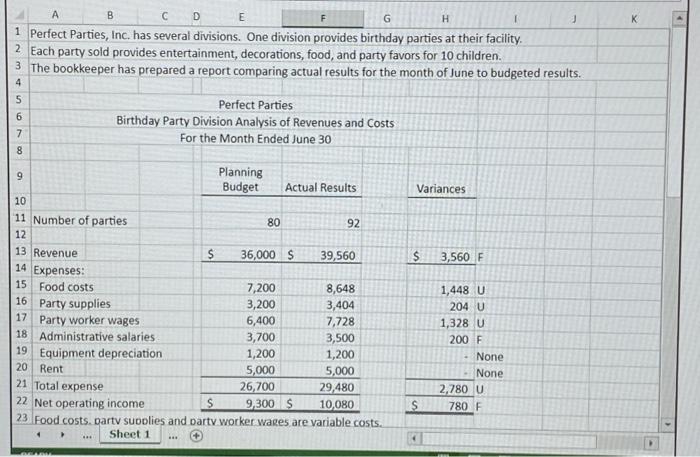
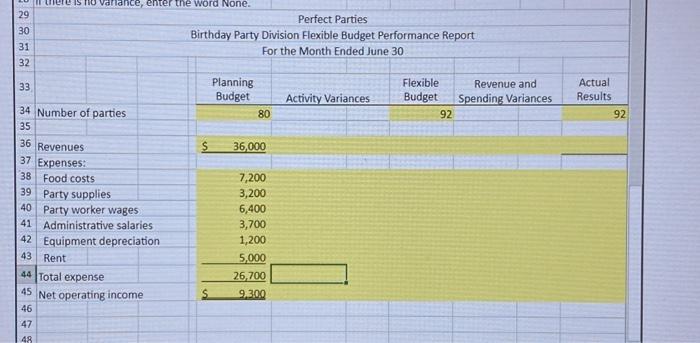
Perfect Parties, Inc has several divisions, one of which provides bitthday porties at their facility, and bas provided the actual and planning budget resuits for the month of June. The Controller has asked you prepare the Binthday Party Divisian Budget Porformance Roport. Use the information included in the Fxcel Simulation and the Excel functions described below to complete the task. - Cell Reference: Allows you to tefer to data from onother cell in the worksheet. From the Excel Simulation below, if in a blank cell, "-Ell" was entered, the formula would output the result from cell E11, or 80 in this example - Basic Math functions: Allows you to use the basic math symbols to perform mathematcal functions. You can use the following keys: + (olus sign to add). - (minus sign to subtract). "(asterisk sign to muliply), and / (forward slash to divide) From the Excel Simulation below, if in a bionk cell "-E13+F13" was entered, the formulo would add the values from those celis and output the result, or 75,560 in this example. If using the other math symbols the result would output an oppropatate answer for its function - SuM function: Allows you to refer to multiple cells and adds all the values You can add individual cell references or ranges to utilize this function. From the Excelsimulation below, if in a blank cell "-SUM(E16,E17,E18)" wos entered, the formula would output the result of adding those three separate cells, or 13,300 in this example. Similatly, if in a blonk cell- "suM(Et6 Etg)" was entered, the formula would output the same result of adding those ceils, except they are expressed as a range in the formula, and the result would be 13,300 in this example. - ABS function: Allows you to return the absolute value of a number or calculation You can reference any cell to display its absolute vaiue. of surround another formula with the ABS function, to return the finol result as an absolute value. From the Fxcel Sirnulation betow, you can Soe in cell H18 that the ABS function is being used, "-ABS(F18-E18)" which first calculates the subtraction of F18- E18 that results in - 200 Then, the ABS portion of the form Then, the ABS portion of the formula resurns the absolute value of the subtraction result, which would be 200 in this example the If function is "-iffest_condition, value_d_frue,walue_if_faiser and specific considerations noed to be made When using the function. The fest condition argument is on evolustion of the status of a cell, such as if the value of a coll is greater than, inss than, or equal to anothet number or cell. The value_if_true and value_if_false arguments will return any spectic result for each option, such as another cell reference. testal of the varue, if true since function by separating if out into sepe fest condition would be result as true, or in this case the text "Revenue is good" Excel processes the if then 30,000 Once Excel determines if the rosult of that test condition is TRUE or FAISE, it will return the value if 1 Perfect Parties, Inc. has several divisions. One division provides birthday parties at their facility. 2 Each party sold provides entertainment, decorations, food, and party favors for 10 children. 3 The bookkeeper has prepared a report comparing actual results for the month of June to budgeted results \begin{tabular}{|c|c|c|c|c|c|c|} \hline 29 & \multicolumn{6}{|c|}{ Perfect Parties } \\ \hline 30 & \multicolumn{6}{|c|}{ Birthday Party Division Flexible Budget Performance Report } \\ \hline 31 & \multicolumn{6}{|c|}{ For the Month Ended June 30} \\ \hline 32 & & & & & & \\ \hline 33 & & \begin{tabular}{l} Planning \\ Budget \end{tabular} & Activity Variances & \begin{tabular}{l} Flexible \\ Budget \end{tabular} & \begin{tabular}{c} Revenue and \\ Spending Variances \end{tabular} & \begin{tabular}{l} Actual \\ Results \end{tabular} \\ \hline 34 & Number of parties & \multicolumn{2}{|l|}{80} & \multicolumn{2}{|c|}{92} & 92 \\ \hline \multicolumn{7}{|l|}{35} \\ \hline 36 & Revenues & 36,000 & & & & \\ \hline 37 & \multicolumn{5}{|l|}{ Expenses: } & \\ \hline 38 & Food costs & \multicolumn{5}{|l|}{7,200} \\ \hline 39 & Party supplies & \multicolumn{5}{|l|}{3,200} \\ \hline 40 & Party worker wages & \multicolumn{5}{|l|}{6,400} \\ \hline 41 & Administrative salaries & \multicolumn{5}{|l|}{3,700} \\ \hline 42 & Equipment depreciation & \multicolumn{5}{|l|}{1,200} \\ \hline 43 & Rent & \multicolumn{5}{|l|}{5,000} \\ \hline 44 & Total expense & \multicolumn{5}{|l|}{26,700} \\ \hline 45 & Net operating income & 2300 & & & & \\ \hline 46 & & & & & & \\ \hline 47 & & & & & & \\ \hline \end{tabular}
Step by Step Solution
There are 3 Steps involved in it

Get step-by-step solutions from verified subject matter experts
 Study Help