







Question: PLS SOLVE IT IN EXCEL PLS Task 1: (3 marks) Give a central header called Film Information. Bold it and give it a font size
PLS SOLVE IT IN EXCEL PLS
Task 1: (3 marks)
Give a central header called "Film Information". Bold it and give it a font size of 20 and color the font with dark green.
Bold the column header cells, center align them and highlight the cells with light blue color.
Rename the sheet as "Film Analysis".
Provide borders to all sides of the cells of the data.
Make sure all the data in the table is center aligned and properly readable.
Task 2: (2 marks)
Fill the Film ID column like First6CharactersOfName-Last3DigitsOfYear. All the characters should be in uppercase. Example: If Name is Abcd Efghij and the Year is 1996, then the Film ID should be ABCD E996 since space is a character too.
Calculate the Up Votes and fill the cells accordingly. [Note: Up Votes = Views - Down Votes]
Task 3: (2 marks)
Leave 2 rows blank after the given dataset, and find the maximum, minimum, total and average of each of the columns from Views to Up Votes and round it to the nearest whole number.
Task 4: (2 marks)
Calculate the Percentage Up Votes and fill the cells accordingly. Use percentage formatting for the results.
You must use conditions for this task. Fill up the Film Status column using the following conditions:
i. If Percentage Up Votes is greater than or equal to 65%, then fill up the Film Status column with Name - RECOMMENDED.
ii. Otherwise, fill the Film Status column with Name - NOT RECOMMENDED.
Example:
| Name | Percentage Up Votes | Film Status |
| Abcd Efgh | 25.67% | Abcd Efgh - NOT RECOMMENDED |
| Opqrst | 88.90% | Opqrst - RECOMMENDED |
Task 5: (6 marks)
Color all the film Name cells whose Percentage Up Votes are greater than or equal to 50% with Blue and bold the fonts with dark Blue color.(Hint:- First Filter the values that are greater than 50% and then use conditional Formatting to color all the Names.)(2)
Color all the film Name cells whose Percentage Up Votes are greater than or equal to 80% with yellow and bold the fonts with green. (1)
Sort the data by views and then by Up votes and finally by Name cells(descending Order).(2)
Represent the data for Film Status on a Pie Chart(only recommended and not recommended).(1)
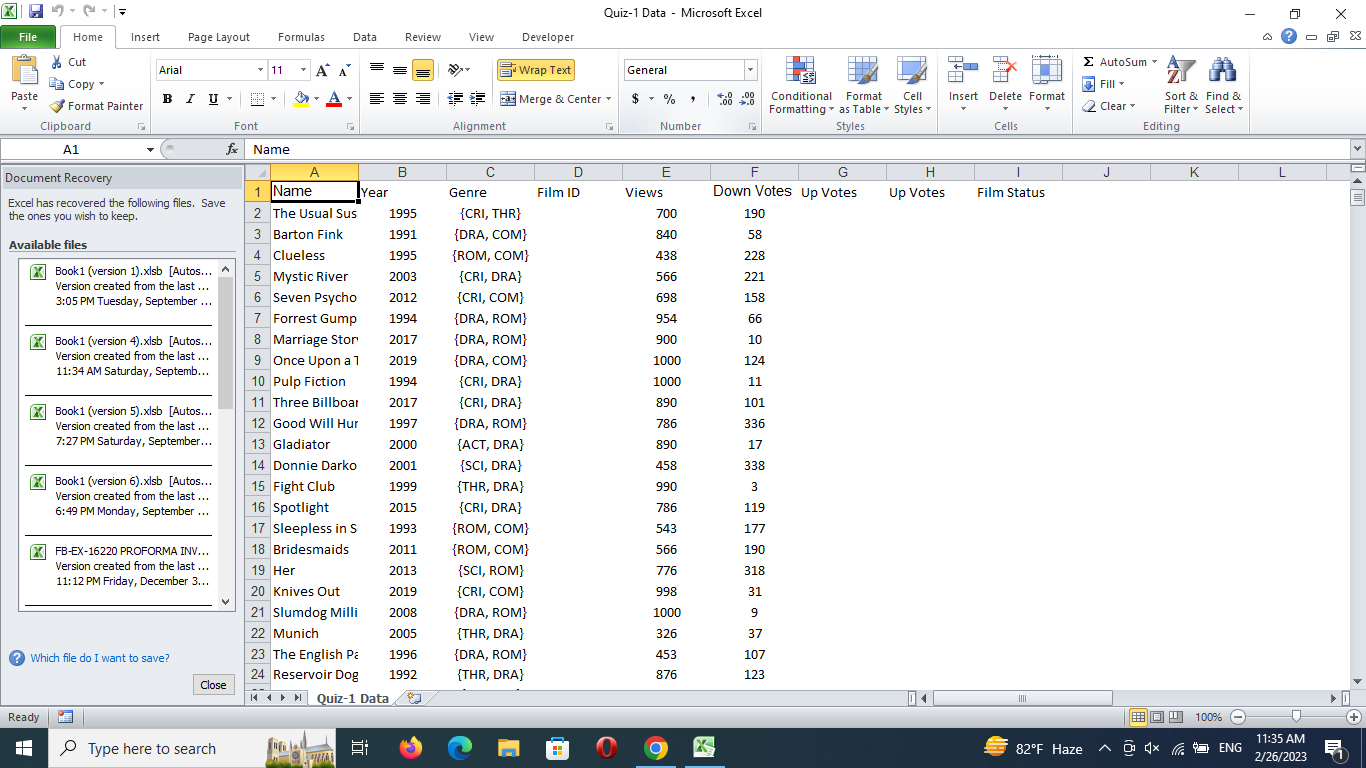
DATA FORMAT
Step by Step Solution
There are 3 Steps involved in it

Get step-by-step solutions from verified subject matter experts
 Study Help