







Question: pls solve plugins id 'java' id 'application } repositories jcenter() } dependencies { implementation 'com.google.guava:guava:29.0-jre' testimplementation 'org.junit.jupiter:junit-jupiter-api:5.6.2 testRuntime Only 'org.junit.jupiter:junit-jupiter-engine:5.6.2 } test { useJUnit Platform()
pls solve
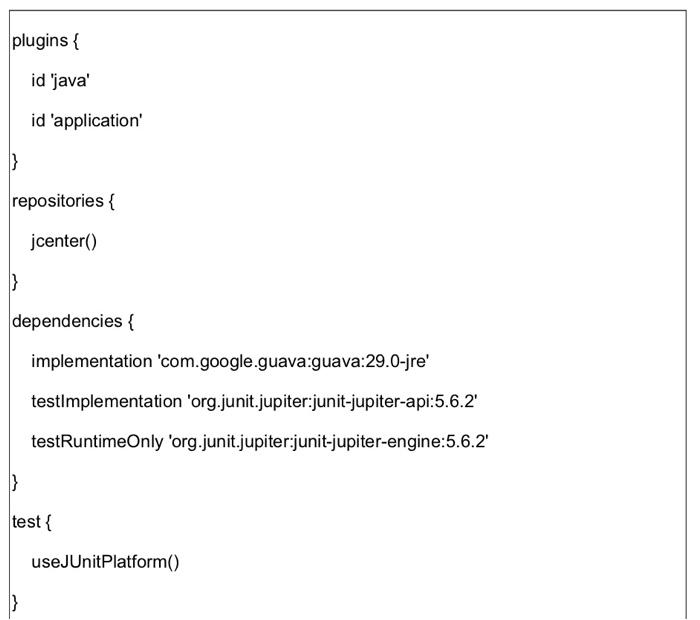
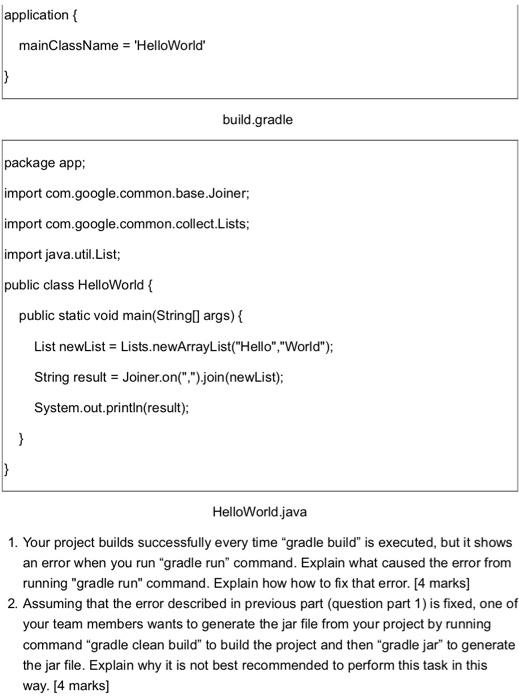
plugins id 'java' id 'application } repositories jcenter() } dependencies { implementation 'com.google.guava:guava:29.0-jre' testimplementation 'org.junit.jupiter:junit-jupiter-api:5.6.2 testRuntime Only 'org.junit.jupiter:junit-jupiter-engine:5.6.2 } test { useJUnit Platform() application { mainClassName = 'HelloWorld' } build.gradle package app: import com.google.common.base.Joiner; import com.google.common.collect.Lists; import java.util.List; public class HelloWorld public static void main(Stringi args) { List newList = Lists.newArrayList("Hello", "World"); String result = Joiner.on("").join(newList); System.out.println(result); } } HelloWorld.java 1. Your project builds successfully every time "gradle build" is executed, but it shows an error when you run "gradle run" command. Explain what caused the error from running "gradle run" command. Explain how how to fix that error. [4 marks) 2. Assuming that the error described in previous part (question part 1) is fixed, one of your team members wants to generate the jar file from your project by running command "gradle clean build" to build the project and then "gradle jar" to generate the jar file. Explain why it is not best recommended to perform this task in this way. [4 marks) plugins id 'java' id 'application } repositories jcenter() } dependencies { implementation 'com.google.guava:guava:29.0-jre' testimplementation 'org.junit.jupiter:junit-jupiter-api:5.6.2 testRuntime Only 'org.junit.jupiter:junit-jupiter-engine:5.6.2 } test { useJUnit Platform() application { mainClassName = 'HelloWorld' } build.gradle package app: import com.google.common.base.Joiner; import com.google.common.collect.Lists; import java.util.List; public class HelloWorld public static void main(Stringi args) { List newList = Lists.newArrayList("Hello", "World"); String result = Joiner.on("").join(newList); System.out.println(result); } } HelloWorld.java 1. Your project builds successfully every time "gradle build" is executed, but it shows an error when you run "gradle run" command. Explain what caused the error from running "gradle run" command. Explain how how to fix that error. [4 marks) 2. Assuming that the error described in previous part (question part 1) is fixed, one of your team members wants to generate the jar file from your project by running command "gradle clean build" to build the project and then "gradle jar" to generate the jar file. Explain why it is not best recommended to perform this task in this way. [4 marks)
Step by Step Solution
There are 3 Steps involved in it

Get step-by-step solutions from verified subject matter experts
 Study Help