







Question: Pls, use the java language to solve this question. I've been struggling on this for hours SampleSolutionLab05Gold This program will use JOptionPane to read in
Pls, use the java language to solve this question. I've been struggling on this for hours
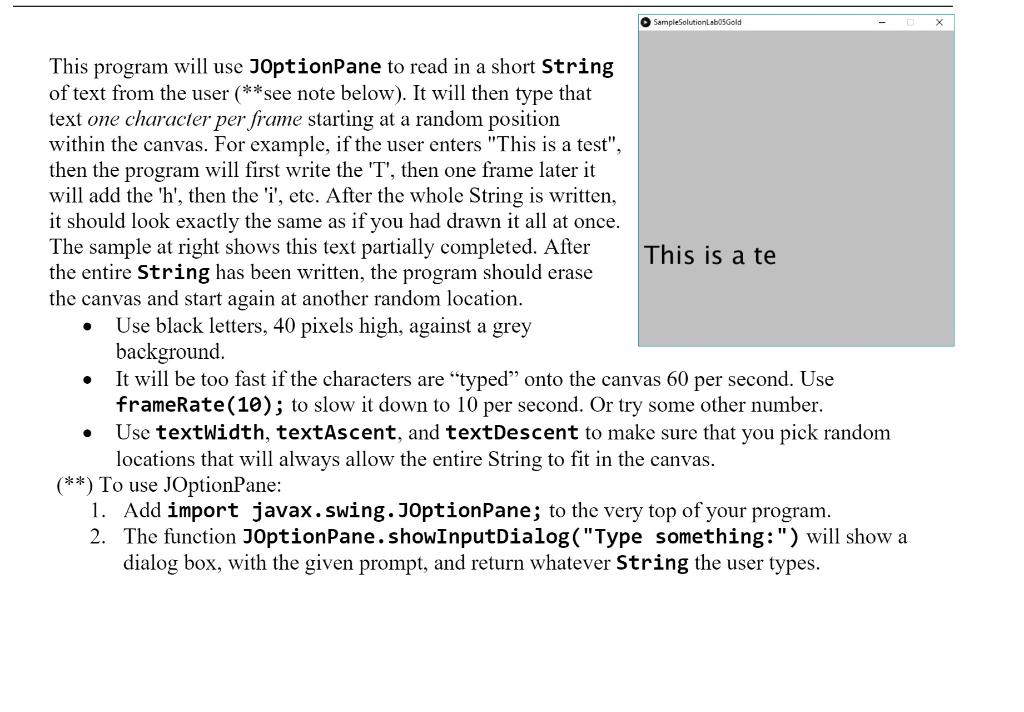
SampleSolutionLab05Gold This program will use JOptionPane to read in a short String of text from the user (**see note below). It will then type that text one character per frame starting at a random position within the canvas. For example, if the user enters "This is a test", then the program will first write the 'T', then one frame later it will add the 'h', then the 'i', etc. After the whole String is written, it should look exactly the same as if you had drawn it all at once. The sample at right shows this text partially completed. After This is a te the entire String has been written, the program should erase the canvas and start again at another random location. Use black letters, 40 pixels high, against a grey background. It will be too fast if the characters are "typed onto the canvas 60 per second. Use frameRate(10); to slow it down to 10 per second. Or try some other number. Use textWidth, textAscent, and textDescent to make sure that you pick random locations that will always allow the entire String to fit in the canvas. (**) To use JOptionPane: 1. Add import javax.swing.JOptionPane; to the very top of your program. 2. The function JOptionPane.showInputDialog("Type something:") will show a dialog box, with the given prompt, and return whatever String the user types. . SampleSolutionLab05Gold This program will use JOptionPane to read in a short String of text from the user (**see note below). It will then type that text one character per frame starting at a random position within the canvas. For example, if the user enters "This is a test", then the program will first write the 'T', then one frame later it will add the 'h', then the 'i', etc. After the whole String is written, it should look exactly the same as if you had drawn it all at once. The sample at right shows this text partially completed. After This is a te the entire String has been written, the program should erase the canvas and start again at another random location. Use black letters, 40 pixels high, against a grey background. It will be too fast if the characters are "typed onto the canvas 60 per second. Use frameRate(10); to slow it down to 10 per second. Or try some other number. Use textWidth, textAscent, and textDescent to make sure that you pick random locations that will always allow the entire String to fit in the canvas. (**) To use JOptionPane: 1. Add import javax.swing.JOptionPane; to the very top of your program. 2. The function JOptionPane.showInputDialog("Type something:") will show a dialog box, with the given prompt, and return whatever String the user types
Step by Step Solution
There are 3 Steps involved in it

Get step-by-step solutions from verified subject matter experts
 Study Help