







Question: plz help me Question 2: Design the following form using Visual Basic: Formi Name Balance Age Create account Depost 1000 Depost Balance in Dolar Convert
plz help me
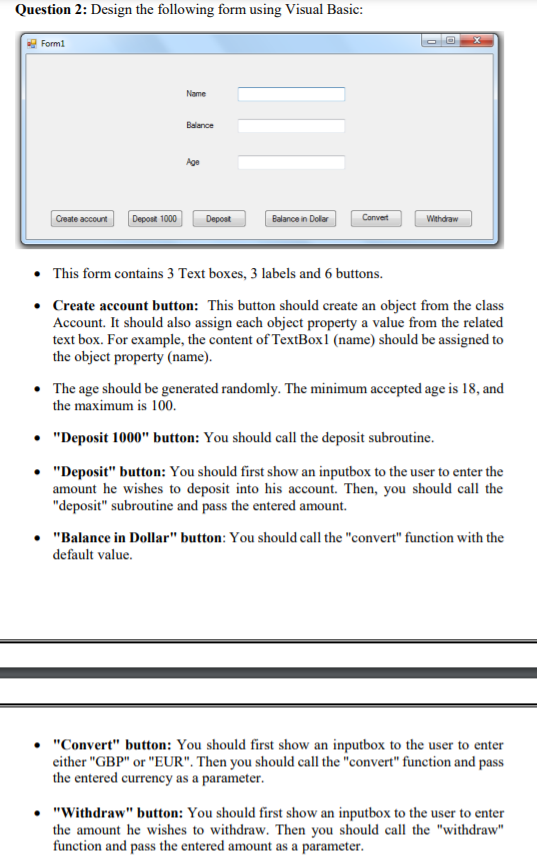
Question 2: Design the following form using Visual Basic: Formi Name Balance Age Create account Depost 1000 Depost Balance in Dolar Convert Withdraw This form contains 3 Text boxes, 3 labels and 6 buttons. Create account button: This button should create an object from the class Account. It should also assign each object property a value from the related text box. For example, the content of TextBox1 (name) should be assigned to the object property (name). The age should be generated randomly. The minimum accepted age is 18, and the maximum is 100. "Deposit 1000" button: You should call the deposit subroutine. "Deposit" button: You should first show an inputbox to the user to enter the amount he wishes to deposit into his account. Then, you should call the "deposit" subroutine and pass the entered amount. "Balance in Dollar" button: You should call the "convert" function with the default value. "Convert" button: You should first show an inputbox to the user to enter either "GBP" or "EUR". Then you should call the "convert" function and pass the entered currency as a parameter. "Withdraw" button: You should first show an inputbox to the user to enter the amount he wishes to withdraw. Then you should call the "withdraw" function and pass the entered amount as a parameter. Question 2: Design the following form using Visual Basic: Formi Name Balance Age Create account Depost 1000 Depost Balance in Dolar Convert Withdraw This form contains 3 Text boxes, 3 labels and 6 buttons. Create account button: This button should create an object from the class Account. It should also assign each object property a value from the related text box. For example, the content of TextBox1 (name) should be assigned to the object property (name). The age should be generated randomly. The minimum accepted age is 18, and the maximum is 100. "Deposit 1000" button: You should call the deposit subroutine. "Deposit" button: You should first show an inputbox to the user to enter the amount he wishes to deposit into his account. Then, you should call the "deposit" subroutine and pass the entered amount. "Balance in Dollar" button: You should call the "convert" function with the default value. "Convert" button: You should first show an inputbox to the user to enter either "GBP" or "EUR". Then you should call the "convert" function and pass the entered currency as a parameter. "Withdraw" button: You should first show an inputbox to the user to enter the amount he wishes to withdraw. Then you should call the "withdraw" function and pass the entered amount as a parameter
Step by Step Solution
There are 3 Steps involved in it

Get step-by-step solutions from verified subject matter experts
 Study Help