







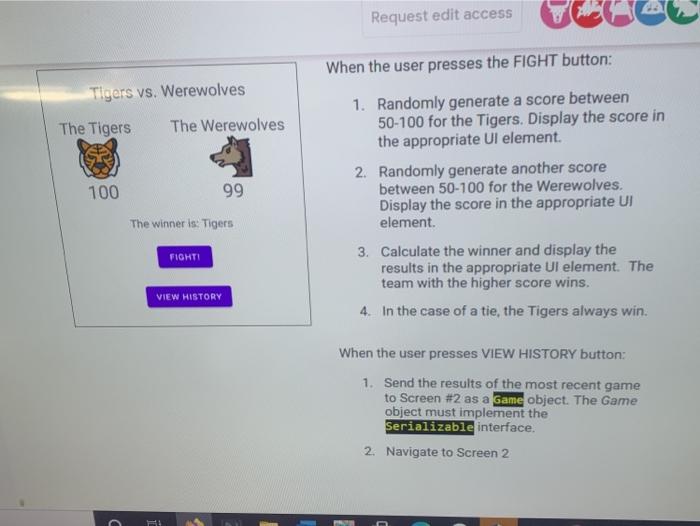
Question: plz i want. answer its coding as soon as posssible android. studio Request edit access When the user presses the FIGHT button: Tigers vs. Werewolves
 plz i want. answer its coding as soon as posssible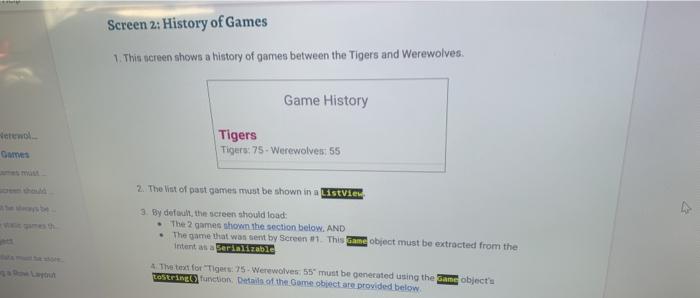
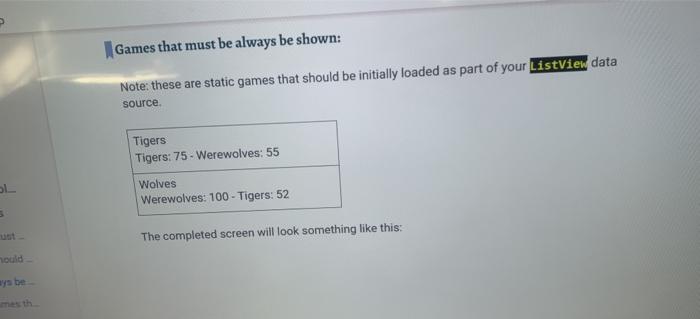
Request edit access When the user presses the FIGHT button: Tigers vs. Werewolves The Tigers The Werewolves 100 99 1. Randomly generate a score between 50-100 for the Tigers. Display the score in the appropriate UI element. 2. Randomly generate another score between 50-100 for the Werewolves. Display the score in the appropriate UI element. 3. Calculate the winner and display the results in the appropriate UI element. The team with the higher score wins. 4. In the case of a tie, the Tigers always win. The winner is: Tigers FIGHTI VIEW HISTORY When the user presses VIEW HISTORY button: 1. Send the results of the most recent game to Screen #2 as a Game object. The Game object must implement the Serializable interface. 2. Navigate to Screen 2 Screen 2: History of Games 1. This screen shown a history of games between the Tigers and Werewolves. Game History erewol Tigers Tigers: 75. Werewolves: 55 2. The Vint of past games must be shown in a ListVies 3. By default, the screen should load: The 2 games shown the section below. AND The game that was sent by Screen. This Zane object must be extracted from the intents a serializable The te for "Tigers 75 Werewolves: 55 must be generated using the same objects costring function Details of the Game object are provided below Games that must be always be shown: Note: these are static games that should be initially loaded as part of your ListView data source Tigers Tigers: 75 - Werewolves: 55 Wolves Werewolves: 100 - Tigers: 52 5 The completed screen will look something like this: hould ays be Request edit access When the user presses the FIGHT button: Tigers vs. Werewolves The Tigers The Werewolves 100 99 1. Randomly generate a score between 50-100 for the Tigers. Display the score in the appropriate UI element. 2. Randomly generate another score between 50-100 for the Werewolves. Display the score in the appropriate UI element. 3. Calculate the winner and display the results in the appropriate UI element. The team with the higher score wins. 4. In the case of a tie, the Tigers always win. The winner is: Tigers FIGHTI VIEW HISTORY When the user presses VIEW HISTORY button: 1. Send the results of the most recent game to Screen #2 as a Game object. The Game object must implement the Serializable interface. 2. Navigate to Screen 2 Screen 2: History of Games 1. This screen shown a history of games between the Tigers and Werewolves. Game History erewol Tigers Tigers: 75. Werewolves: 55 2. The Vint of past games must be shown in a ListVies 3. By default, the screen should load: The 2 games shown the section below. AND The game that was sent by Screen. This Zane object must be extracted from the intents a serializable The te for "Tigers 75 Werewolves: 55 must be generated using the same objects costring function Details of the Game object are provided below Games that must be always be shown: Note: these are static games that should be initially loaded as part of your ListView data source Tigers Tigers: 75 - Werewolves: 55 Wolves Werewolves: 100 - Tigers: 52 5 The completed screen will look something like this: hould ays be
Step by Step Solution
There are 3 Steps involved in it

Get step-by-step solutions from verified subject matter experts
 Study Help