







Question: plz show with formulas A17 fx D C E F G 11 Years 3 2 5 4 1 2 B 1 Chapter 14: Applying Excel
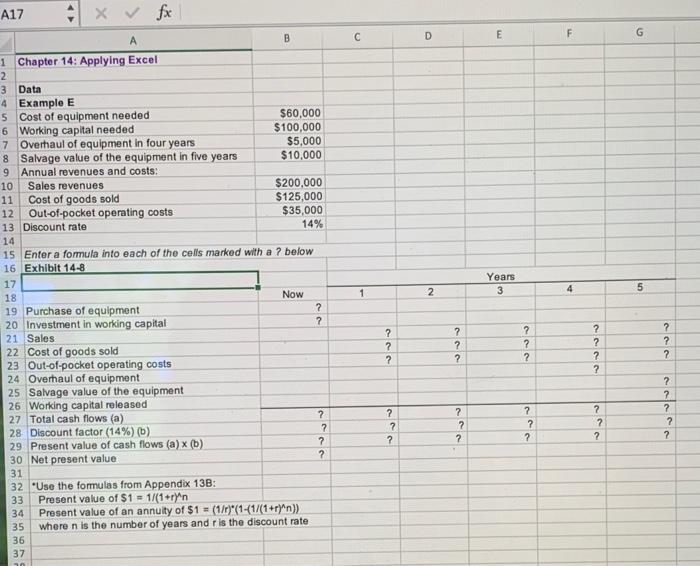
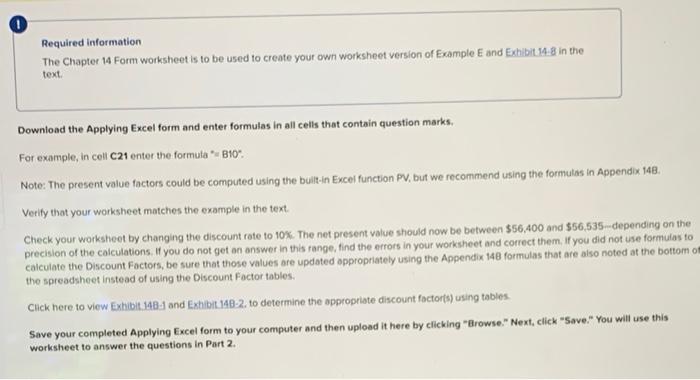
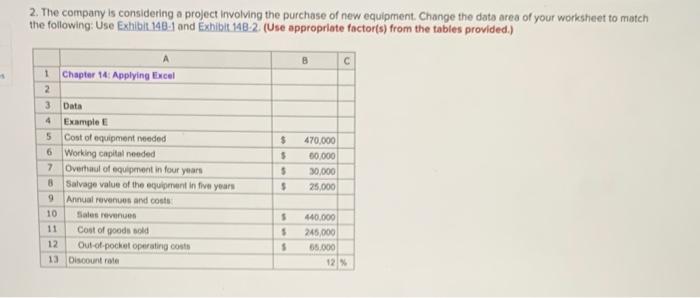
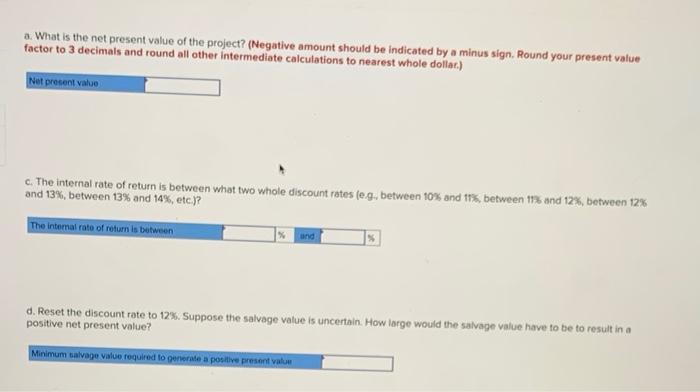
A17 fx D C E F G 11 Years 3 2 5 4 1 2 B 1 Chapter 14: Applying Excel 2 3 Data 4 Example E 5 Cost of equipment needed $60,000 6 Working capital needed $100,000 7 Overhaul of equipment in four years $5,000 8 Salvage value of the equipment in five years $10,000 9 Annual revenues and costs: 10 Sales revenues $200,000 Cost of goods sold $125,000 12 Out-of-pocket operating costs $35,000 13 Discount rate 14% 14 15 Enter a formula into each of the cells marked with a 7 below 16 Exhibit 14-8 17 18 Now 19 Purchase of equipment ? 20 Investment in working capital ? 21 Sales 22 Cost of goods sold 23 Out-of-pocket operating costs 24 Overhaul of equipment 25 Salvage value of the equipment 26 Working capital released 27 Total cash flows (a) ? 28 Discount factor (14%) (b) 7 29 Present value of cash flows (a) (b) ? 30 Net present value ? 31 32 "Use the formulas from Appendix 13B: Present value of $1 = 1/(1+r)^n Present value of an annuity of $1 = (1/1)' (1-(1/(1+r)^n)) 35 where n is the number of years and r is the discount rate 36 37 ? ? ? ? ? ? ? ? ? ? ? ? ? 7 ? 2 2 ? ? 2 ? ? ? ? ? ? ? 7 2 Required information The Chapter 14 Form worksheet is to be used to create your own worksheet version of Example E and Exhibit 14-8 in the text Download the Applying Excel form and enter formulas in all cells that contain question marks For example, in cell C21 enter the formula 8109 Note: The present value factors could be computed using the built-in Excel function PV, but we recommend using the formulas in Appendix 148. Verify that your worksheet matches the example in the text Check your worksheet by changing the discount rote to 10%. The net present value should now be between $56,400 and $56,535-depending on the precision of the calculations. If you do not get an answer in this range, find the errors in your worksheet and correct them. If you did not use formulas to calculate the Discount Factors, be sure that those values are updated appropriately using the Appendix 148 formulas that are also noted at the bottom om the spreadsheet instead of using the Discount Factor tables, Click here to view Exhibit.148-1 and Exhibit 148-2. to determine the appropriate discount factors) using tables Save your completed Applying Excel form to your computer and then upload it here by clicking "Browse." Next, click "Save." You will use this worksheet to answer the questions in Part 2 2. The company is considering a project involving the purchase of new equipment Change the data area of your worksheet to match the following: Use Exhibit 140.1 and Exhibit 148-2 (Use appropriate factor(s) from the tables provided.) 1 Chapter 14: Applying Excel 2 3 Data 4 Example 5 Cost of equipment needed 6 Working capital needed 7 Overhaul of equipment in four years 8 Salvage value of the equipment in five years 9 Annual revenues and could 10 Sales revenues 11 Cost of yoods sold 12 Out-of-pocket operating costs 13 Discount rate $ $ $ 470.000 60.000 30,000 25.000 $ 440.000 245,000 65.000 12% 5 a. What is the net present value of the project? (Negative amount should be indicated by a minus sign. Round your present value factor to 3 decimals and round all other intermediate calculations to nearest whole dollar) Not present value c. The internal rate of return is between what two whole discount rates (e.g, between 10% and 11%, between 17% and 12%, between 12% and 13%, between 13% and 14%, etc.)? The internal rate of return is between % und d. Reset the discount rate to 12%. Suppose the salvage value is uncertain. How large would the salvage value have to be to result in a positive net present value? Minimum salvage value required to generate a positive presentar
Step by Step Solution
There are 3 Steps involved in it

Get step-by-step solutions from verified subject matter experts
 Study Help