







Question: PLZ USE C++ CS 135 Assignment #6 Purpose: practice I/O files, prompt user for filename, verify that the file opened, and read data from a
PLZ USE C++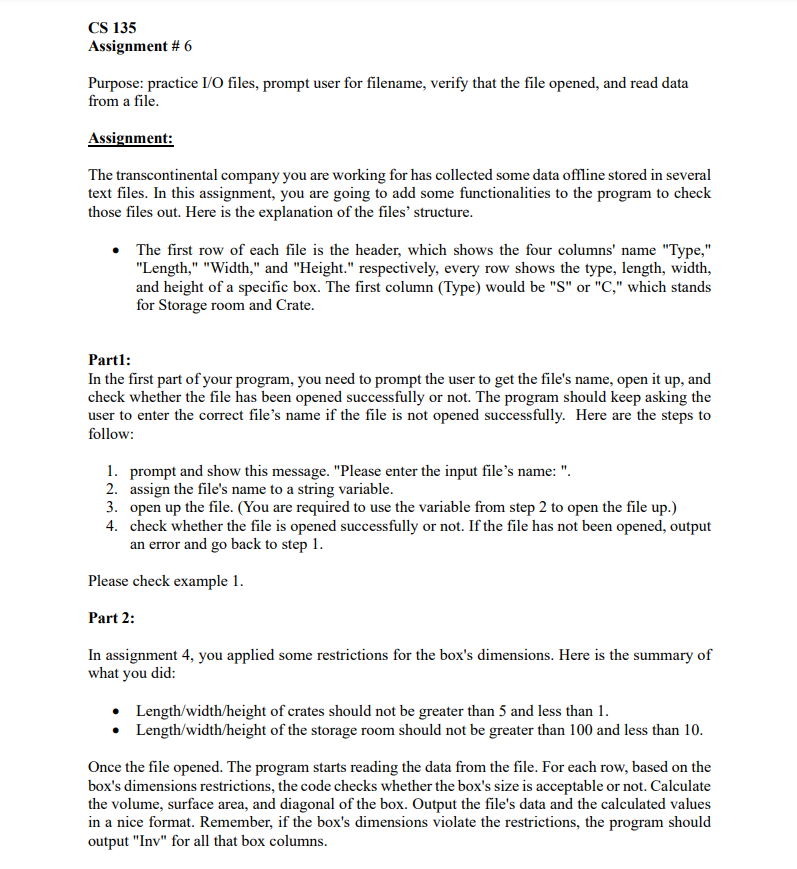
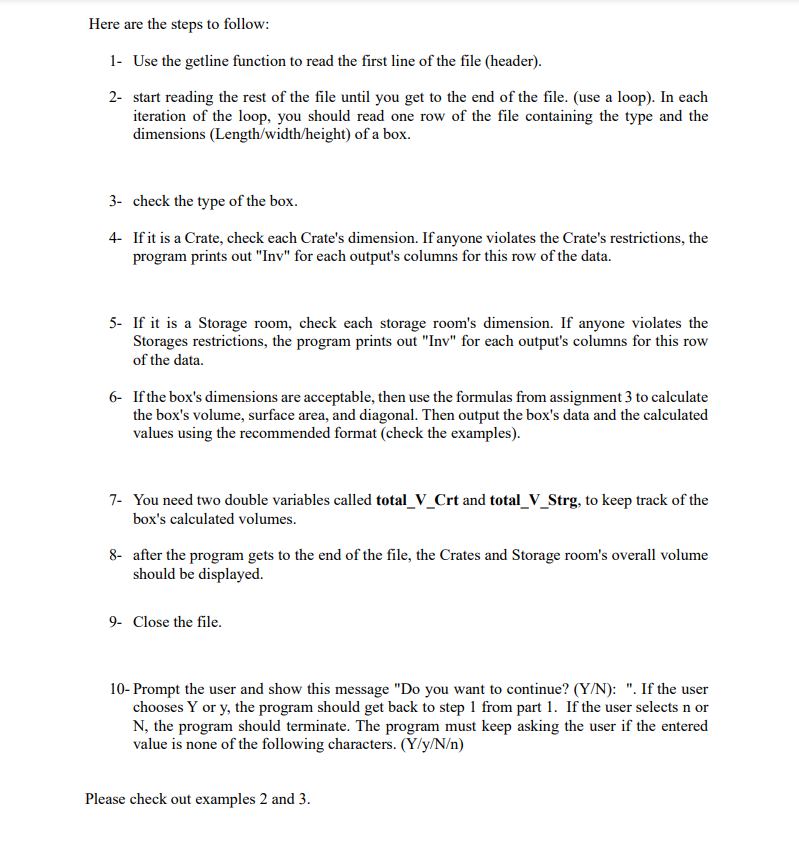
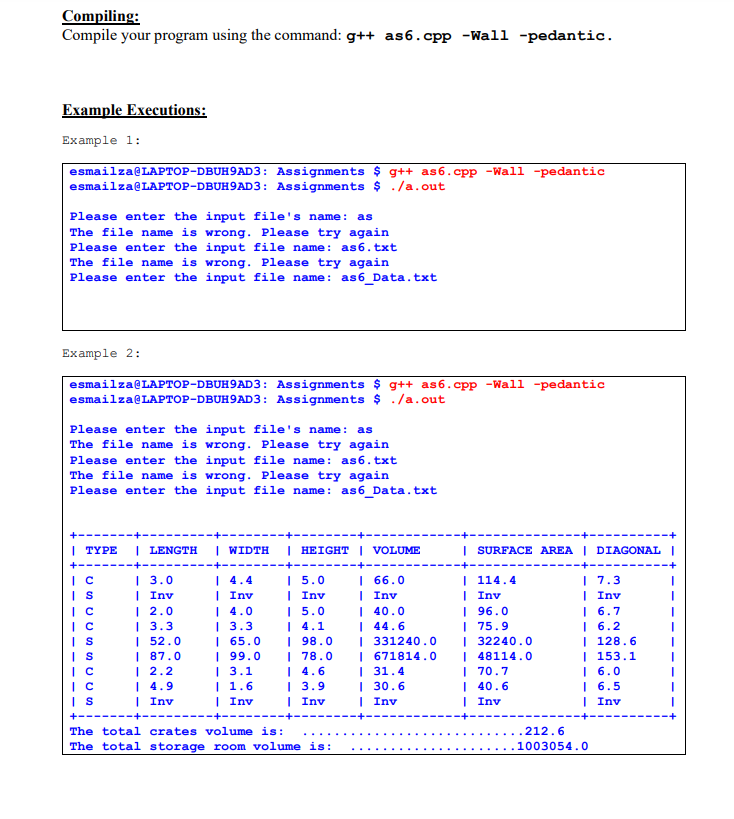
CS 135 Assignment #6 Purpose: practice I/O files, prompt user for filename, verify that the file opened, and read data from a file. Assignment: The transcontinental company you are working for has collected some data offline stored in several text files. In this assignment, you are going to add some functionalities to the program to check those files out. Here is the explanation of the files' structure. The first row of each file is the header, which shows the four columns' name "Type," "Length," "Width," and "Height." respectively, every row shows the type, length, width, and height of a specific box. The first column (Type) would be "S" or "C," which stands for Storage room and Crate. Part1: In the first part of your program, you need to prompt the user to get the file's name, open it up, and check whether the file has been opened successfully or not. The program should keep asking the user to enter the correct file's name if the file is not opened successfully. Here are the steps to follow: 1. prompt and show this message. "Please enter the input file's name: ". 2. assign the file's name to a string variable. 3. open up the file. (You are required to use the variable from step 2 to open the file up.) 4. check whether the file is opened successfully or not. If the file has not been opened, output an error and go back to step 1. Please check example 1. Part 2: In assignment 4, you applied some restrictions for the box's dimensions. Here is the summary of what you did: Length/width/height of crates should not be greater than 5 and less than 1. Length/width/height of the storage room should not be greater than 100 and less than 10. Once the file opened. The program starts reading the data from the file. For each row, based on the box's dimensions restrictions, the code checks whether the box's size is acceptable or not. Calculate the volume, surface area, and diagonal of the box. Output the file's data and the calculated values in a nice format. Remember, if the box's dimensions violate the restrictions, the program should output "Inv" for all that box columns. Here are the steps to follow: 1- Use the getline function to read the first line of the file (header). 2- start reading the rest of the file until you get to the end of the file. (use a loop). In each iteration of the loop, you should read one row of the file containing the type and the dimensions (Length/width/height) of a box. 3- check the type of the box. 4 If it is a Crate, check each Crate's dimension. If anyone violates the Crate's restrictions, the program prints out "Inv" for each output's columns for this row of the data. 5- If it is a storage room, check each storage room's dimension. If anyone violates the Storages restrictions, the program prints out "Inv" for each output's columns for this row of the data. 6- If the box's dimensions are acceptable, then use the formulas from assignment 3 to calculate the box's volume, surface area, and diagonal. Then output the box's data and the calculated values using the recommended format (check the examples). 7- You need two double variables called total_V_Crt and total_V_Strg, to keep track of the box's calculated volumes. 8- after the program gets to the end of the file, the Crates and Storage room's overall volume should be displayed. 9- Close the file. 10- Prompt the user and show this message "Do you want to continue? (Y/N): ". If the user chooses Y or y, the program should get back to step 1 from part 1. If the user selects n or N, the program should terminate. The program must keep asking the user if the entered value is none of the following characters. (Y/y/N) Please check out examples 2 and 3. Compiling: Compile your program using the command: g++ as6.cpp -Wall -pedantic. Example Executions: Example 1: esmailza LAPTOP-DBUH9AD3: Assignments $ g++ as6.cpp -Wall -pedantic esmailza@LAPTOP-DBUH9AD3: Assignments $ ./a.out Please enter the input file's name: as The file name is wrong. Please try again Please enter the input file name: as 6.txt The file name is wrong. Please try again Please enter the input file name: as6_Data.txt Example 2: esmailza LAPTOP-DBUH9AD3: Assignments $ g++ as6.cpp -Wall -pedantic esmailza@LAPTOP-DBUH9AD3: Assignments $ ./a.out Please enter the input file's name: as The file name is wrong. Please try again Please enter the input file name: as 6.txt The file name is wrong. Please try again Please enter the input file name: as6_Data.txt | SURFACE AREA | DIAGONAL | Ic | TYPE | LENGTH | WIDTH | HEIGHT | VOLUME +---- I 3.0 | 4.4 | 5.0 | 66.0 IS | Inv | Inv | Inv | Inv | 2.0 | 4.0 15.0 | 40.0 IC | 3.3 | 3.3 | 4.1 | 44.6 IS | 52.0 | 65.0 1 98.0 | 331240.0 IS | 87.0 | 99.0 | 78.0 | 671814.0 IC I 2.2 13.1 | 4.6 131.4 c | 4.9 | 1.6 I 3.9 | 30.6 IS Inv | Inv | Inv | Inv +----- --------- The total crates volume is: The total storage room volume is: | 114.4 | Inv | 96.0 175.9 | 32240.0 148114.0 170.7 | 40.6 | Inv 17.3 | Inv 16.7 16.2 | 128.6 | 153.1 16.0 | 6.5 | Inv .212.6 1003054.0
Step by Step Solution
There are 3 Steps involved in it

Get step-by-step solutions from verified subject matter experts
 Study Help