







Question: Populate.sql: Please show with steps on cmd SQL format Rem ******** dropping tables ************* DROP TABLE SALGRADE; DROP TABLE EMPLOYEE; DROP TABLE DEPT; Rem ********
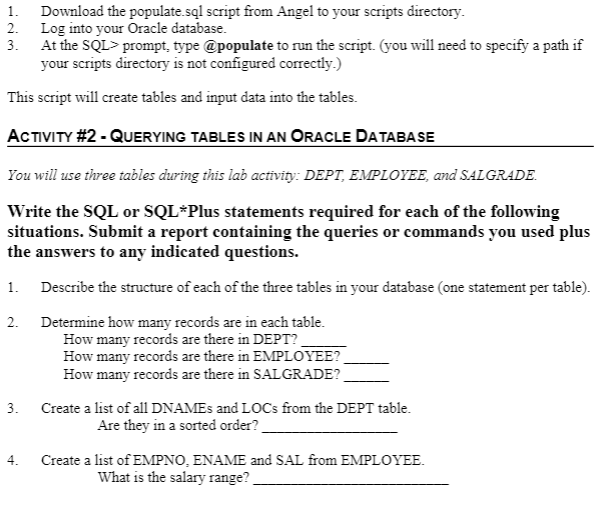
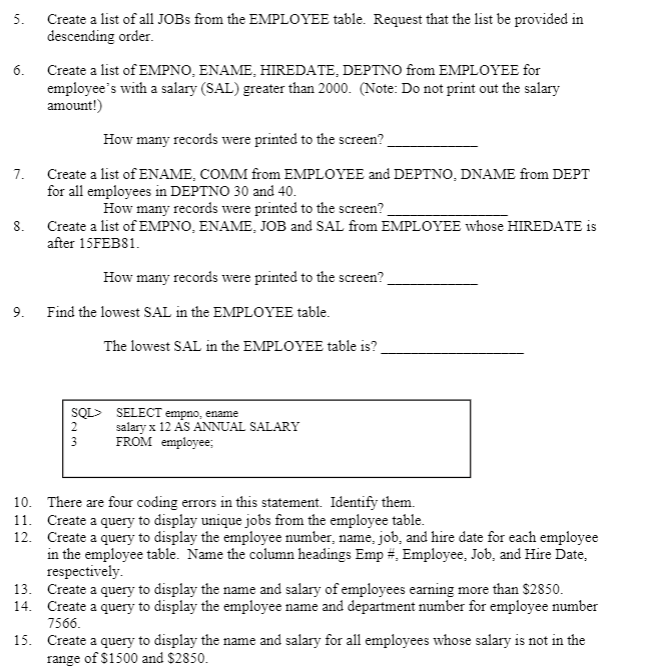
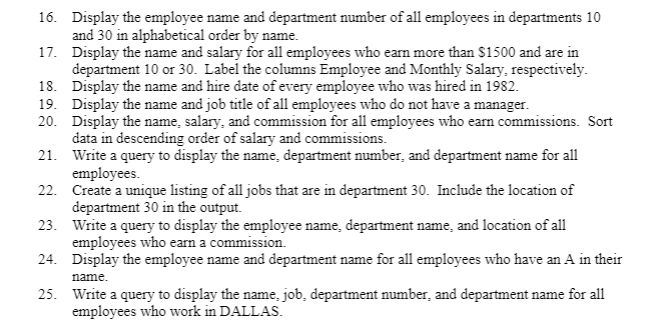
Populate.sql:
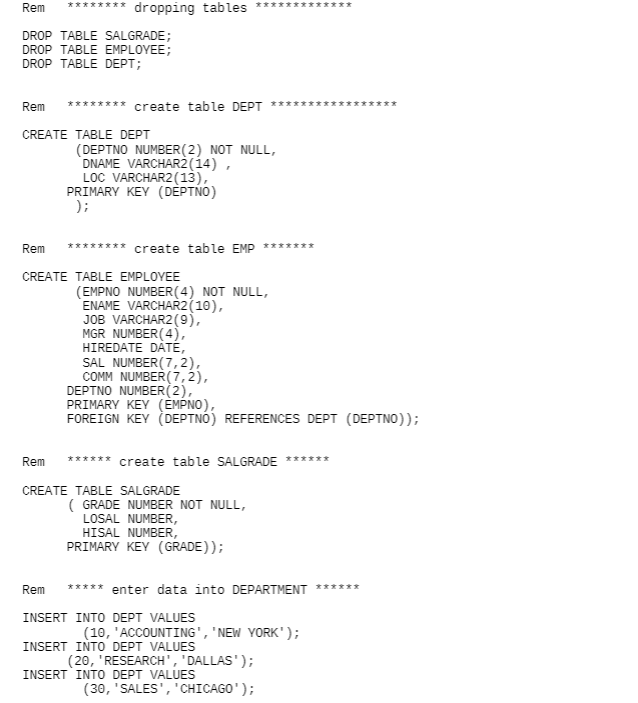
Please show with steps on cmd SQL format
Rem ******** dropping tables *************
DROP TABLE SALGRADE; DROP TABLE EMPLOYEE; DROP TABLE DEPT;
Rem ******** create table DEPT *****************
CREATE TABLE DEPT (DEPTNO NUMBER(2) NOT NULL, DNAME VARCHAR2(14) , LOC VARCHAR2(13), PRIMARY KEY (DEPTNO) );
Rem ******** create table EMP *******
CREATE TABLE EMPLOYEE (EMPNO NUMBER(4) NOT NULL, ENAME VARCHAR2(10), JOB VARCHAR2(9), MGR NUMBER(4), HIREDATE DATE, SAL NUMBER(7,2), COMM NUMBER(7,2), DEPTNO NUMBER(2), PRIMARY KEY (EMPNO), FOREIGN KEY (DEPTNO) REFERENCES DEPT (DEPTNO));
Rem ****** create table SALGRADE ******
CREATE TABLE SALGRADE ( GRADE NUMBER NOT NULL, LOSAL NUMBER, HISAL NUMBER, PRIMARY KEY (GRADE));
Rem ***** enter data into DEPARTMENT ******
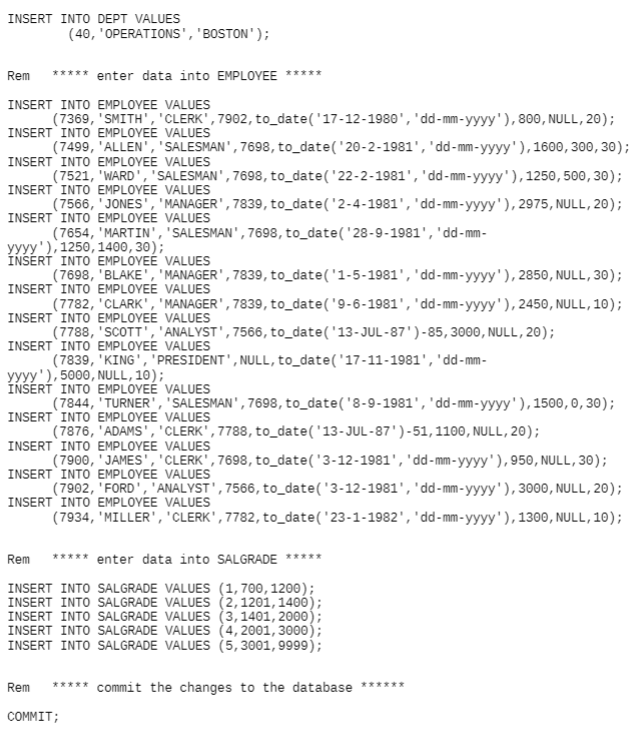
INSERT INTO DEPT VALUES (10,'ACCOUNTING','NEW YORK'); INSERT INTO DEPT VALUES (20,'RESEARCH','DALLAS'); INSERT INTO DEPT VALUES (30,'SALES','CHICAGO'); INSERT INTO DEPT VALUES (40,'OPERATIONS','BOSTON');
Rem ***** enter data into EMPLOYEE *****
INSERT INTO EMPLOYEE VALUES (7369,'SMITH','CLERK',7902,to_date('17-12-1980','dd-mm-yyyy'),800,NULL,20); INSERT INTO EMPLOYEE VALUES (7499,'ALLEN','SALESMAN',7698,to_date('20-2-1981','dd-mm-yyyy'),1600,300,30); INSERT INTO EMPLOYEE VALUES (7521,'WARD','SALESMAN',7698,to_date('22-2-1981','dd-mm-yyyy'),1250,500,30); INSERT INTO EMPLOYEE VALUES (7566,'JONES','MANAGER',7839,to_date('2-4-1981','dd-mm-yyyy'),2975,NULL,20); INSERT INTO EMPLOYEE VALUES (7654,'MARTIN','SALESMAN',7698,to_date('28-9-1981','dd-mm-yyyy'),1250,1400,30); INSERT INTO EMPLOYEE VALUES (7698,'BLAKE','MANAGER',7839,to_date('1-5-1981','dd-mm-yyyy'),2850,NULL,30); INSERT INTO EMPLOYEE VALUES (7782,'CLARK','MANAGER',7839,to_date('9-6-1981','dd-mm-yyyy'),2450,NULL,10); INSERT INTO EMPLOYEE VALUES (7788,'SCOTT','ANALYST',7566,to_date('13-JUL-87')-85,3000,NULL,20); INSERT INTO EMPLOYEE VALUES (7839,'KING','PRESIDENT',NULL,to_date('17-11-1981','dd-mm-yyyy'),5000,NULL,10); INSERT INTO EMPLOYEE VALUES (7844,'TURNER','SALESMAN',7698,to_date('8-9-1981','dd-mm-yyyy'),1500,0,30); INSERT INTO EMPLOYEE VALUES (7876,'ADAMS','CLERK',7788,to_date('13-JUL-87')-51,1100,NULL,20); INSERT INTO EMPLOYEE VALUES (7900,'JAMES','CLERK',7698,to_date('3-12-1981','dd-mm-yyyy'),950,NULL,30); INSERT INTO EMPLOYEE VALUES (7902,'FORD','ANALYST',7566,to_date('3-12-1981','dd-mm-yyyy'),3000,NULL,20); INSERT INTO EMPLOYEE VALUES (7934,'MILLER','CLERK',7782,to_date('23-1-1982','dd-mm-yyyy'),1300,NULL,10);
Rem ***** enter data into SALGRADE *****
INSERT INTO SALGRADE VALUES (1,700,1200); INSERT INTO SALGRADE VALUES (2,1201,1400); INSERT INTO SALGRADE VALUES (3,1401,2000); INSERT INTO SALGRADE VALUES (4,2001,3000); INSERT INTO SALGRADE VALUES (5,3001,9999);
Rem ***** commit the changes to the database ******
COMMIT;
1. Download the populate.sql script from Angel to your scripts directory. 2. Log into your Oracle database. 3. At the SQL> prompt, type @populate to run the script. (you will need to specify a path if your scripts directory is not configured correctly.) This script will create tables and input data into the tables. ACTIVITY #2 - QUERYING TABLES IN AN ORACLE DATABASE You will use three tables during this lab activity: DEPT, EMPLOYEE, and SAL GRADE. Write the SQL or SQL*Plus statements required for each of the following situations. Submit a report containing the queries or commands you used plus the answers to any indicated questions. 1. Describe the structure of each of the three tables in your database (one statement per table). 2. Determine how many records are in each table. How many records are there in DEPT? How many records are there in EMPLOYEE? How many records are there in SAL GRADE? 3. Create a list of all DNAMEs and LOCs from the DEPT table. Are they in a sorted order? Create a list of EMPNO, ENAME and SAL from EMPLOYEE. What is the salary range? 4. 5. 6. Create a list of all JOBs from the EMPLOYEE table. Request that the list be provided in descending order. Create a list of EMPNO, ENAME, HIREDATE, DEPTNO from EMPLOYEE for employee's with a salary (SAL) greater than 2000. (Note: Do not print out the salary amount!) How many records were printed to the screen? Create a list of ENAME, COMM from EMPLOYEE and DEPTNO, DNAME from DEPT for all employees in DEPTNO 30 and 40. How many records were printed to the screen? Create a list of EMPNO, ENAME, JOB and SAL from EMPLOYEE whose HIREDATE is after 15FEB81. 7. 8. How many records were printed to the screen? 9. Find the lowest SAL in the EMPLOYEE table. The lowest SAL in the EMPLOYEE table is? 2 SQL> SELECT empno, ename salary x 12 AS ANNUAL SALARY 3 FROM employee; 10. There are four coding errors in this statement. Identify them. 11. Create a query to display unique jobs from the employee table. 12. Create a query to display the employee number, name, job, and hire date for each employee in the employee table. Name the column headings Emp. Employee. Job, and Hire Date, respectively. 13. Create a query to display the name and salary of employees earning more than $2850. 14. Create a query to display the employee name and department number for employee number 7566. 15. Create a query to display the name and salary for all employees whose salary is not in the range of $1500 and $2850. 16. Display the employee name and department number of all employees in departments 10 and 30 in alphabetical order by name. 17. Display the name and salary for all employees who earn more than $1500 and are in department 10 or 30. Label the columns Employee and Monthly Salary, respectively. 18. Display the name and hire date of every employee who was hired in 1982. 19. Display the name and job title of all employees who do not have a manager. 20. Display the name salary, and commission for all employees who earn commissions. Sort data in descending order of salary and commissions. 21. Write a query to display the name, department number, and department name for all employees. 22. Create a unique listing of all jobs that are in department 30. Include the location of department 30 in the output. 23. Write a query to display the employee name, department name and location of all employees who earn a commission. 24. Display the employee name and department name for all employees who have an A in their 25. Write a query to display the name job. department number, and department name for all employees who work in DALLAS. name. ttttt Rem ******** dropping tables DROP TABLE SALGRADE; DROP TABLE EMPLOYEE; DROP TABLE DEPT; Rem ******** create table DEPT ***************** CREATE TABLE DEPT (DEPTNO NUMBER (2) NOT NULL, DNAME VARCHAR2(14), LOC VARCHAR2(13), PRIMARY KEY (DEPTNO) ); Rem ******** create table EMP ******* CREATE TABLE EMPLOYEE (EMPNO NUMBER (4) NOT NULL, ENAME VARCHAR2(10), JOB VARCHAR2(9), MGR NUMBER(4), HIREDATE DATE, SAL NUMBER(7,2), COMM NUMBER(7,2), DEPTNO NUMBER(2), PRIMARY KEY (EMPNO), FOREIGN KEY (DEPTNO) REFERENCES DEPT (DEPTNO)); Rem ****** create table SALGRADE ****** CREATE TABLE SALGRADE (GRADE NUMBER NOT NULL, LOSAL NUMBER, HISAL NUMBER PRIMARY KEY (GRADE)); Rem ***** enter data into DEPARTMENT INSERT INTO DEPT VALUES (10, ACCOUNTING', 'NEW YORK'); INSERT INTO DEPT VALUES (20,"RESEARCH', 'DALLAS'); INSERT INTO DEPT VALUES (30, 'SALES', 'CHICAGO'); INSERT INTO DEPT VALUES (40, 'OPERATIONS', 'BOSTON'); Rem ***** enter data into EMPLOYEE ***** INSERT INTO EMPLOYEE VALUES (7369, 'SMITH', 'CLERK', 7902, to_date('17-12-1980', 'dd-mm-yyyy'), 800, NULL, 20); INSERT INTO EMPLOYEE VALUES (7499, 'ALLEN', 'SALESMAN', 7698, to_datel 20-2-1981', 'dd-mm-yyyy'), 1600, 300,30); INSERT INTO EMPLOYEE VALUES (7521, 'WARD', 'SALESMAN', 7698, to_date('22-2-1981', 'dd-mm-yyyy'), 1250, 500, 30); INSERT INTO EMPLOYEE VALUES (7566, 'JONES', 'MANAGER', 7839, to_date('2-4-1981', 'dd-mm-yyyy'), 2975, NULL, 20); INSERT INTO EMPLOYEE VALUES (7654, 'MARTIN', 'SALESMAN', 7698, to_date('28-9-1981', 'dd-mm- yyyy'), 1250, 1400, 30); INSERT INTO EMPLOYEE VALUES (7698, 'BLAKE', 'MANAGER', 7839, to_date('1-5-1981', 'dd-mm-yyyy'), 2850, NULL, 30); INSERT INTO EMPLOYEE VALUES (7782, 'CLARK', 'MANAGER', 7839, to_date('9-6-1981', 'dd-mm-yyyy'), 2450, NULL, 10); INSERT INTO EMPLOYEE VALUES (7788, 'SCOTT', 'ANALYST',7566, to_date('13-JUL-87')-85, 3000, NULL, 20); INSERT INTO EMPLOYEE VALUES (7839, 'KING', 'PRESIDENT',NULL, to_date('17-11-1981', 'dd-mm- yyyy'), 5000, NULL, 10); INSERT INTO EMPLOYEE VALUES (7844, 'TURNER', 'SALESMAN', 7698, to_date('8-9-1981', 'dd-mm-yyyy'), 1500,0,30); INSERT INTO EMPLOYEE VALUES (7876, 'ADAMS', 'CLERK', 7788, to_date('13-JUL-87')-51, 1100, NULL, 20); INSERT INTO EMPLOYEE VALUES (7900, JAMES', 'CLERK,7698, to_date('3-12-1981', 'dd-mm-yyyy'), 950, NULL, 30); INSERT INTO EMPLOYEE VALUES (7902, 'FORD', 'ANALYST', 7566, to_date('3-12-1981', 'dd-mm-yyyy'), 3000, NULL, 20); INSERT INTO EMPLOYEE VALUES (7934, 'MILLER', 'CLERK', 7782, to_date('23-1-1982', 'dd-mm-yyyy'), 1300, NULL, 10); Rem ***** enter data into SALGRADE ***** INSERT INTO SALGRADE VALUES (1,700, 1200); INSERT INTO SALGRADE VALUES (2, 1201, 1400); INSERT INTO SALGRADE VALUES (3, 1401, 2000); INSERT INTO SALGRADE VALUES (4, 2001, 3000) INSERT INTO SALGRADE VALUES (5,3001, 9999); Rem ***** commit the changes to the database ****** COMMIT
Step by Step Solution
There are 3 Steps involved in it

Get step-by-step solutions from verified subject matter experts
 Study Help