







Question: Power BI using DAX and Advanced Analytics for the given Airbnb case. * * * Requirements: Create a Power BI report ( NO DASHBOARD )
Power BI using DAX and Advanced Analytics for the given Airbnb case.
Requirements: Create a Power BI report NO DASHBOARD using PB Desktop stepbystep including:
Do any necessary data cleaning and transformation to enhanceenrich the dataset using DAX. Ensure that there are no unnecessary columns in your main table Listing and the end result of the data cleaning and transformation is three tables: listing, reviews, and neighborhood contains the data for the three quarters.
Perform data anonymization techniques
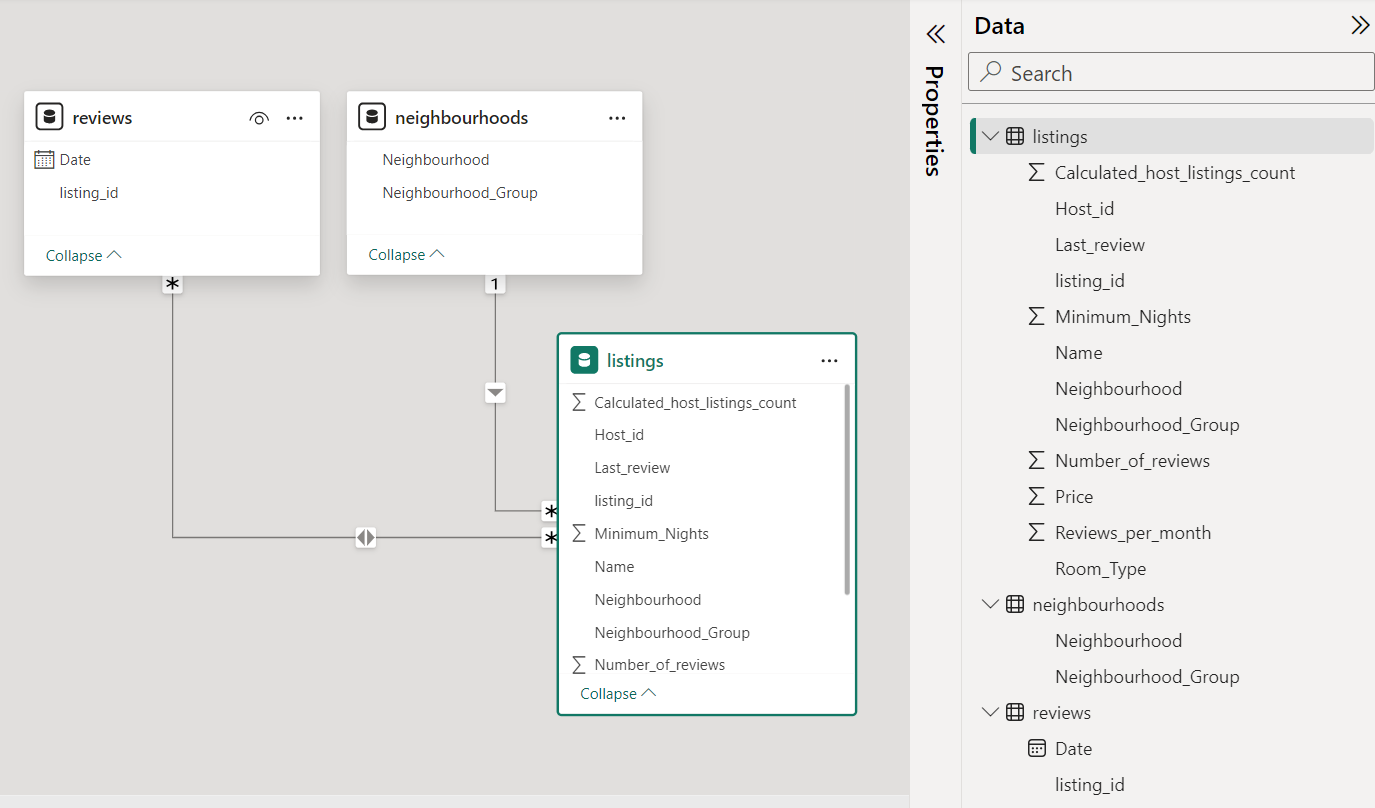
Create the necessary Model and relations.
Using DAX as a data transformation tool, add at least one from each type of calculation calculated columns, Measures, and "date table"
Using the added calculations to your project, present the results of your analysis.
Investor point of view, answering questions like or any other question you find valuable:
o Which location time is best to invest in Airbnb?
o What is the expected revenue from the investment? Change over time?
o What are the characteristics of a good unit to invest number of beds, baths, unit type etc
Customer's point of view, answering questions like or any other question you find valuable::
o Which location time is best to rent on Airbnb?
o What is the expected cost of shorttermlongterm stay? Which is better, multiple short stays in different units or one long stay in the same unit?
o What are the characteristics of a good unit to rent number of beds, baths, unit type etc
Deliverables:
Power BI report construction step by step including:
Page : Overview, Page : Investor point of view analysis with diferent kind of visuals, Page : Customer's point of view analysis with diferent kind of visuals, Page : Conclusions.
Please avoid to use any "review" variable for InvestorCustomer analysis. Thx :
Data transformation efforts using DAX, a list of created calculations with a short description of the calculation and its added value to the analysis.
Analysis findings and main recommendations.
Appendix: All DAX code used in the project as text, not screenshots
Data source: Inside Airbnb: Get the Data
insideairbnbcomgetthedata
Files needed: Toronto, Ontario, Canada
December,
listings.csv
reviews.csv
neighbourhoods.csv
September,
listings.csv
reviews.csv
neighbourhoods.csv
June,
listings.csv
reviews.csv
neighbourhoods.csv
Note: You need to "merge" them in a single "listing", "reviews" and "neighbourhoods" data tables as the attached pic
Note :
listings.csv: Summary information and metrics for listings in Toronto Good for visualisations
reviews.csv: Summary Review data and Listing ID to facilitate time based analytics and visualisations linked to a listing
neighbourhoods.csv Neighbourhood list for geo filter. Sourced from city or open source GIS files.
Note : Model View attached as a picture
First columns for each file as follows:
listings columns
id name hostid hostname neighbourhoodgroup neighbourhood latitude longitude roomtype price minimumnights numberofreviews lastreview reviewspermonth calculatedhostlistingscount availability numberofreviewsltm license
Beautiful home in amazing area! Alexandra Little Portugal Entire homeapt
Downtown Harbourfront Private Room Kathie & Larry Waterfront CommunitiesThe Island Private room
World Class @ CN Tower, convention centre, Theatre Adela Waterfront CommunitiesThe Island Entire homeapt
Boutique Chic at Maple Leaf Square Karen Waterfront CommunitiesThe Island Entire homeapt
Executive Studio Unit Ideal for One Person Brent South Riverdale Entire homeapt
###Caution### info about number of beds baths in column B name Please split as a single colum for beds and baths.
neighbourhoods columns
neighbourhoodgroup neighbourhood
Agincourt North
Agincourt SouthMalvern West
Alderwood
Annex
BanburyDon Mills
reviews Columns
listingid date
Step by Step Solution
There are 3 Steps involved in it
1 Expert Approved Answer
Step: 1 Unlock

Question Has Been Solved by an Expert!
Get step-by-step solutions from verified subject matter experts
Step: 2 Unlock
Step: 3 Unlock
 Study Help