







Question: Practical quiz show me the solution in video Microsoft Access Exercise Create a database in MS Access and name it and perform the following tasks:
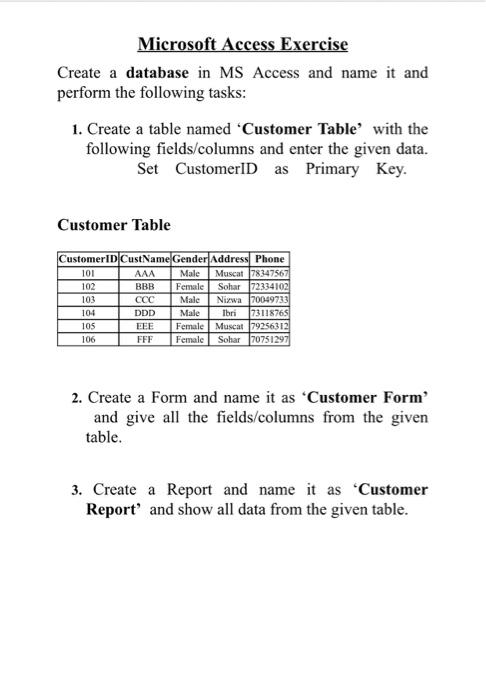
Microsoft Access Exercise Create a database in MS Access and name it and perform the following tasks: 1. Create a table named 'Customer Table with the following fields/columns and enter the given data. Set CustomerID as Primary Key. Customer Table CustomerID CustName Gender Address Phone 101 AAA Male Muscat 78347567 102 BBB Female Sohar 172334102 103 Male Nixwa 70049733 104 DDD Male Ibri 73118765 105 EEE Female Muscat 79256312 106 FFF Female Sohar 170751297 2. Create a Form and name it as 'Customer Form and give all the fields/columns from the given table. 3. Create a Report and name it as "Customer Report and show all data from the given table
Step by Step Solution
There are 3 Steps involved in it

Get step-by-step solutions from verified subject matter experts
 Study Help