







Question: Practical sample Use program P6 profissional and Screen shoot what will do: The project will start on 2-Decmber-2020. Note: Write your full name, ID and
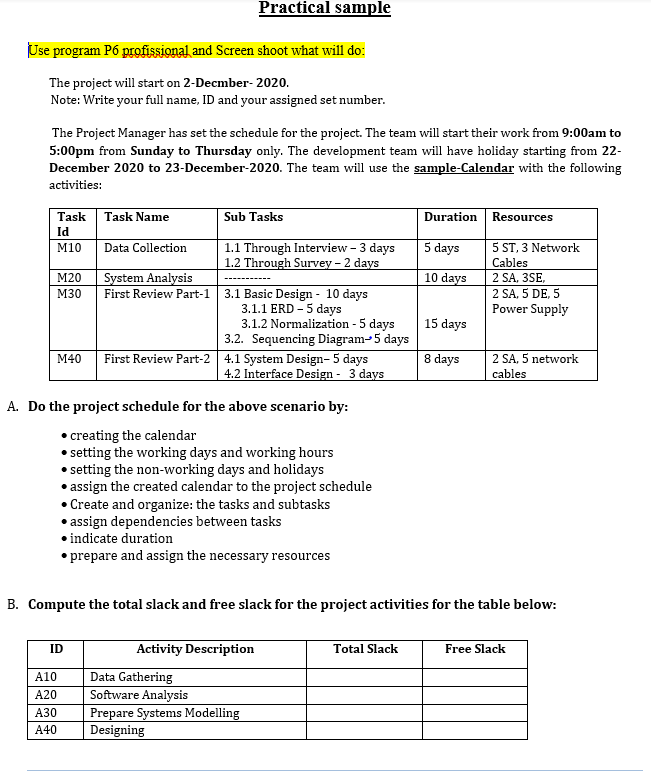
Practical sample Use program P6 profissional and Screen shoot what will do: The project will start on 2-Decmber-2020. Note: Write your full name, ID and your assigned set number. The Project Manager has set the schedule for the project. The team will start their work from 9:00am to 5:00pm from Sunday to Thursday only. The development team will have holiday starting from 22- December 2020 to 23-December-2020. The team will use the sample-Calendar with the following activities: Duration Resources 5 days 10 days Task Task Name Sub Tasks Id M10 Data Collection 1.1 Through Interview - 3 days 1.2 Through Survey - 2 days M20 System Analysis M30 First Review Part-1 3.1 Basic Design - 10 days 3.1.1 ERD-5 days 3.1.2 Normalization - 5 days 3.2. Sequencing Diagram-5 days M40 First Review Part-2 4.1 System Design-5 days 4.2 Interface Design - 3 days 5 ST, 3 Network Cables 2 SA, 3SE 2 SA, 5 DE, 5 Power Supply 15 days 8 days 2 SA, 5 network cables A. Do the project schedule for the above scenario by: creating the calendar setting the working days and working hours setting the non-working days and holidays assign the created calendar to the project schedule Create and organize: the tasks and subtasks .assign dependencies between tasks indicate duration .prepare and assign the necessary resources B. Compute the total slack and free slack for the project activities for the table below: ID Total Slack Free Slack A10 A20 A30 A40 Activity Description Data Gathering Software Analysis Prepare Systems Modelling Designing Practical sample Use program P6 profissional and Screen shoot what will do: The project will start on 2-Decmber-2020. Note: Write your full name, ID and your assigned set number. The Project Manager has set the schedule for the project. The team will start their work from 9:00am to 5:00pm from Sunday to Thursday only. The development team will have holiday starting from 22- December 2020 to 23-December-2020. The team will use the sample-Calendar with the following activities: Duration Resources 5 days 10 days Task Task Name Sub Tasks Id M10 Data Collection 1.1 Through Interview - 3 days 1.2 Through Survey - 2 days M20 System Analysis M30 First Review Part-1 3.1 Basic Design - 10 days 3.1.1 ERD-5 days 3.1.2 Normalization - 5 days 3.2. Sequencing Diagram-5 days M40 First Review Part-2 4.1 System Design-5 days 4.2 Interface Design - 3 days 5 ST, 3 Network Cables 2 SA, 3SE 2 SA, 5 DE, 5 Power Supply 15 days 8 days 2 SA, 5 network cables A. Do the project schedule for the above scenario by: creating the calendar setting the working days and working hours setting the non-working days and holidays assign the created calendar to the project schedule Create and organize: the tasks and subtasks .assign dependencies between tasks indicate duration .prepare and assign the necessary resources B. Compute the total slack and free slack for the project activities for the table below: ID Total Slack Free Slack A10 A20 A30 A40 Activity Description Data Gathering Software Analysis Prepare Systems Modelling Designing
Step by Step Solution
There are 3 Steps involved in it

Get step-by-step solutions from verified subject matter experts
 Study Help