







Question: Practice 11 Part 1 I. 2. 3. 4. Add a table level PRIMARY KEY constraint to the EMPLOYEE table using the ID column. The constraint
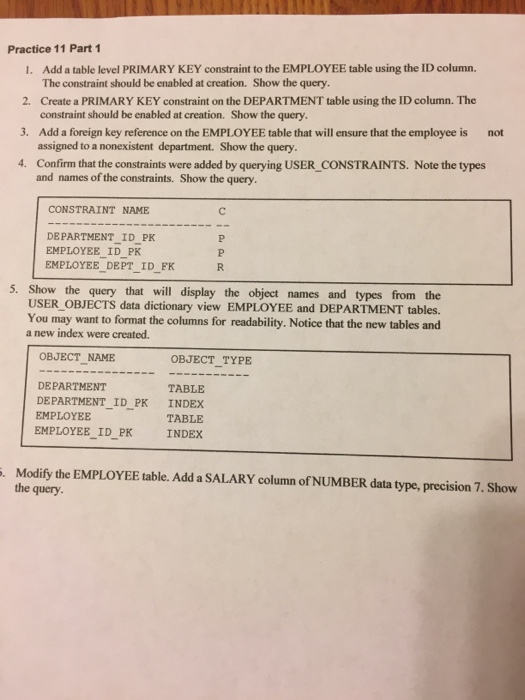
Practice 11 Part 1 I. 2. 3. 4. Add a table level PRIMARY KEY constraint to the EMPLOYEE table using the ID column. The constraint should be enabled at creation. Show the query. Create a PRIMARY KEY constraint on the DEPARTMENT table using the ID column. The constraint should be enabled at creation. Show the query Add a foreign key reference on the EMPLOYEE table that will ensure that the employee is not assigned to a nonexistent department. Show the query Confirm that the constraints were added by querying USER CONSTRAINTS. Note the types and names of the constraints. Show the query. CONSTRAINT NAME DEPARTMENT_ID_PK EMPLOYEE ID PK EMPLOYEE DEPT ID_FK 5. Show the query that will display the object names and types from the USER OBJECTS data dictionary view EMPLOYEE and DEPARTMENT tables. You may want to format the columns for readability. Notice that the new tables and a new index were created. OBJECT NAME OBJECT TYPE TABLE TABLE DEPARTMENT DEPARTMENT_ID_ PK INDEX EMPLOYEE EMPLOYEE_ID PK INDEX Modify the EMPLOYEE table. Add a SALARY column of NUMBER data type, precision 7. Show the query
Step by Step Solution
There are 3 Steps involved in it

Get step-by-step solutions from verified subject matter experts
 Study Help