







Question: Practice question : 1 Task: Develop a Two pages well looking CV of yours according to the below given instructions: Put your focus on the
Practice question : 1
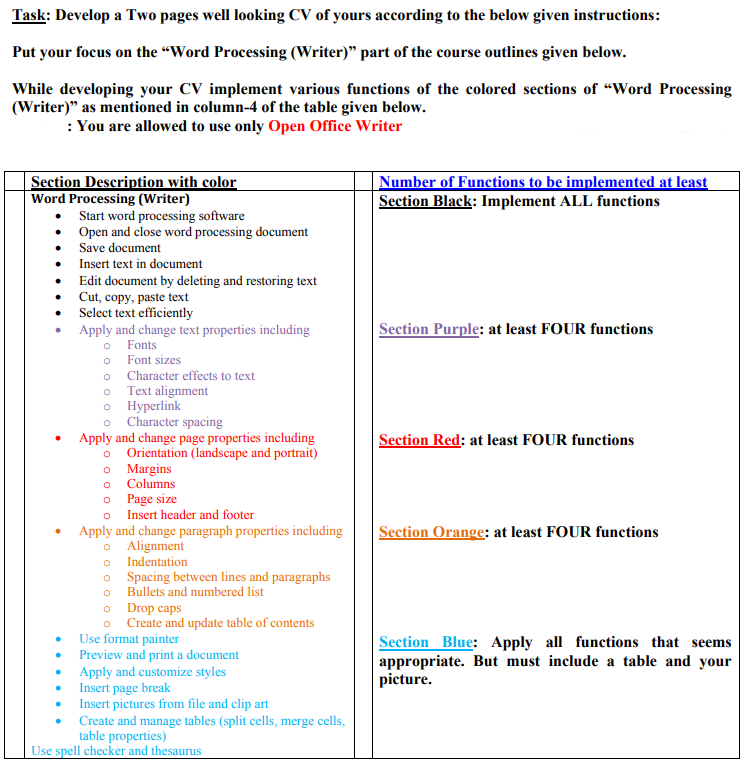
Task: Develop a Two pages well looking CV of yours according to the below given instructions: Put your focus on the Word Processing (Writer) part of the course outlines given below. While developing your CV implement various functions of the colored sections of "Word Processing (Writer) as mentioned in column-4 of the table given below. : You are allowed to use only Open Office Writer Number of Functions to be implemented at least Section Black: Implement ALL functions Section Purple: at least FOUR functions 0 Section Red: at least FOUR functions Section Description with color Word Processing (Writer) Start word processing software Open and close word processing document Save document Insert text in document Edit document by deleting and restoring text Cut, copy, paste text Select text efficiently Apply and change text properties including O Fonts O Font sizes o Character effects to text o Text alignment 0 Hyperlink Character spacing Apply and change page properties including Orientation (landscape and portrait) o Margins Columns Page size Insert header and footer Apply and change paragraph properties including O Alignment 0 Indentation o Spacing between lines and paragraphs o Bullets and numbered list o Drop caps o Create and update table of contents Use format painter Preview and print a document Apply and customize styles Insert page break Insert pictures from file and clip art Create and manage tables (split cells, merge cells, table properties) Use spell checker and thesaurus Section Orange: at least FOUR functions Section Blue: pply all functions that seems appropriate. But must include a table and your picture. . Task: Develop a Two pages well looking CV of yours according to the below given instructions: Put your focus on the Word Processing (Writer) part of the course outlines given below. While developing your CV implement various functions of the colored sections of "Word Processing (Writer) as mentioned in column-4 of the table given below. : You are allowed to use only Open Office Writer Number of Functions to be implemented at least Section Black: Implement ALL functions Section Purple: at least FOUR functions 0 Section Red: at least FOUR functions Section Description with color Word Processing (Writer) Start word processing software Open and close word processing document Save document Insert text in document Edit document by deleting and restoring text Cut, copy, paste text Select text efficiently Apply and change text properties including O Fonts O Font sizes o Character effects to text o Text alignment 0 Hyperlink Character spacing Apply and change page properties including Orientation (landscape and portrait) o Margins Columns Page size Insert header and footer Apply and change paragraph properties including O Alignment 0 Indentation o Spacing between lines and paragraphs o Bullets and numbered list o Drop caps o Create and update table of contents Use format painter Preview and print a document Apply and customize styles Insert page break Insert pictures from file and clip art Create and manage tables (split cells, merge cells, table properties) Use spell checker and thesaurus Section Orange: at least FOUR functions Section Blue: pply all functions that seems appropriate. But must include a table and your picture
Step by Step Solution
There are 3 Steps involved in it

Get step-by-step solutions from verified subject matter experts
 Study Help