



Question: Preparing a Basic Data Visualization in Excel to Highlight Changes in Expenses Over Time The Excel file associated with this exercise includes three years of
Preparing a Basic Data Visualization in Excel to Highlight Changes in Expenses Over Time
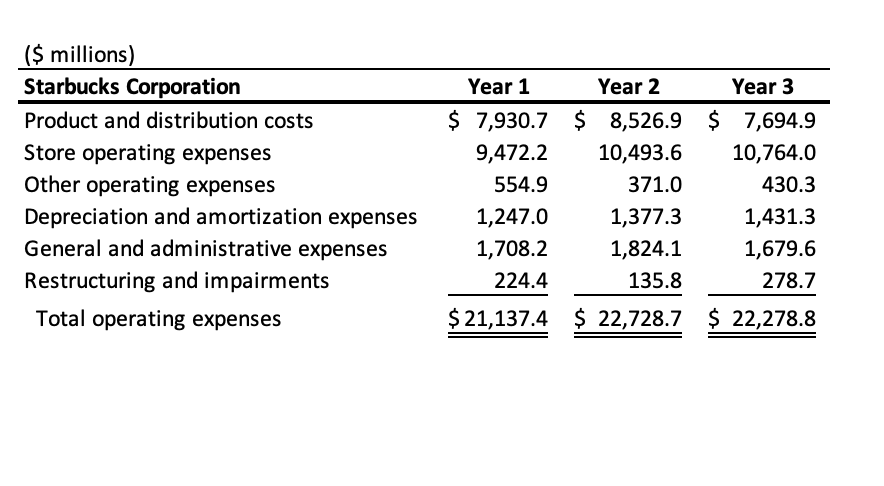
The Excel file associated with this exercise includes three years of operating expenses of Starbucks Corporation reported in recent annual reports on Form K We will use data visualizations to analyze the trends of expenses over this three year period.
Required
Download the following Excel file:Starbucks Corporation
Create a data visualization within the worksheet in Excel, through the Sparkline feature: Line option.Hint:Highlight the cells with numeric data and click on Insert, click on Sparklines, click on Line. Next, select where to place Sparklines by highlighting the empty cells in the column to the right of your last column of data.
Format the Sparklines by adding color markers to the high and low points of your chart and adding thickness to the chart lines.Hint:Highlight your Sparkline and under the Sparkline tab, click on High Point and Low Point and choose your desired color scheme from the options listed in the Style group. To add thickness, click on Sparkline Color, and Weight to make an adjustment.
Determine which Sparkline and thus pattern of activity is most similar to the Sparkline for Product and distribution.
Answer Product and distribution costsStore operating expensesOther operating expensesDepreciation and amortization expensesGeneral and administrative expensesRestructuring and impairments
Determine which Sparkline is most similar to the Sparkline for Store operating expenses.
Answer Product and distribution costsStore operating expensesOther operating expensesDepreciation and amortization expensesGeneral and administrative expensesRestructuring and impairments $ millions
Step by Step Solution
There are 3 Steps involved in it
1 Expert Approved Answer
Step: 1 Unlock

Question Has Been Solved by an Expert!
Get step-by-step solutions from verified subject matter experts
Step: 2 Unlock
Step: 3 Unlock