







Question: PREVIOUS NEXT MODULE 3: CHAPTER 8 COMPREHENSIVE PRACTICE SET Problem 1: P8-31A Background: Sleepy Recliner Chairs completed the transactions listed in the Transactions section below
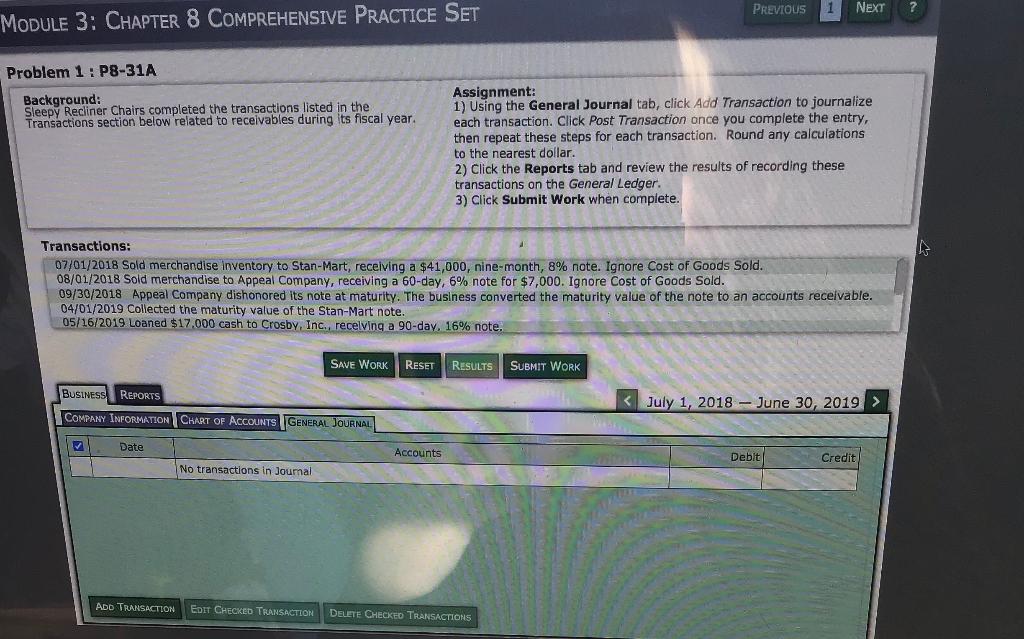
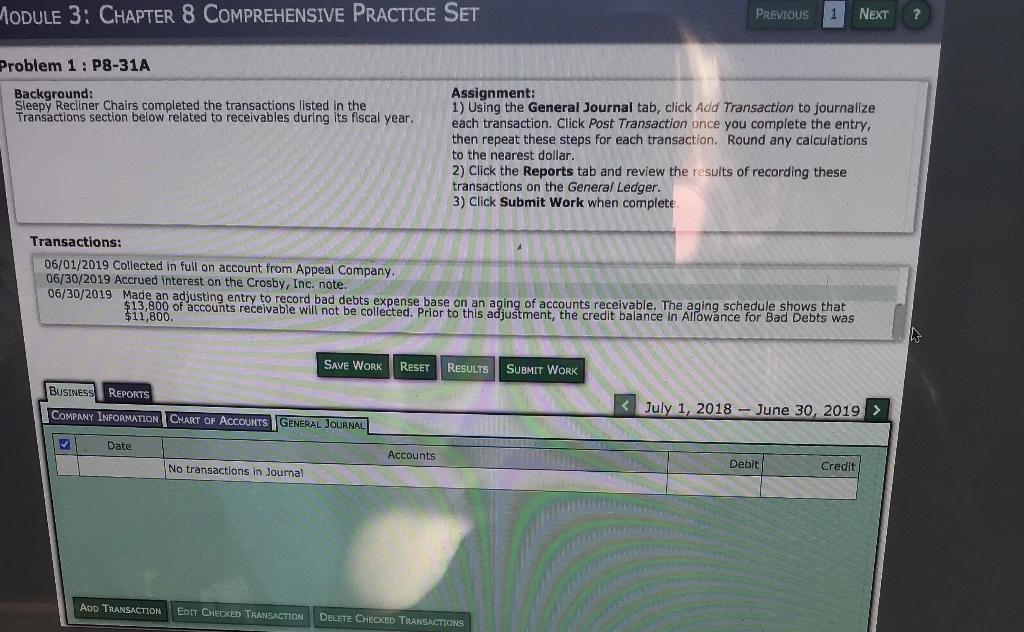
PREVIOUS NEXT MODULE 3: CHAPTER 8 COMPREHENSIVE PRACTICE SET Problem 1: P8-31A Background: Sleepy Recliner Chairs completed the transactions listed in the Transactions section below related to receivables during its fiscal year. Assignment: 1) Using the General Journal tab, click Add Transaction to journalize each transaction. Click Post Transaction once you complete the entry, then repeat these steps for each transaction. Round any calculations to the nearest dollar. 2) Click the Reports tab and review the results of recording these transactions on the General Ledger. 3) Click Submit Work when complete. Transactions: 07/01/2018 Sold merchandise inventory to Stan-Mart, receiving a $41,000, nine-month, 8% note. Ignore Cost of Goods Sold. 08/01/2018 Sold merchandise to Appeal Company, receiving a 60-day, 6% note for $7,000. Ignore Cost of Goods Sold. 09/30/2018 Appeal Company dishonored its note at maturity. The business converted the maturity value of the note to an accounts receivable. 04/01/2019 Collected the maturity value of the Stan-Mart note. 05/16/2019 Loaned $17.000 cash to Crosby, Inc., recelving a 90-day, 16% note. SAVE WORK RESET RESULTS SUBMIT WORK BUSINESS REPORTS COMPANY INFORMATION CHART OF ACCOUNTS GENERAL JOURNAL Date Accounts Debit Credit No transactions in Joumal ADD TRANSACTION EDIT CHECKED TRANSACTION DELETE CHECKED TRANSACTIONS MODULE 3: CHAPTER 8 COMPREHENSIVE PRACTICE SET PREVIOUS 1 NEXT ? Problem 1: P8-31A Background: Sleepy Recliner Chairs completed the transactions listed in the Transactions section below related to receivables during its fiscal year. Assignment: 1) Using the General Journal tab, click Add Transaction to journalize each transaction. Click Post Transaction once you complete the entry, then repeat these steps for each transaction. Round any calculations to the nearest dollar. 2) Click the Reports tab and review the results of recording these transactions on the General Ledger. 3) Click Submit Work when complete Transactions: 06/01/2019 Collected in full on account from Appeal Company. 06/30/2019 Accrued interest on the Crosby, Inc. note. 06/30/2019 Made an adjusting entry to record bad debts expense base on an aging of accounts receivable. The aging schedule shows that $13,800 of accounts receivable will not be collected. Prior to this adjustment, the credit balance in Allowance for Bad Debts was $11,800. SAVE WORK RESET RESULTS SUBMIT WORK REPORTS BUSINESS COMPANY INFORMATION CHART OF ACCOUNTS GENERAL JOURNAL
Step by Step Solution
There are 3 Steps involved in it

Get step-by-step solutions from verified subject matter experts
 Study Help