



Question: print ( This program calculates the distance traveled by a ball based on its speed and time. ) def get _ valid _ input
printThis program calculates the distance traveled by a ball based on its speed and time."
def getvalidinputprompt:
while True:
try:
value folatinputprompt
if value :
raise ValueErrorValue must be greater than zero."
return value
except ValueError as e:
printfInvalid input: e Please try again."
speed getvalidinputWhat is the speed of the ball in in meters per minute
time intgetvalidinputHow many minutes has it travelled?
print
printMinute Distance Travelled meters
print
minute
while minute time:
distance speed minute
printfminute:distance:
minute
print
printCalculation complete. Thank you!"
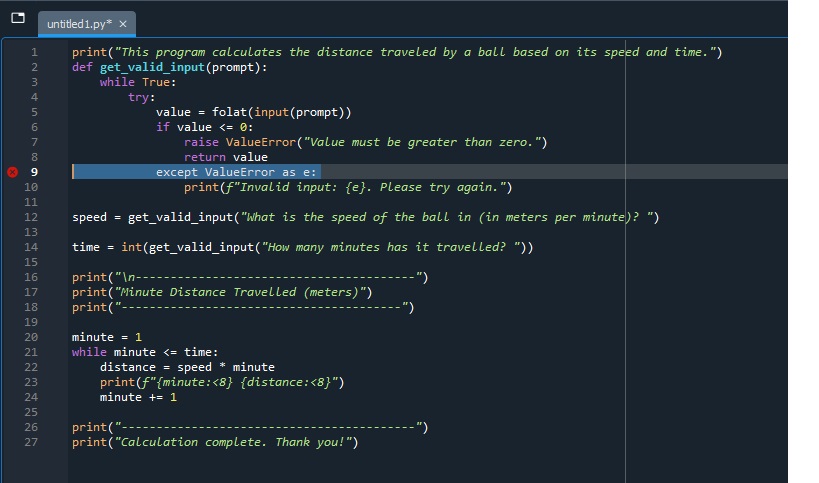
why am i getting a syntax error message where it says:
except ValueError as e:
below is the question for this python code:
Write a program to calculate how far a tennis ball will touch the ground. For example, if the ball
travels meters per minute for seven minutes, the distance travelled is metres.
Write a program that asks the user for the speed of a ball in meters per minute and the
number of minutes it has travelled. You should then use a while loop to display the distance
travelled for each minute. The distance ball travels can be calculated as follows: distance
speed time
Sample output:
What is the speed of the ball in in metres per minute
How many minutes has it travelled?
Hour Distance Travelled
The above task should make an appropriate use of trycatch and ensures correct inputs are processed,
and incorrect inputs are handled by using exceptions.
Step by Step Solution
There are 3 Steps involved in it
1 Expert Approved Answer
Step: 1 Unlock

Question Has Been Solved by an Expert!
Get step-by-step solutions from verified subject matter experts
Step: 2 Unlock
Step: 3 Unlock