







Question: printAnimals() method for java I'm almost done with this just need this code for this Driver for printAnimals method I bolded the spot that I
printAnimals() method for java
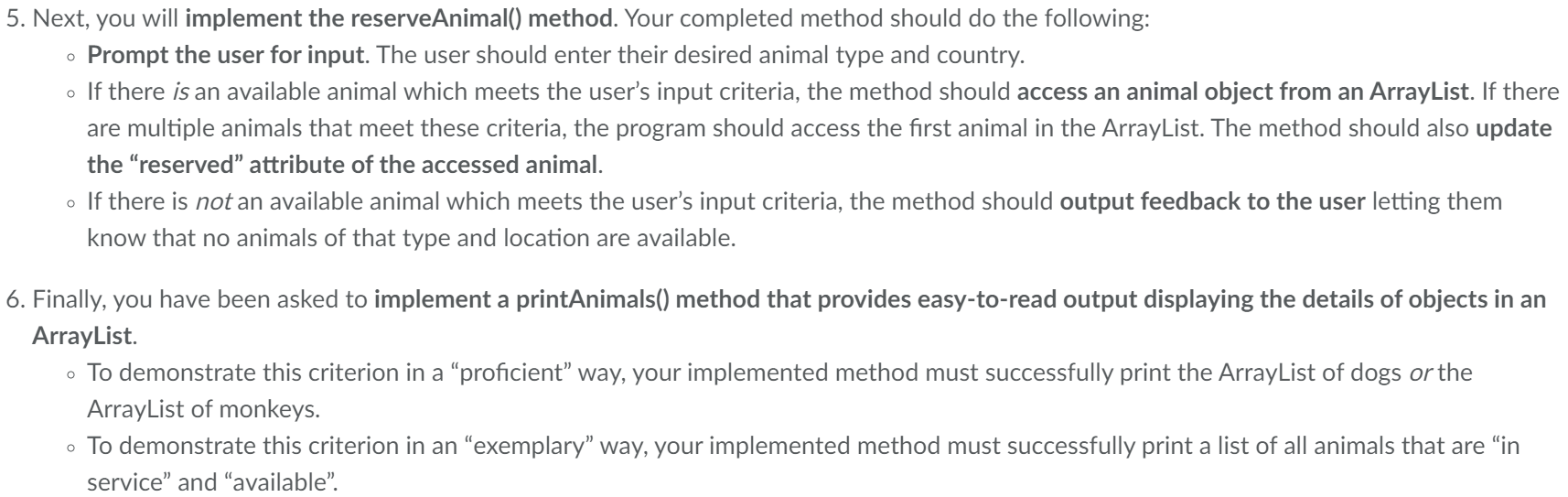
I'm almost done with this just need this code for this Driver for printAnimals method I bolded the spot that I need help with!!!
package animalRescue;
import java.util.ArrayList; import java.util.Scanner;
public class Driver{ private static ArrayList dogList = new ArrayList(); private static ArrayList monkeyList = new ArrayList(); // Instance variables (if needed) // This method prints the menu options public static void displayMenu() { System.out.println(" "); System.out.println("\t\t\t\tRescue Animal System Menu"); System.out.println("[1] Intake a new dog"); System.out.println("[2] Intake a new monkey"); System.out.println("[3] Reserve an animal"); System.out.println("[4] Print a list of all dogs"); System.out.println("[5] Print a list of all monkeys"); System.out.println("[6] Print a list of all animals that are not reserved"); System.out.println("[q] Quit application"); System.out.println(); } // Adds dogs to a list for testing public static void initializeDogList() { Dog dog1 = new Dog("Spot", "German Shepherd", "male", "1", "25.6", "05-12-2019", "United States", "intake", false, "United States"); Dog dog2 = new Dog("Rex", "Great Dane", "male", "3", "35.2", "02-03-2020", "United States", "Phase I", false, "United States"); Dog dog3 = new Dog("Bella", "Chihuahua", "female", "4", "25.6", "12-12-2019", "Canada", "in service", true, "Canada"); dogList.add(dog1); dogList.add(dog2); dogList.add(dog3); } // Adds monkeys to a list for testing //Optional for testing public static void initializeMonkeyList() { Monkey monkey1 = new Monkey("Marcel", "Capuchin", "5.2", "9.4", "19.6", "male", "2", "15.3", "09-11-2019", "Canada", "Phase I", true, "Canada"); Monkey monkey2 = new Monkey("Kong", "Macaque", "4.8", "10.2", "20.7", "female", "1", "17.4", "12-05-2020", "United Kingdom", "in service", false, "United Kingdom"); Monkey monkey3 = new Monkey("Pat", "Tamarin", "5.5", "8.6", "18.4", "male", "3", "18.2", "12-10-2019", "United States", "intake", false, "United States"); monkeyList.add(monkey1); monkeyList.add(monkey2); monkeyList.add(monkey3); } // Complete the intakeNewDog method // The input validation to check that the dog is not already in the list // is done for you public static void intakeNewDog(Scanner scanner) { System.out.println("What is the dog's name?"); String name = scanner.nextLine(); for(Dog dog: dogList) { if(dog.getName().equalsIgnoreCase(name)) { System.out.println(" This dog is already in our system "); return; //returns to menu } } // Add the code to instantiate a new dog and add it to the appropriate list System.out.println("What is the dog's breed?"); String breed = scanner.nextLine(); System.out.println("What is the dog's gender?"); String gender = scanner.nextLine(); System.out.println("What is the dog's age?"); String age = scanner.nextLine(); System.out.println("What is the dog's weight?"); String weight = scanner.nextLine(); System.out.println("What is the dog's acquisition date?"); String acqDate = scanner.nextLine(); System.out.println("What is the dog's acquisition country?"); String acqCountry = scanner.nextLine(); System.out.println("What is the dog's training status?"); String ts = scanner.nextLine(); System.out.println("Is the dog reserved?"); boolean res = scanner.nextBoolean();scanner.nextLine(); System.out.println("What is the dog's in Service Country?"); String isc = scanner.nextLine(); Dog newdog=new Dog(name,breed,gender,age,weight,acqDate,acqCountry,ts,res,isc); dogList.add(newdog); } // Complete intakeNewMonkey //Instantiate and add the new monkey to the appropriate list // For the project submission you must also validate the input // to make sure the monkey doesn't already exist and the species type is allowed public static void intakeNewMonkey(Scanner scanner) { System.out.println("What is the monkey's name?"); String name = scanner.nextLine(); for(Monkey monkey: monkeyList) { if(monkey.getName().equalsIgnoreCase(name)) { System.out.println(" This monkey is already in our system "); return; //returns to menu } } System.out.println("What is the monkey's species?"); String species = scanner.nextLine(); if(!(species.equalsIgnoreCase("Capuchin")) && !(species.equalsIgnoreCase("Guenon")) && !(species.equalsIgnoreCase("Macaque")) && !(species.equalsIgnoreCase("Marmoset")) && !(species.equalsIgnoreCase("Squirrel Monkey")) && !(species.equalsIgnoreCase("Tamarin"))){ System.out.println(" This monkey's species is not allowed "); return; } System.out.println("What is the monkey's tail length?"); String tailLength = scanner.nextLine(); System.out.println("What is the monkey's height?"); String height = scanner.nextLine(); System.out.println("What is the monkey's body length?"); String bodyLength = scanner.nextLine(); System.out.println("What is the monkey's gender?"); String gender = scanner.nextLine(); System.out.println("What is the monkey's age?"); String age = scanner.nextLine(); System.out.println("What is the monkey's weight?"); String weight = scanner.nextLine(); System.out.println("What is the monkey's acquisition date?"); String acqDate = scanner.nextLine(); System.out.println("What is the monkey's acquisition country?"); String acqCountry = scanner.nextLine(); System.out.println("What is the monkey's training status?"); String ts = scanner.nextLine(); System.out.println("Is the monkey reserved?"); boolean res = scanner.nextBoolean();scanner.nextLine(); System.out.println("What is the monkey's in Service Country?"); String isc = scanner.nextLine(); Monkey newmonkey=new Monkey(name,species,tailLength,height,bodyLength,gender,age,weight,acqDate,acqCountry,ts,res,isc); monkeyList.add(newmonkey); } // Complete printAnimals // Include the animal name, status, acquisition country and if the animal is reserved. // Remember that this method connects to three different menu items. // The printAnimals() method has three different outputs // based on the listType parameter // dog - prints the list of dogs // monkey - prints the list of monkeys // available - prints a combined list of all animals that are // fully trained ("in service") but not reserved // Remember that you only have to fully implement ONE of these lists. // The other lists can have a print statement saying "This option needs to be implemented". // To score "exemplary" you must correctly implement the "available" list. public static void printAnimals() { System.out.println("The method printAnimals needs to be implemented"); } public static void main(String[] args) { initializeDogList(); initializeMonkeyList(); // Add a loop that displays the menu, accepts the users input // and takes the appropriate action. // For the project submission you must also include input validation // and appropriate feedback to the user. // Hint: create a Scanner and pass it to the necessary // methods // Hint: Menu options 4, 5, and 6 should all connect to the printAnimals() method. Scanner sc=new Scanner(System.in); displayMenu(); System.out.println("Enter a menu selection"); char input=sc.nextLine().charAt(0); if(input=='q'){ System.exit(0); } int input1=Character.getNumericValue(input); while(input16){ System.out.println("Invalid selection!"); displayMenu(); System.out.println("Enter a menu selection"); input=sc.nextLine().charAt(0); input1=Character.getNumericValue(input); } switch(input1){ case 1: intakeNewDog(sc); break; case 2: intakeNewMonkey(sc); break; case 3: reserveAnimal(sc); break; case 4: printAnimals(); break; case 5: printAnimals(); break; case 6: System.exit(0); } } }
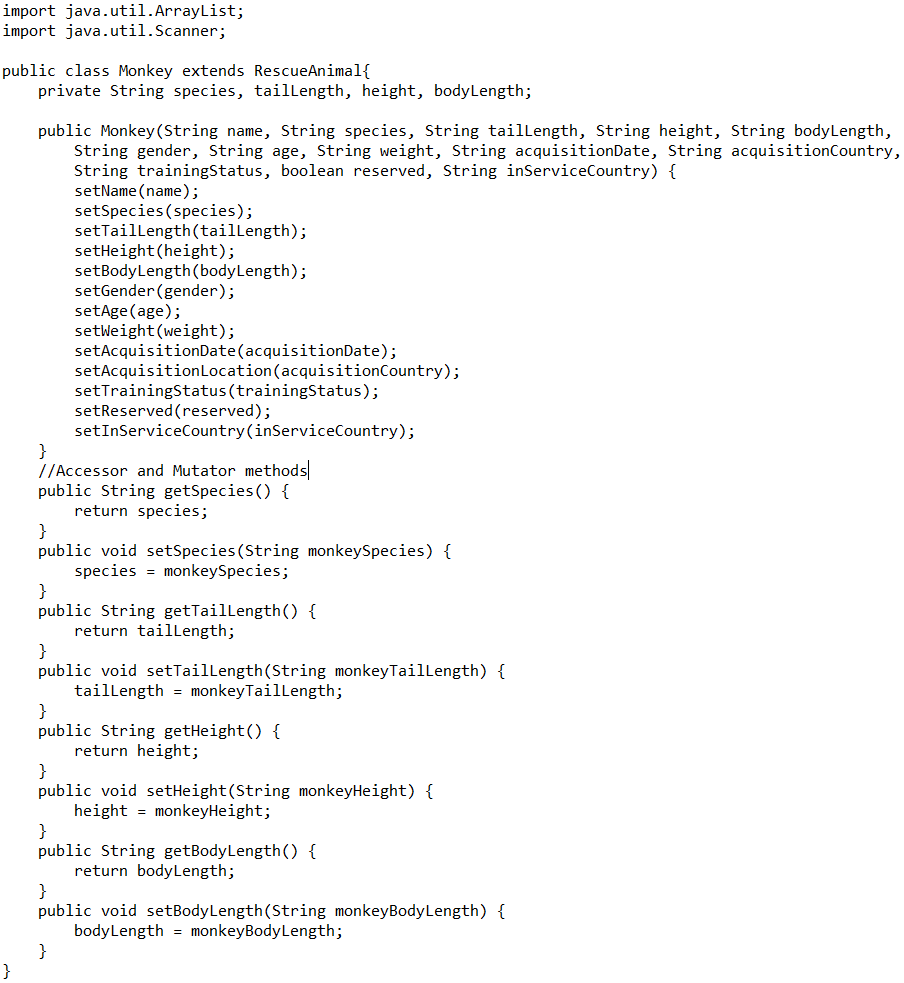
**********************Monkey.java**********************
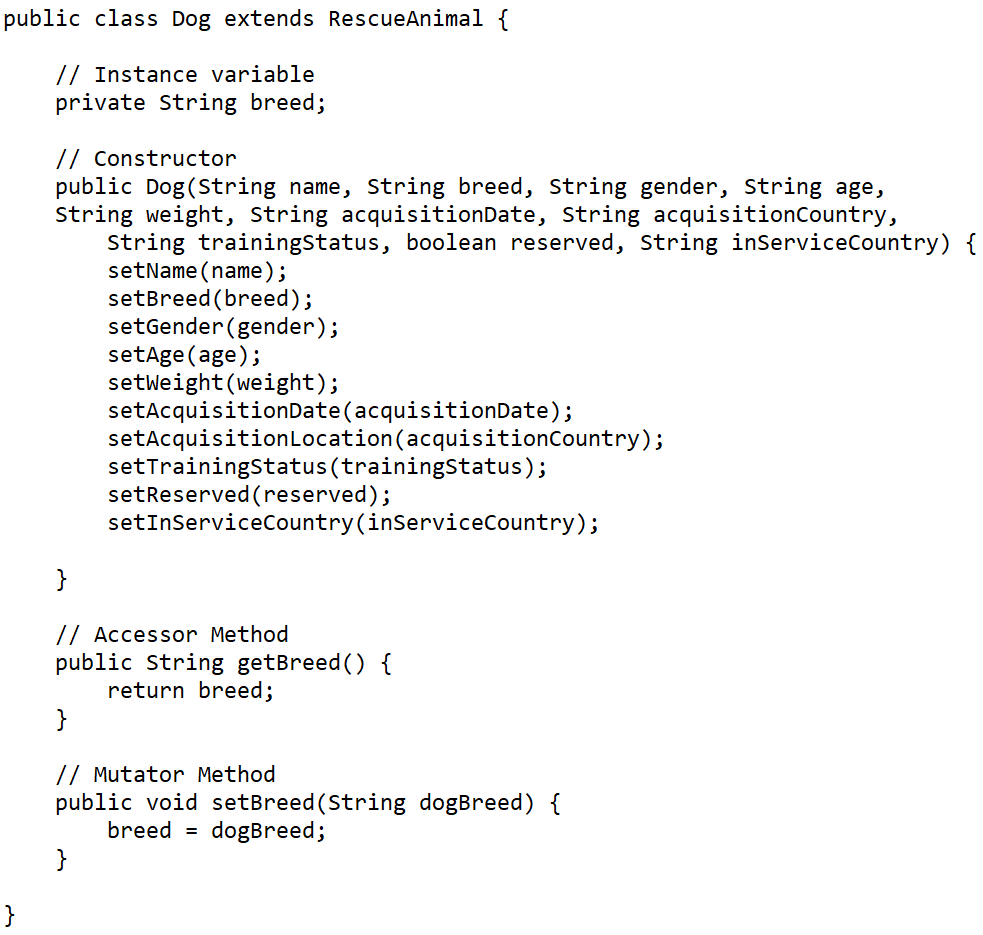
**********************Dog.java**********************
import java.lang.String;
public class RescueAnimal {
// Instance variables private String name; private String animalType; private String gender; private String age; private String weight; private String acquisitionDate; private String acquisitionCountry; private String trainingStatus; private boolean reserved; private String inServiceCountry;
// Constructor public RescueAnimal() { }
public String getName() { return name; }
public void setName(String name) { this.name = name; }
public String getAnimalType() { return animalType; }
public void setAnimalType(String animalType) { this.animalType = animalType; }
public String getGender() { return gender; }
public void setGender(String gender) { this.gender = gender; }
public String getAge() { return age; }
public void setAge(String age) { this.age = age; }
public String getWeight() { return weight; }
public void setWeight(String weight) { this.weight = weight; }
public String getAcquisitionDate() { return acquisitionDate; }
public void setAcquisitionDate(String acquisitionDate) { this.acquisitionDate = acquisitionDate; }
public String getAcquisitionLocation() { return acquisitionCountry; }
public void setAcquisitionLocation(String acquisitionCountry) { this.acquisitionCountry = acquisitionCountry; }
public boolean getReserved() { return reserved; }
public void setReserved(boolean reserved) { this.reserved = reserved; }
public String getInServiceLocation() { return inServiceCountry; }
public void setInServiceCountry(String inServiceCountry) { this.inServiceCountry = inServiceCountry; }
public String getTrainingStatus() { return trainingStatus; }
public void setTrainingStatus(String trainingStatus) { this.trainingStatus = trainingStatus; } }
Now the rescue class and the dog class don't need to be edited but the driver class needs to be completed and have the printAnimals() method and reserveAnimal() method.
o 5. Next, you will implement the reserveAnimal() method. Your completed method should do the following: Prompt the user for input. The user should enter their desired animal type and country. o If there is an available animal which meets the user's input criteria, the method should access an animal object from an ArrayList. If there are multiple animals that meet these criteria, the program should access the first animal in the ArrayList. The method should also update the reserved attribute of the accessed animal. o If there is not an available animal which meets the user's input criteria, the method should output feedback to the user letting them know that no animals of that type and location are available. 6. Finally, you have been asked to implement a printAnimals() method that provides easy-to-read output displaying the details of objects in an ArrayList. o To demonstrate this criterion in a proficient" way, your implemented method must successfully print the ArrayList of dogs or the ArrayList of monkeys. o To demonstrate this criterion in an "exemplary way, your implemented method must successfully print a list of all animals that are in service" and "available". import java.util.ArrayList; import java.util.Scanner; public class Monkey extends RescueAnimal{ private String species, tailLength, height, bodyLength; public Monkey (String name, String species, String tailLength, String height, String bodyLength, String gender, String age, String weight, String acquisitionDate, String acquisitionCountry, String trainingStatus, boolean reserved, String in ServiceCountry) { setName(name); setSpecies (species); setTailLength(tailLength); setHeight(height); setBodyLength(bodyLength); setGender(gender); setAge(age); setWeight(weight); setAcquisitionDate(acquisitionDate); setAcquisition Location(acquisitionCountry); setTrainingStatus (trainingStatus); setReserved(reserved); setInServiceCountry(inServiceCountry); } //Accessor and Mutator methods public String getSpecies() { return species; } public void setSpecies (String monkey Species) { species = monkeySpecies; } public String getTailLength() { return tailLength; } public void setTailLength(String monkeyTailLength) { tailLength = monkeyTailLength; } public String getHeight() { return height; } public void setHeight(String monkeyHeight) { height = monkeyHeight; } public String getBodyLength() { return bodyLength; } public void setBodyLength(String monkeyBodyLength) { bodyLength = monkeyBodyLength; } } public class Dog extends RescueAnimal { // Instance variable private String breed; // Constructor public Dog(String name, String breed, String gender, String age, String weight, String acquisitionDate, String acquisitionCountry, String trainingstatus, boolean reserved, String inServiceCountry) { setName(name); setBreed (breed); setGender(gender); setAge(age); setWeight(weight); setAcquisitionDate(acquisitionDate); setAcquisitionLocation(acquisitionCountry); setTrainingstatus (trainingstatus); setReserved (reserved); setInServiceCountry(inServiceCountry); } // Accessor Method public String getBreed() { return breed; } // Mutator Method public void setBreed(String dogBreed) { breed = dogBreed; } }
Step by Step Solution
There are 3 Steps involved in it

Get step-by-step solutions from verified subject matter experts
 Study Help