





Question: PRINTQUEUE.H #include #include using namespace std; void print_queue(queue q) { while (!q.empty()) { cout int sum_queue(queue q) { int sum = 0; while (!q.empty()) {
 PRINTQUEUE.H #include #include using namespace std; void print_queue(queue q) { while

(!q.empty()) { cout int sum_queue(queue q) { int sum = 0; while

PRINTQUEUE.H

#include #include

using namespace std;

void print_queue(queue q) { while (!q.empty()) { cout

int sum_queue(queue q) { int sum = 0; while (!q.empty()) { sum+=q.front(); q.pop(); } return sum; }

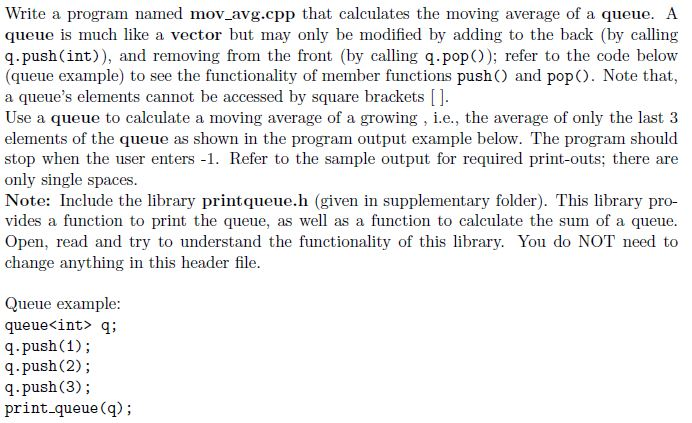
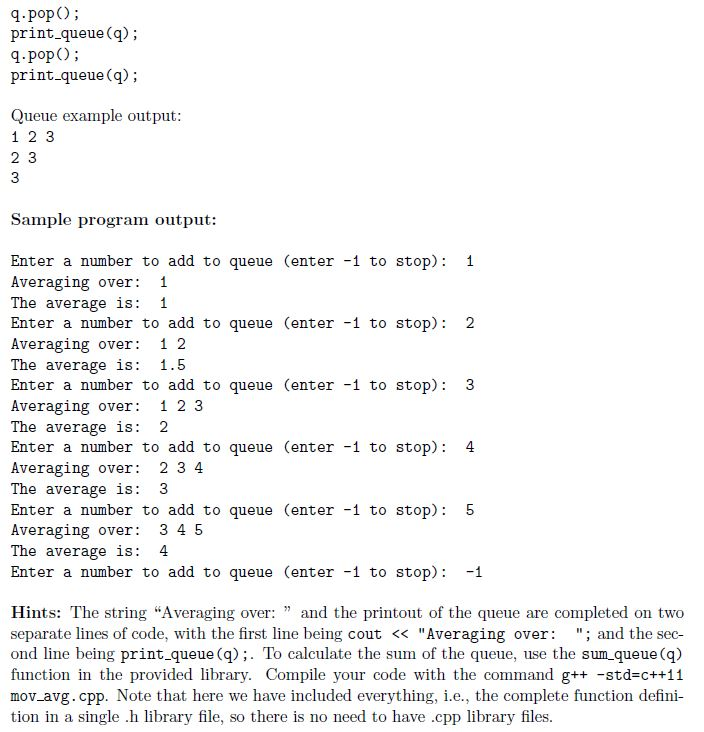
Write a program named mov avg.cpp that calculates the moving average of a queue. A queue is much like a vector but may only be modified by adding to the back (by calling q.push(int)), and removing from the front (by calling q.pop)); refer to the code below (queue example) to see the functionality of member functions push) and pop). Note that, a queue's elements cannot be accessed by square brackets [] Use a queue to calculate a moving average of a growing, i.e., the average of only the last 3 elements of the queue as shown in the program output example below. The program should stop when the user enters -1. Refer to the sample output for required print-outs; there are only single spaces Note: Include the library printqueue.h (given in supplementary folder). This library pro- vides a function to print the queue, as well as a function to calculate the sum of a queue Open, read and try to understand the functionality of this library. You do NOT need to change anything in this header file Queue example queue q; q.push(1); q.push (2); q.push(3); print queue (q)

Step by Step Solution

There are 3 Steps involved in it

1 Expert Approved Answer
Step: 1 Unlock blur-text-image
Question Has Been Solved by an Expert!

Get step-by-step solutions from verified subject matter experts

Step: 2 Unlock
Step: 3 Unlock

Students Have Also Explored These Related Databases Questions!