







Question: PROBLEM 1: 5 POINTS) Design and implement Flutter application with two pages. Main Page is designed as shown Figure 1. When save button is clicked
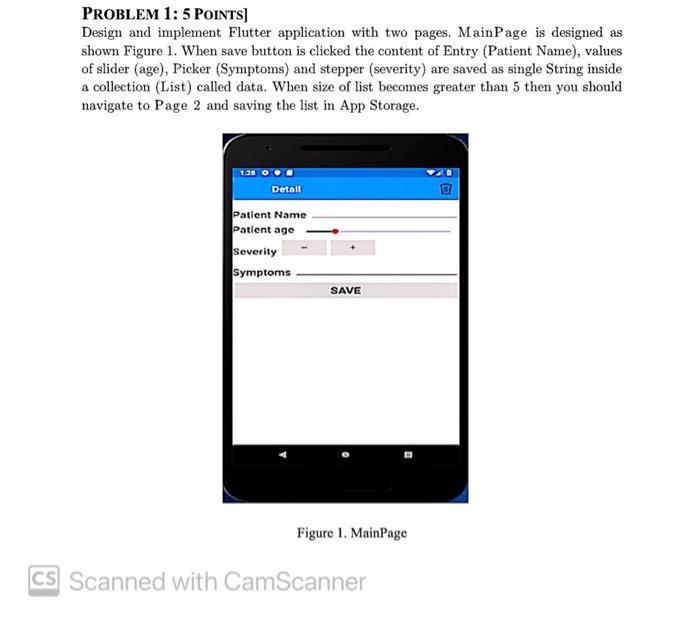
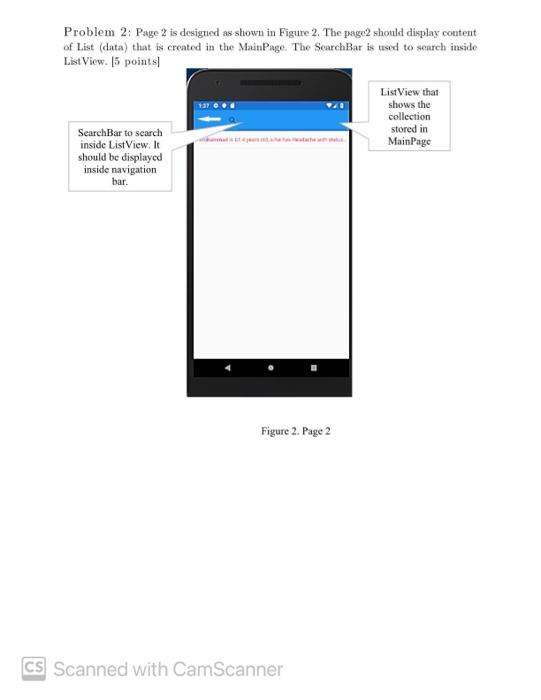
PROBLEM 1: 5 POINTS) Design and implement Flutter application with two pages. Main Page is designed as shown Figure 1. When save button is clicked the content of Entry (Patient Name), values of slider (age), Picker (Symptoms) and stepper (severity) are saved as single String inside a collection (List) called data. When size of list becomes greater than 5 then you should navigate to Page 2 and saving the list in App Storage. Detall Patient Name Patient age Severity Symptoms SAVE Figure 1. MainPage CS Scanned with CamScanner Problem 2: Page 2 is designed as shown in Figure 2. The page2 should display content of List (data) that is created in the MainPage. The SearchBar is used to search inside List View. 15 points ListView that shows the collection stored in MainPage SearchBar to search inside List View. It should be displayed inside navigation bar. Figure 2. Page 2 CS Scanned with CamScanner PROBLEM 1: 5 POINTS) Design and implement Flutter application with two pages. Main Page is designed as shown Figure 1. When save button is clicked the content of Entry (Patient Name), values of slider (age), Picker (Symptoms) and stepper (severity) are saved as single String inside a collection (List) called data. When size of list becomes greater than 5 then you should navigate to Page 2 and saving the list in App Storage. Detall Patient Name Patient age Severity Symptoms SAVE Figure 1. MainPage CS Scanned with CamScanner Problem 2: Page 2 is designed as shown in Figure 2. The page2 should display content of List (data) that is created in the MainPage. The SearchBar is used to search inside List View. 15 points ListView that shows the collection stored in MainPage SearchBar to search inside List View. It should be displayed inside navigation bar. Figure 2. Page 2 CS Scanned with CamScanner
Step by Step Solution
There are 3 Steps involved in it

Get step-by-step solutions from verified subject matter experts
 Study Help