







Question: PROBLEM: 1 . Pick a number in your head? Allow the User to input a different number. Fill in the worksheet - SUBMIT this Worksheet
PROBLEM:
Pick a number in your head? Allow the User to input a different number.
Fill in the worksheet SUBMIT this Worksheet
solve this problem:
SUBMIT your Code
PSUEDOCODE
that describes the process of guessing a number between and
After each guess, the player is told that the guess is too high or too low. The process continues until the player guesses the correct number. Pick a number and have a fellow student try to guess it following your instructions.
There can be many solutions for this problem,, I will look at what you came up with,, but try not to overthink it
This can be psuedocoded in as little as about lines of code!
Ask Yourself:
Is there a Loop? Then you need: while & endwhile to allow the user to keep entering a guess until while loop allowing user to input Think logicallyl
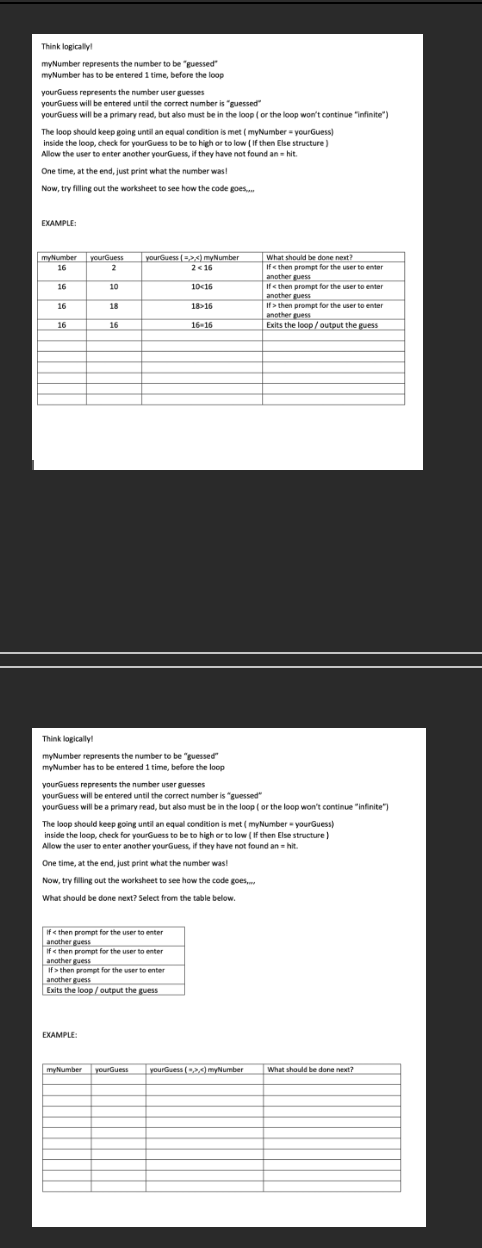
myNumber represents the number to be "guesseof"
mynumber has to be entered time, before the loop
yourGuess represents the number user guesses
yourGuess will be entered until the correct number is "guessed"
yourGuess will be a primary read, but also must be in the loop or the loop won't continue "infinite"?
The loop should keep going until an equal condition is met myNumber yourGuess
inside the loop, check for yourGuess to be to high or to low If then Else structure
Allow the user to enter another yourGuess, if they have not found an hit.
One time, at the end, just print what the number was!
Now, try filling out the worksheet to see how the code goes,...,
What should be done next? Select from the table below.
EXAMPLE:
Are there If Then Else questions? Selection To determine if the user has guest too high, too low or guessed the number. Prompt the user to tell them their guess is Guess too high Guess again same for too Low
Step by Step Solution
There are 3 Steps involved in it
1 Expert Approved Answer
Step: 1 Unlock

Question Has Been Solved by an Expert!
Get step-by-step solutions from verified subject matter experts
Step: 2 Unlock
Step: 3 Unlock
 Study Help