





Question: Problem 1c #include int main() { return 0; } Problem 1oracle TO Archie RE I Need a Working Keyboard Please order a new keyboard for
 Problem 1c #include int main() { return 0; } Problem 1oracle

Problem 1c

#include

int main() { return 0; } Problem 1oracle

TO Archie RE I Need a Working Keyboard

Please order a new keyboard for me. This one is broken.

Code is done is C

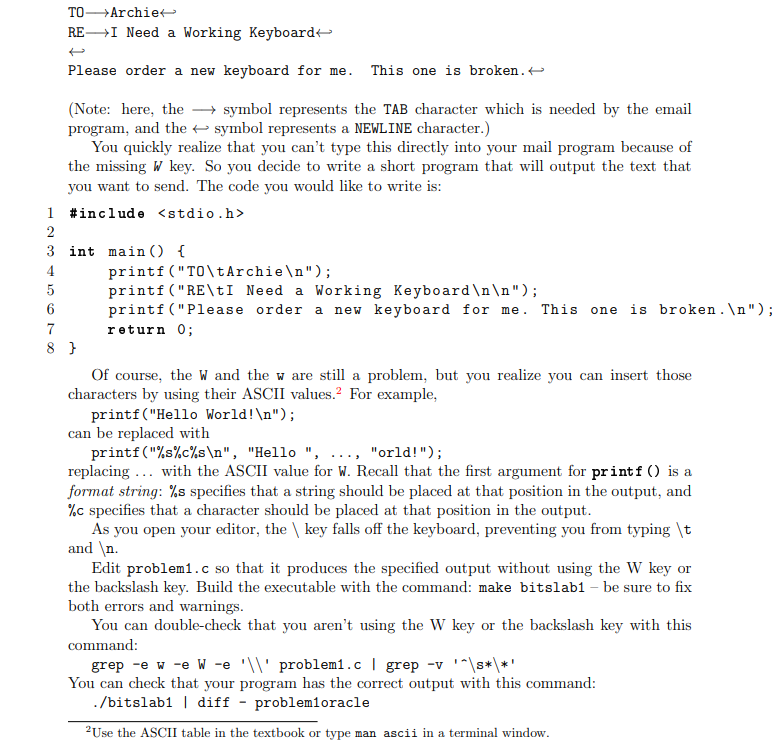
TO->Archie REI Need a Working Keyboard Please order a new keyboard for me. This one is broken. (Note: here, the symbol represents the TAB character which is needed by the email program, and the symbol represents a NEWLINE character.) You quickly realize that you can't type this directly into your mail program because of the missing W key. So you decide to write a short program that will output the text that you want to send. The code you would like to write is: 1 #include 2 3 int main() { 4 printf ("TO\tArchie "); 5 printf ("RE\tI Need a Working Keyboard "); 6 printf ("Please order a new keyboard for me. This one is broken. "); 7 return 0; 8 } Of course, the W and the w are still a problem, but you realize you can insert those characters by using their ASCII values. For example, printf ("Hello World! "); can be replaced with printf("%s%c%s ", "Hello", ..., "orld!"); replacing ... with the ASCII value for W. Recall that the first argument for printf() is a format string: %s specifies that a string should be placed at that position in the output, and %c specifies that a character should be placed at that position in the output. As you open your editor, the key falls off the keyboard, preventing you from typing \t and . Edit problem1.c so that it produces the specified output without using the W key or the backslash key. Build the executable with the command: make bitslab1 be sure to fix both errors and warnings. You can double-check that you aren't using the W key or the backslash key with this command: grep -e w -e W -e 'Il problemi.c | grep -v ' \s*\*' You can check that your program has the correct output with this command: ./bitslab1 | diff problemloracle 2 Use the ASCII table in the textbook or type man ascii in a terminal window

Step by Step Solution

There are 3 Steps involved in it

1 Expert Approved Answer
Step: 1 Unlock blur-text-image
Question Has Been Solved by an Expert!

Get step-by-step solutions from verified subject matter experts

Step: 2 Unlock
Step: 3 Unlock

Students Have Also Explored These Related Databases Questions!