







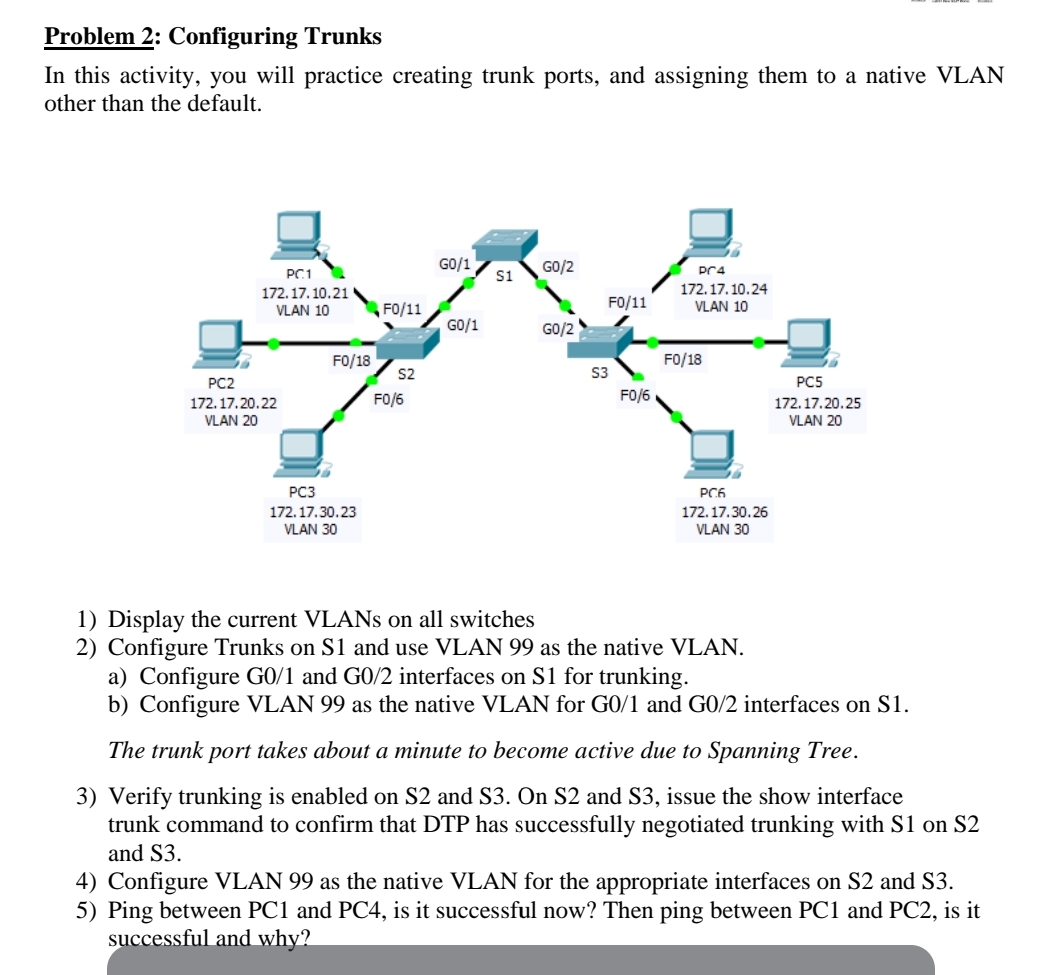
Question: Problem 2 : Configuring Trunks In this activity, you will practice creating trunk ports, and assigning them to a native VLAN other than the default.
Problem : Configuring Trunks
In this activity, you will practice creating trunk ports, and assigning them to a native VLAN other than the default.
Display the current VLANs on all switches
Configure Trunks on S and use VLAN as the native VLAN.
a Configure G and G interfaces on S for trunking.
b Configure VLAN as the native VLAN for G and G interfaces on S
The trunk port takes about a minute to become active due to Spanning Tree.
Verify trunking is enabled on S and S On S and S issue the show interface trunk command to confirm that DTP has successfully negotiated trunking with S on S and S
Configure VLAN as the native VLAN for the appropriate interfaces on S and S
Ping between PC and PC is it successful now? Then ping between PC and PC is it successful and why?Im
Step by Step Solution
There are 3 Steps involved in it
1 Expert Approved Answer
Step: 1 Unlock

Question Has Been Solved by an Expert!
Get step-by-step solutions from verified subject matter experts
Step: 2 Unlock
Step: 3 Unlock
 Study Help