







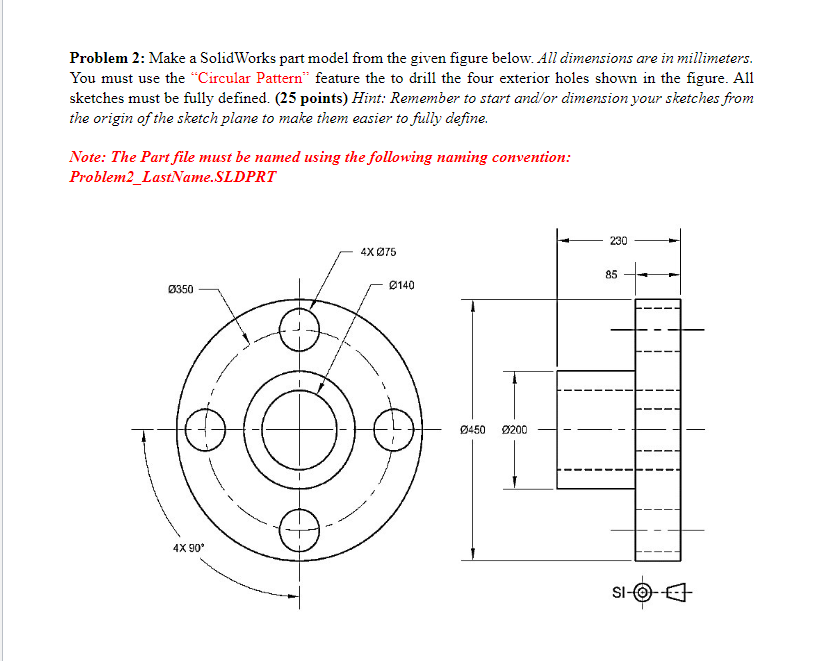
Question: Problem 2 : Make a SolidWorks part model from the given figure below. All dimensions are in millimeters. You must use the Circular Pattern feature
Problem : Make a SolidWorks part model from the given figure below. All dimensions are in millimeters. You must use the "Circular Pattern" feature the to drill the four exterior holes shown in the figure. All sketches must be fully defined. mathbf points Hint: Remember to start andor dimension your sketches from the origin of the sketch plane to make them easier to fully define.
Note: The Part file must be named using the following naming convention:
ProblemLastName.SLDPRT
Step by Step Solution
There are 3 Steps involved in it
1 Expert Approved Answer
Step: 1 Unlock

Question Has Been Solved by an Expert!
Get step-by-step solutions from verified subject matter experts
Step: 2 Unlock
Step: 3 Unlock
 Study Help