







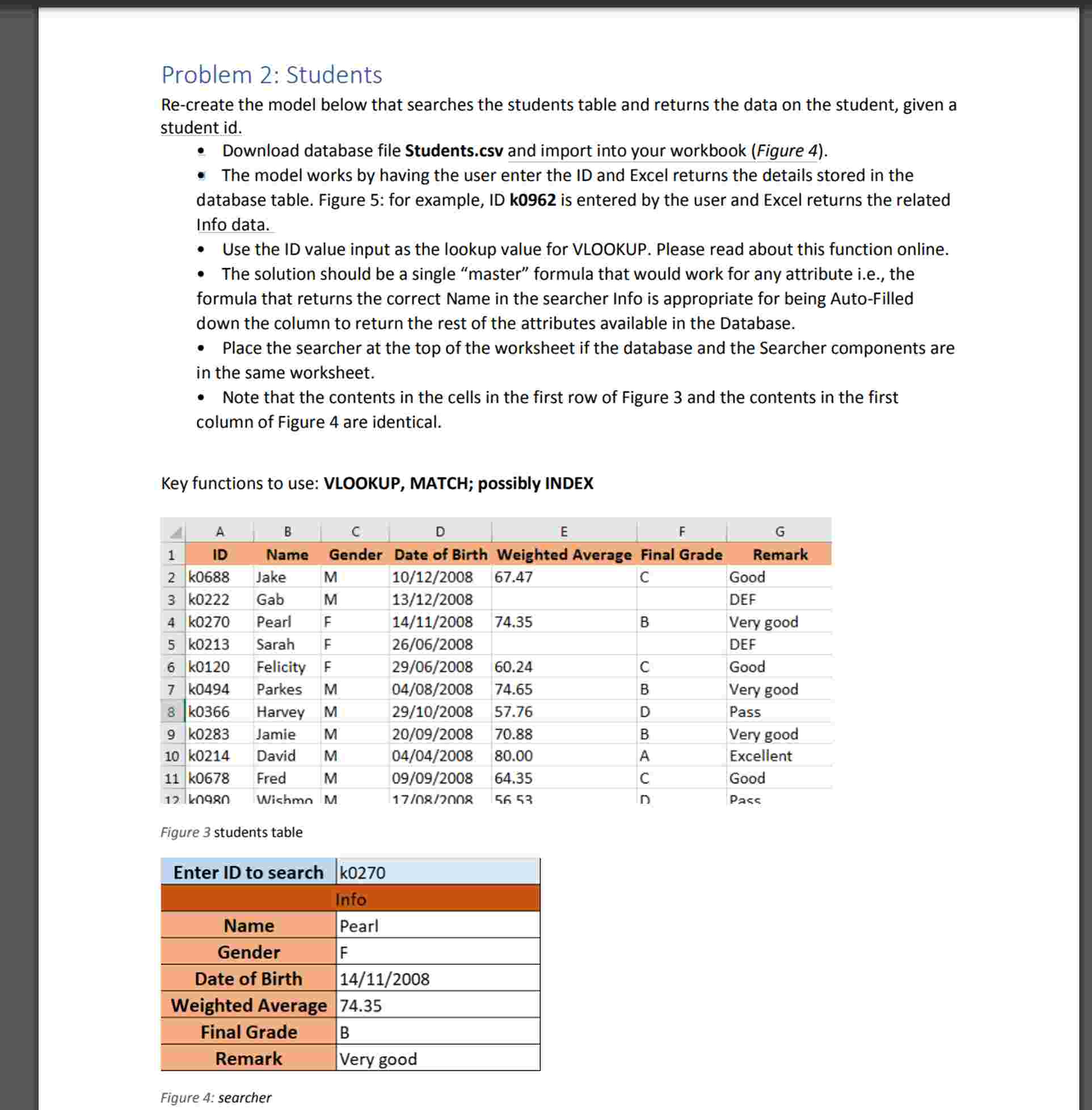
Question: Problem 2 : Students Re - create the model below that searches the students table and returns the data on the student, given a student
Problem : Students
Recreate the model below that searches the students table and returns the data on the student, given a student id
Download database file Students.csv and import into your workbook Figure
The model works by having the user enter the ID and Excel returns the details stored in the database table. Figure : for example, ID k is entered by the user and Excel returns the related Info data.
Use the ID value input as the lookup value for VLOOKUP. Please read about this function online.
The solution should be a single "master" formula that would work for any attribute ie the formula that returns the correct Name in the searcher Info is appropriate for being AutoFilled down the column to return the rest of the attributes available in the Database.
Place the searcher at the top of the worksheet if the database and the Searcher components are in the same worksheet.
Note that the contents in the cells in the first row of Figure and the contents in the first column of Figure are identical.
Key functions to use: VLOOKUP, MATCH; possibly INDEX
Figure students table
Figure : searcher
Step by Step Solution
There are 3 Steps involved in it
1 Expert Approved Answer
Step: 1 Unlock

Question Has Been Solved by an Expert!
Get step-by-step solutions from verified subject matter experts
Step: 2 Unlock
Step: 3 Unlock
 Study Help