







Question: PROBLEM 2 This program also tests your ability to analyze and manipulate strings. You have been provided a starter file called Lab 0 7 P
PROBLEM
This program also tests your ability to analyze and manipulate strings.
You have been provided a starter file called LabPstarter.py Download that file from Blackboard and rename it LabPpy
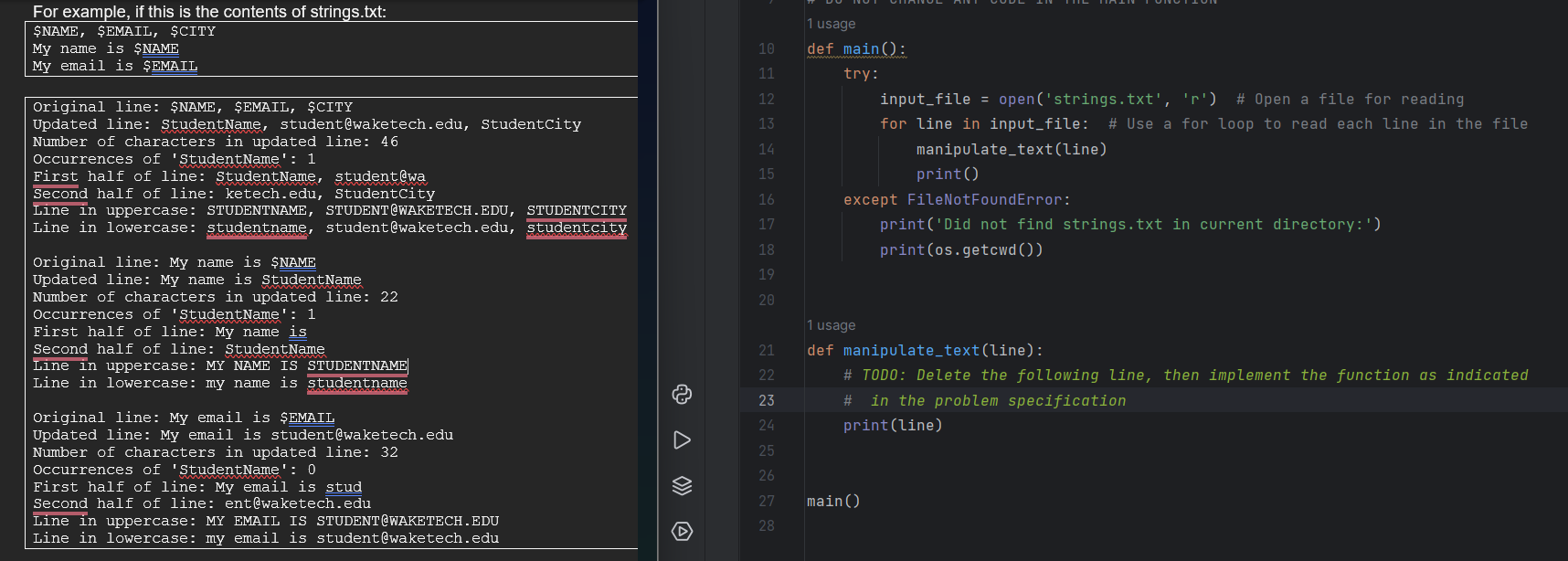
The starter code will open a file named strings.txt if it is in the same directory as your Python program. You can create your own stings.txt file or download the one provided on Blackboard. Note that opening and reading files is something you will learn about in Lesson The starter code will read the file line by line, and pass each line to a function called manipulatetext You will be filling in the code for this function.
The manipulatetext function accepts one string as input. The function should do the following with the string parameter:
Strip the leading and trailing whitespace, and output the string.
Replace all occurrences of $NAME with your first name.
Replace all occurrences of $EMAIL with your email address.
Replace all occurrences of $CITY with the name of the city where you live.
Print the updated line.
Print a message indicating the number of characters in the updated line.
Count the number of occurrences of your first name and print a message reporting the count.
Use floor division to divide the number of characters by then print the first half and last half of the line.
Print the line in uppercase.
Print the line in lowercase.For example, if this is the contents of strings.txt:
Step by Step Solution
There are 3 Steps involved in it
1 Expert Approved Answer
Step: 1 Unlock

Question Has Been Solved by an Expert!
Get step-by-step solutions from verified subject matter experts
Step: 2 Unlock
Step: 3 Unlock
 Study Help