







Question: Problem 3 . 3 prob 3 _ 4 . mlx set up W } = 3 5 ; quad % mathrm { weight
Problem probmlx
set up
W;quadmathrm weight lb
g ; Gravitational acceleration ins
mtextrmwtextrmg;quadmathrm Mass lbsin
k ; stiffness lbin
x; Initial position in
dxe ; Initial velocity ins
Find the response analytically
wn sqrt km;
Aoperatornamesqrtx
tA linspace;
Find the response numerically
ode@trafficLightEOM, ;
Plot
figure
hold on
plottAxA 'DisplayName', 'Analytical'
plottNzN: 'LineWidth', 'DisplayName','Numerical'
legendshow
xlabelTime s
ylabelx in probmlx x trafficLightEOM.m
function dz trafficLightEOMtz
Firstorder differential equation for an undamped free system to be used
with ode
Inputs:
~ t: the time, a single value
~ z: a vector of position and velocity. The first element is position and
the second is velocity.
Outputs:
~ dz: the derivative of z
Set up
W; Weight lb
g ; Gravitational acceleration ins
mtextrmWtextrmg;quadmathrm Mass lbsin
k ; Stiffness lbin
Equations of motion
z z; position
zz; velocity
dz z;kmz
Just after a gust of wind, a lb traffic light has a position of in and a velocity of relative to its
rest position. Suppose the equivalent stiffness is
a Find the response of the system analytically.
b Suppose a student were to calculate the phase shift using their calculator. Explain why they
should or should not add to the value from the calculator.
Partial answer: a
Problem
Download the files probmlx and trafficLightEOM.m from Canvas. These files will be used to find the
response of the system in Problem numerically ie using ode
a There are several errors in the files. Find and fix all the errors. Also briefly explain why the error
is an error as if you were explaining it to your friend Circle, highlight, or otherwise clearly
indicate where you modified the code.
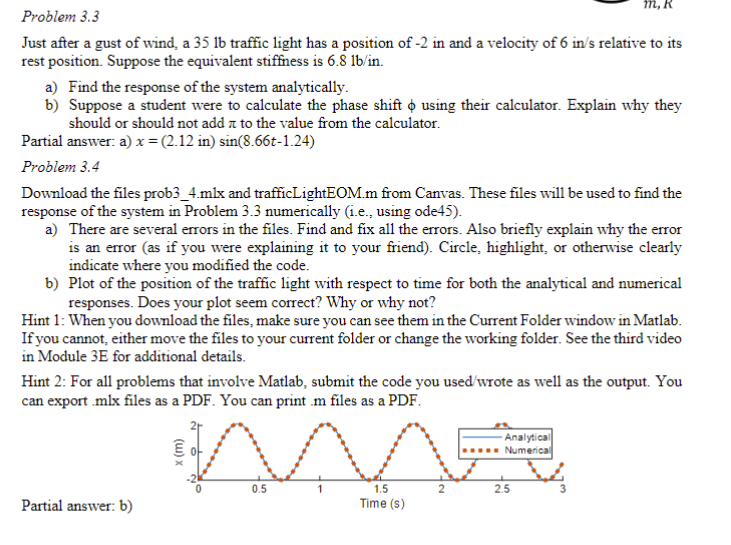
b Plot of the position of the traffic light with respect to time for both the analytical and numerical
responses. Does your plot seem correct? Why or why not?
Hint : When you download the files, make sure you can see them in the Current Folder window in Matlab.
If you cannot, either move the files to your current folder or change the working folder. See the third video
in Module E for additional details.
Hint : For all problems that involve Matlab, submit the code you usedwrote as well as the output. You
can export mlx files as a PDF You can print m files as a PDF
Partial answer: b
ONLY NEED COMPLETED. CONTAINS BACKGROUND INFORMATION AND NUMBERS RELEVANT TO
Step by Step Solution
There are 3 Steps involved in it
1 Expert Approved Answer
Step: 1 Unlock

Question Has Been Solved by an Expert!
Get step-by-step solutions from verified subject matter experts
Step: 2 Unlock
Step: 3 Unlock
 Study Help