







Question: Problem 3 ( 4 0 points ) ( CCOs 1 & 3 ) / Mat labGrader On Canvas, you will find a Matlab function file
Problem pointsCCOs & Mat labGrader
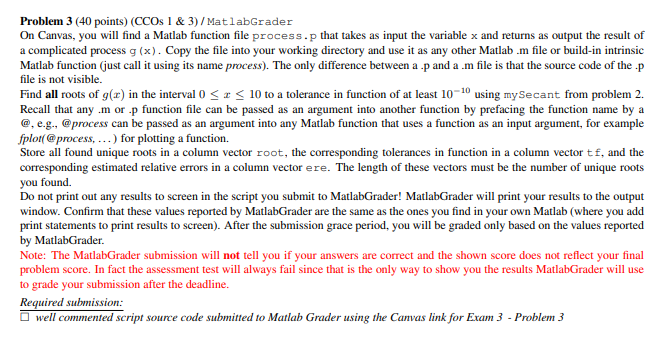
On Canvas, you will find a Matlab function file process.p that takes as input the variable x and returns as output the result of
a complicated process Copy the file into your working directory and use it as any other Matlab m file or buildin intrinsic
Matlab function just call it using its name process The only difference between a p and a file is that the source code of the. p
file is not visible.
Find all roots of in the interval to a tolerance in function of at least using my Secant from problem
Recall that any. m or p function file can be passed as an argument into another function by prefacing the function name by a
@ eg @process can be passed as an argument into any Matlab function that uses a function as an input argument, for example
fplot@process, for plotting a function.
Store all found unique roots in a column vector root, the corresponding tolerances in function in a column vector and the
corresponding estimated relative errors in a column vector ere. The length of these vectors must be the number of unique roots
you found.
Do not print out any results to screen in the script you submit to MatlabGrader! MatlabGrader will print your results to the output
window. Confirm that these values reported by MatlabGrader are the same as the ones you find in your own Matlab where you add
print statements to print results to screen After the submission grace period, you will be graded only based on the values reported
by MatlabGrader.
Note: The MatlabGrader submission will not tell you if your answers are correct and the shown score does not reflect your final
problem score. In fact the assessment test will always fail since that is the only way to show you the results MatlabGrader will use
to grade your submission after the deadline.
Required submission:
well commented script source code submitted to Matlab Grader using the Canvas link for Exam Problem
Step by Step Solution
There are 3 Steps involved in it
1 Expert Approved Answer
Step: 1 Unlock

Question Has Been Solved by an Expert!
Get step-by-step solutions from verified subject matter experts
Step: 2 Unlock
Step: 3 Unlock
 Study Help