







Question: Problem 3: GUI Create a new file called audio_gui.py. When you submit your code Gradescope, make sure to submit all files necessary to run your
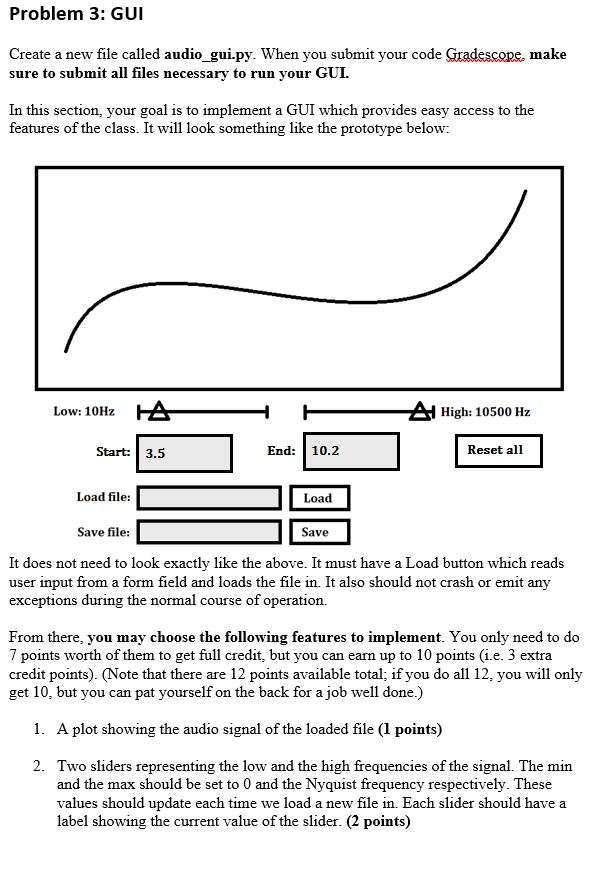
Problem 3: GUI Create a new file called audio_gui.py. When you submit your code Gradescope, make sure to submit all files necessary to run your GUI. In this section, your goal is to implement a GUI which provides easy access to the features of the class. It will look something like the prototype below: Low: 10Hz A A High: 10500 Hz Start: 3.5 End: 10.2 Reset all Load file: Load Save file: Save It does not need to look exactly like the above. It must have a Load button which reads user input from a form field and loads the file in. It also should not crash or emit any exceptions during the normal course of operation. From there, you may choose the following features to implement. You only need to do 7 points worth of them to get full credit, but you can earn up to 10 points (i.e. 3 extra credit points). (Note that there are 12 points available total; if you do all 12, you will only get 10, but you can pat yourself on the back for a job well done.) 1. A plot showing the audio signal of the loaded file (1 points) 2. Two sliders representing the low and the high frequencies of the signal. The min and the max should be set to 0 and the Nyquist frequency respectively. These values should update each time we load a new file in. Each slider should have a label showing the current value of the slider. (2 points) Problem 3: GUI Create a new file called audio_gui.py. When you submit your code Gradescope, make sure to submit all files necessary to run your GUI. In this section, your goal is to implement a GUI which provides easy access to the features of the class. It will look something like the prototype below: Low: 10Hz A A High: 10500 Hz Start: 3.5 End: 10.2 Reset all Load file: Load Save file: Save It does not need to look exactly like the above. It must have a Load button which reads user input from a form field and loads the file in. It also should not crash or emit any exceptions during the normal course of operation. From there, you may choose the following features to implement. You only need to do 7 points worth of them to get full credit, but you can earn up to 10 points (i.e. 3 extra credit points). (Note that there are 12 points available total; if you do all 12, you will only get 10, but you can pat yourself on the back for a job well done.) 1. A plot showing the audio signal of the loaded file (1 points) 2. Two sliders representing the low and the high frequencies of the signal. The min and the max should be set to 0 and the Nyquist frequency respectively. These values should update each time we load a new file in. Each slider should have a label showing the current value of the slider. (2 points)
Step by Step Solution
There are 3 Steps involved in it

Get step-by-step solutions from verified subject matter experts
 Study Help