







Question: PROBLEM 3 In this python problem, we redesign the inventory program for Trish's bookstore using dictionaries. Note: We will be continuing this redesign in Lab
PROBLEM
In this python problem, we redesign the inventory program for Trish's bookstore using dictionaries. Note: We will be continuing this redesign in Lab
Copy the starter code LabPstarter.py to a file named LabPpy
Remember in Lab you used a list of lists to store the item information in the inventory system before writing it out to a file. You will change that now so that you are keeping the information in three dictionaries instead.
There are three TODO comments:
At the first TODO comment, create three empty directories named inventorycounts, inventorycosts and inventorycategories.
At the second TODO comment, update the dictionaries with the user entered data. Use the itemname as the key in all dictionaries and store the appropriate data.
o For example, if the user first entered the item name "Science Books" with an item count of a unit cost of and a category "Book" this is what the dictionaries would look like:
inventorycounts Science Books":
inventorycosts Science Books":
inventorycategories Science Books": "Book"
At the third TODO comment, print the dictionaries.
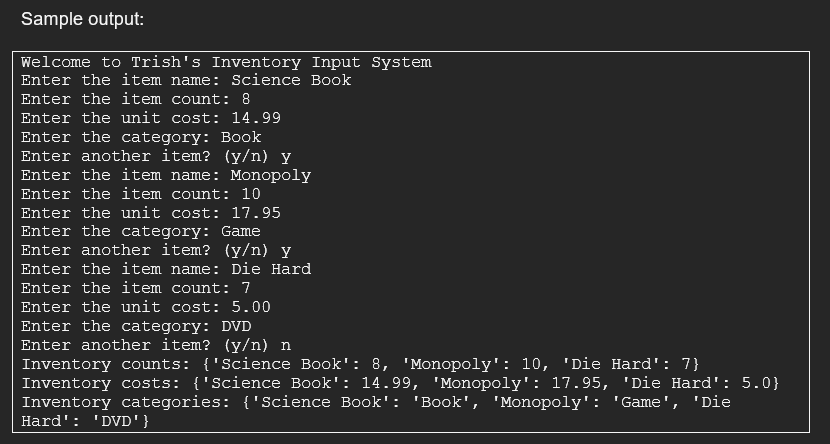
Same output:
Welcome to Trish's Inventory Input System
Enter the item name: Science Book
Enter the item count:
Enter the unit cost:
Enter the category: Book
Enter another item? yn y
Enter the item name: Monopoly
Enter the item count:
Enter the unit cost:
Enter the category: Game
Enter another item? yn y
Enter the item name: Die Hard
Enter the item count:
Enter the unit cost:
Enter the category: DVD
Enter another item? yn n
Inventory counts: Science Book': 'Monopoly': 'Die Hard':
Inventory costs: Science Book': 'Monopoly': 'Die Hard':
Inventory categories: Science Book': 'Book', 'Monopoly': 'Game', 'Die Hard': DVD
Submit the program file LabPpy to Blackboard for credit. Sample output:
Welcome to Trish's Inventory Input System
Enter the item name: Science Book
Enter the item count:
Enter the unit cost:
Enter the category: Book
Enter another item? yn y
Enter the item name: Monopoly
Enter the item count:
Enter the unit cost:
Enter the category: Game
Enter another item? yn y
Enter the item name: Die Hard
Enter the item count:
Enter the unit cost:
Enter the category: DVD
Enter another item? yn n
Inventory counts: Science Book': 'Monopoly': 'Die Hard':
Inventory costs: Science Book': 'Monopoly': 'Die Hard':
Inventory categories: Science Book': 'Book', 'Monopoly': 'Game', 'Die
Hard': DVDCATEGORYLIST BookDVD 'Game'
def main:
# TODO Create three empty dictionaries named inventorycounts,
# inventorycosts, and inventorycategories
printWelcome to Trish's Inventory Input System"
while True:
itemname getitemname
itemcount getitemcount
unitcost getunitcost
category getcategory
# TODO Add the item data to the three dictionaries. Use the itemname
# as a key for all dictionaries.
# Add the itemcount data as a value associated with the key
# itemname in inventorycounts.
# Add the unitcost data as a value associated with the key
# itemname in inventorycosts.
# Add the category data as a value associated with the key
# itemname in inventorycategories.
answer
while answer y and answer n:
answer inputEnter another item? yn
answer answer.lower
if answer y and answer n:
printEnter y or n to continue.
if answer n:
break
# TODO Print the three dictionaries as shown in assignment's
# sample output.
def getitemname:
# Get item name
itemname inputEnter the item name:
return itemname
def getitemcount:
# Get item count
while True:
try:
itemcount intinputEnter the item count:
if itemcount :
printItem count must be or greater.
else:
break
except:
printItem count must be an integer.
return itemcount
def getunitcost:
# Get unit cost
while True:
try:
unitcost floatinputEnter the unit cost:
if unitcost :
printUnit cost must be or greater.
else:
break
except:
printUnit cost can only contain digits and a single decimal point.
return unitcost
def getcategory:
while True:
category inputEnter the category:
if category not in CATEGORYLIST:
printfCategory must be in this list: CATEGORYLIST
else:
break
return category
main
Step by Step Solution
There are 3 Steps involved in it
1 Expert Approved Answer
Step: 1 Unlock

Question Has Been Solved by an Expert!
Get step-by-step solutions from verified subject matter experts
Step: 2 Unlock
Step: 3 Unlock
 Study Help